
Up Arrow to Edit Last Message on WA Web app Chrome 插件, crx 扩展下载

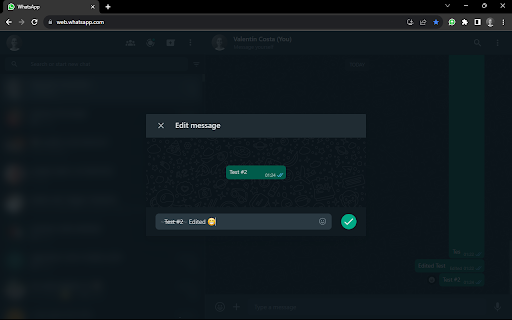
Edit your last message on WA Web app by pressing the Up Arrow key.
This extension allows you to edit your last sent message on WA Web app by pressing the Up Arrow key when the focus is on the message input field.
The extension does not collect or transmit any user data.
The code has no dependencies and does not use any third-party libraries.
You can see the source code on GitHub: https://github.com/valentincostam/up-arrow-edit-last-message
| 分类 | 🛠️工具 |
| 插件标识 | dokegdcpmngehfkdlleacpdgbkmihnjj |
| 平台 | Chrome |
| 评分 |
★★★★★
5
|
| 评分人数 | 4 |
| 插件主页 | https://chromewebstore.google.com/detail/up-arrow-to-edit-last-mes/dokegdcpmngehfkdlleacpdgbkmihnjj |
| 版本号 | 0.0.5 |
| 大小 | 15.95KiB |
| 官网下载次数 | 53 |
| 下载地址 | |
| 更新时间 | 2025-01-28 00:00:00 |
CRX扩展文件安装方法
第1步: 打开Chrome浏览器的扩展程序
第2步:
在地址栏输入: chrome://extensions/
第3步: 开启右上角的【开发者模式】
第4步: 重启Chrome浏览器 (重要操作)
第5步: 重新打开扩展程序管理界面
第6步: 将下载的crx文件直接拖入页面完成安装
注意:请确保使用最新版本的Chrome浏览器
同类插件推荐
Up Arrow to Edit Last Message on WA Web app
Edit your last message on WA Web app by pressing t

AI Anyone
Experience the future of communication with AI Any

Wordle++
This cheat tells you the exact word of the day als

LeadhuntAI - Chrome Extension
This extension will allow you to easily retrieve s

B2B Sunshine Coast
Boost your LinkedIn outreach with this tool. Initi

Pitch Avatar Customer Catcher
Pitch Avatar Customer Catcher helps you create a l

DIG This Deal
Compare prices and find the best deals on new and

Boss Hub | Signal YES
By Whatsapp & Telegram & SMS & Email s
Time Tracker, Todo, Sprint Manager - Basecamp
Sync daily tasks or work between Basecamp & Mo

ChatGPT Search Bar & Send With Command Enter
ChatGPT Search Bar & Send With Command Enter M

Linqbase - LinkedIn CRM & Outreach
Effortlessly collect, organize, and export detaile

Trello Bug Feature Colors
Sets colors on Trello cardsColors Trello cards tha

Circle of Trust
LinkedIn business networking extension for entrepr