
UW Sched2Cal Chrome 插件, crx 扩展下载
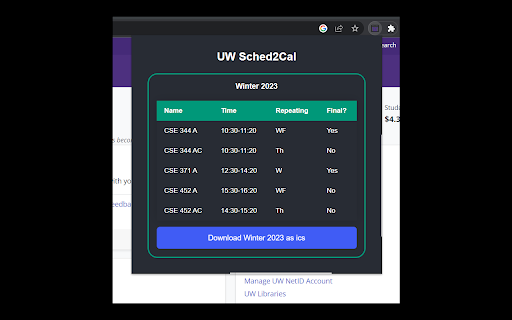
A chrome extension built to help UW students export their schedule to their calender.
Description:
This chrome extension allows University of Washington students export their UW course schedule as an .ics file to add to their personal calendars.
Usage:
1. Install the extension
2. Login to https://my.uw.edu
3. Run the extension in that window
4. Click the blue "Download" button to download as .ics
Questions or Comments?
This is my very first extension so I appreciate the feedback. I will try my best to fix any bugs as they arise though I am a college student so I might not respond very quickly.
Credits:
This extension was created using https://github.com/lxieyang/chrome-extension-boilerplate-react and https://www.npmjs.com/package/ics?activeTab=readme
| 分类 | 📝工作流程与规划 |
| 插件标识 | dpkiehpnagbpdfnmojelolmibledjccj |
| 平台 | Chrome |
| 评分 |
★★★★★
5
|
| 评分人数 | 1 |
| 插件主页 | https://chromewebstore.google.com/detail/uw-sched2cal/dpkiehpnagbpdfnmojelolmibledjccj |
| 版本号 | 1.0.0 |
| 大小 | 208KiB |
| 官网下载次数 | 56 |
| 下载地址 | |
| 更新时间 | 2022-12-27 00:00:00 |
CRX扩展文件安装方法
第1步: 打开Chrome浏览器的扩展程序
第2步:
在地址栏输入: chrome://extensions/
第3步: 开启右上角的【开发者模式】
第4步: 重启Chrome浏览器 (重要操作)
第5步: 重新打开扩展程序管理界面
第6步: 将下载的crx文件直接拖入页面完成安装
注意:请确保使用最新版本的Chrome浏览器
同类插件推荐

UW CourseKeeper
Simplify Course Registration with Just One Click!F

HuskyReg
Helper tools for UW course registrationSimple Chro

RateMyProf Assistant for UW MyPlan
Make Smarter Course Decisions with Just One Click!

UW Calendar Exporter
Say Goodbye to Manual Calendar Entry! ?This Chrome
UW Sched2Cal
A chrome extension built to help UW students expor

MyUW Calendar Scraper
Import your schedule to Google Calendar!For studen

WatAccess
Easy Access to Waterloo SitesNow that a large port

技术求职信生成器
轻松生成针对任何工作申请的求职信,使用为科技职位定制的AI,帮助您获得更多面试机会。Input yo

TabCloser
Tab Closer allows you to search through your tabs,

A1QUA account sorter
A small tool to sort A1QUA accountsA small tool to

Quran Quotes
Start each new tab with inspiration and wisdom fro

SEO Insights
Chrome extension to know about page metrics of pag

FYBR
FYBR: clean inbox clean mindClean inbox. Clean min