
URL List – save and export lists of URLs Chrome 插件, crx 扩展下载
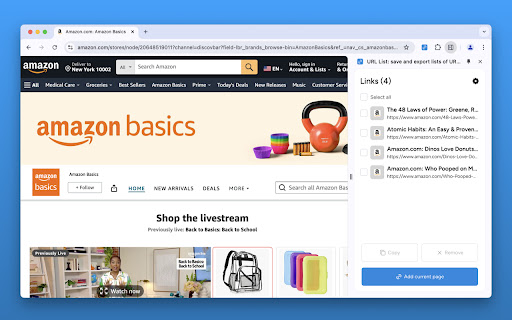

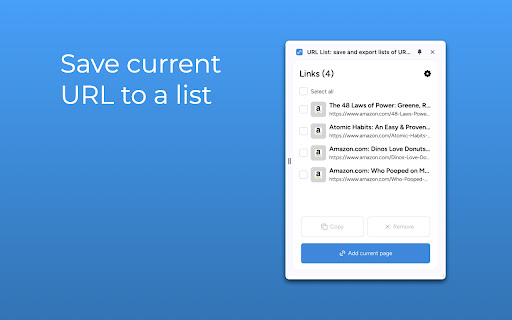
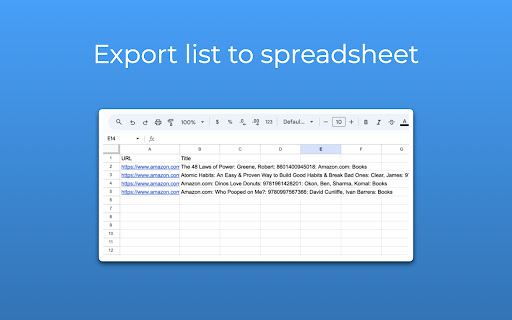
Save and export lists of URLs
Tired of juggling a million browser tabs? Wish you could save all those important URLs to a list? "URL List" is here to rescue you from tab chaos!
We get it – sometimes you need more than just bookmarks. You want a simple, organized way to save those links you stumble upon while browsing and easily access them later.
That's where "URL List" comes in. This little tool is like a productivity ninja for your browser tabs. ?
Here's how it works (it's ridiculously easy):
1. Install "URL List": It takes 2 seconds. Seriously, we timed it. ⏱️
2. Surf the Web: Go wild! Shop online, research like crazy, find inspiration – whatever your heart desires.
3. Find a URL Worth Saving? Click the "URL List" icon. Boom! ? It's instantly saved to a list.
4. Ready to Share? Open the extension, copy the URL, and paste it into a spreadsheet, a text message, WhatsApp, your notes – anywhere!
"URL List" is perfect for:
• Shopping Lists: Keep track of all those must-have items you find online.
• Research: Organize all your articles and websites in one place.
• Inspiration: Save designs, recipes, DIY projects – whatever sparks your creativity!
• Work: Organize client websites, competitor research, or important documents.
• Sharing Links Quickly: Easily grab those URLs to share with friends, colleagues, or your social media followers.
• Apartment Hunting: Never lose track of those dream apartments again.
• ...And basically anything else that involves a URL!
"URL List" helps you:
• Save Time: No more digging through browser history or endless copy-pasting.
• Stay Organized: Conquer tab overload and create order out of your digital life.
• Work Smarter: Spend less time managing chaos, more time doing what matters.
Ready to become a URL-organizing master? Get "URL List" and join the 3xFaster revolution!
P.S. This is just the beginning! Stay tuned for specialized versions of "URL List," tailor-made for your favorite websites. (Amazon wish lists, anyone?) ?
| 分类 | 🛠️工具 |
| 插件标识 | eanodefmgdjijhfbgmfehmcokadfgdmb |
| 平台 | Chrome |
| 评分 |
★★★★★
5
|
| 评分人数 | 1 |
| 插件主页 | https://chromewebstore.google.com/detail/url-list-–-save-and-expor/eanodefmgdjijhfbgmfehmcokadfgdmb |
| 版本号 | 1.0.1 |
| 大小 | 686KiB |
| 官网下载次数 | 145 |
| 下载地址 | |
| 更新时间 | 2024-08-13 00:00:00 |
CRX扩展文件安装方法
第1步: 打开Chrome浏览器的扩展程序
第2步:
在地址栏输入: chrome://extensions/
第3步: 开启右上角的【开发者模式】
第4步: 重启Chrome浏览器 (重要操作)
第5步: 重新打开扩展程序管理界面
第6步: 将下载的crx文件直接拖入页面完成安装
注意:请确保使用最新版本的Chrome浏览器
同类插件推荐

Link List
Page’s hyperlinks (internal and external links, ph

Look-alike finder - search similar profiles on LinkedIn™
Find LinkedIn profiles that are similar to the cur

URL Saver
A simple and fashionable way to save and manage yo

WhatsApp Direct Message
Start WhatsApp Chats Instantly - Without Saving Co
URL List – save and export lists of URLs
Save and export lists of URLsTired of juggling a m

List all Links
List and search all text links, javascript, css, a

LinkLister
Extension that extracts and list links from a web

CopyTab URLs
Effortlessly copy and organize the URLs of your op

Export Tabs URLs
Save a list of all open tabs into a text file.List
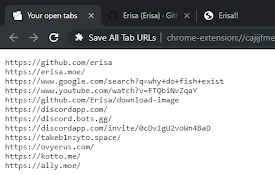
Save All Tab URLs
Get the raw URLs of all your open tabs!When clicke

Copy All URLs (Free)
A simple Chrome extension to copy URLs of all open

Copy URLs
Copy all open URLs to clipboardCopy all open pages

智能超链接复制
智能复制浏览器标签页,网页超链接,并且可以任意框选复制超链接,支持文本内容超链接解析,支持超链接打开