
Alt Tab Shortcuts Chrome 插件, crx 扩展下载

Speeds up tab management with simple shortcuts
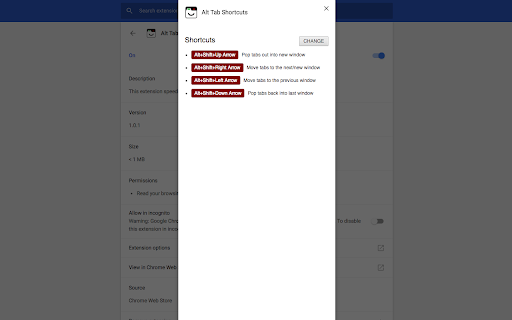
This extension provides shortcuts for moving tabs between already open chrome windows.
1. Alt+Shift+Right - Move tabs to the next/new window
2. Alt+Shift+Left - Move tabs to the previous window
3. Alt+Shift+Up - Pop tabs into new window
4. Alt+Shift+Down - Pop tabs back into last window / Undo last move action
Stuck performing the following actions when switching or moving tabs between windows?
1. Select and drag out the tabs to a new window
2. Verify the desired destination window is visible below
3. Select and drags tabs to the destination window
That's frustrating and cumbersome especially when you prefer running your browser maximised. This extension aims to solve that, view the options page to view the shortcuts.
For the ultimate chrome tab controls, combine with
• Reorder Tabs Shortcuts - https://chrome.google.com/webstore/detail/keyboard-shortcuts-to-reo/moigagbiaanpboaflikhdhgdfiifdodd?hl=en
• Tab to Window/Popup - https://chrome.google.com/webstore/detail/tab-to-windowpopup-keyboa/adbkphmimfcaeonicpmamfddbbnphikh
| 分类 | 📝工作流程与规划 |
| 插件标识 | ebdcpdepkbefmgfdkdplcmhfkddagfon |
| 平台 | Chrome |
| 评分 |
★★★★☆
4.1
|
| 评分人数 | 166 |
| 插件主页 | https://chromewebstore.google.com/detail/alt-tab-shortcuts/ebdcpdepkbefmgfdkdplcmhfkddagfon |
| 版本号 | 1.2.6 |
| 大小 | 576KiB |
| 官网下载次数 | 270 |
| 下载地址 | |
| 更新时间 | 2024-12-03 00:00:00 |
CRX扩展文件安装方法
第1步: 打开Chrome浏览器的扩展程序
第2步:
在地址栏输入: chrome://extensions/
第3步: 开启右上角的【开发者模式】
第4步: 重启Chrome浏览器 (重要操作)
第5步: 重新打开扩展程序管理界面
第6步: 将下载的crx文件直接拖入页面完成安装
注意:请确保使用最新版本的Chrome浏览器
同类插件推荐
Alt Tab Shortcuts
Speeds up tab management with simple shortcutsThis
Lightweight Tab Search
Quick way to navigate through tabs!Lightweight Tab

Rearrange Tabs
Allows users to rearrange tabs using keyboard shor

Simplest Tabs
Streamline Your Tab Management. Save, search, and