
CMS Enrollment extension Chrome 插件, crx 扩展下载
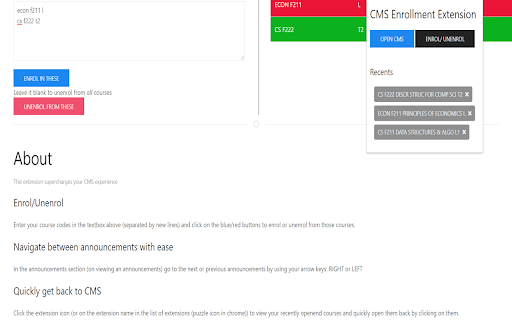
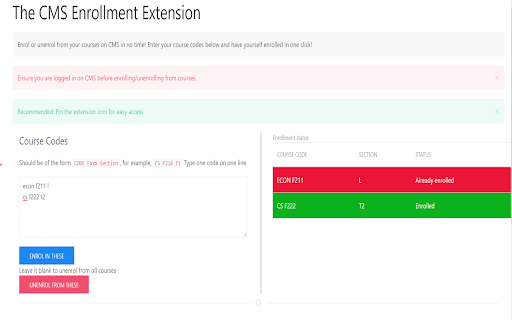
Enroll in courses on CMS with just one click!
[Chronofactorem support: Use this with the chronofactorem webapp for a smoother experience]
The extension to supercharge your CMS experience is right here!
Spending unnecessarily long time searching and enrolling for your courses again and again?
Tired of clicking through three pages just to unenroll from one course, and doing that for nine more times?
Wish you had something that would complete these tasks efficiently?
This CMS enrollment extension is the answer to your questions.
Bonus: Navigate quickly between course announcements with arrow keys, view your recently accessed courses and get back to them faster.
Install now and spend more time on the content, not on searching.
*This extension is not developed and not endorsed by Moodle.org
| 分类 | 📝工作流程与规划 |
| 插件标识 | ebjldebpahljhpakgngnandakdbajdnj |
| 平台 | Chrome |
| 评分 |
★★★★☆
4.2
|
| 评分人数 | 164 |
| 插件主页 | https://chromewebstore.google.com/detail/cms-enrollment-extension/ebjldebpahljhpakgngnandakdbajdnj |
| 版本号 | 0.2.4 |
| 大小 | 102KiB |
| 官网下载次数 | 233 |
| 下载地址 | |
| 更新时间 | 2024-01-08 00:00:00 |
CRX扩展文件安装方法
第1步: 打开Chrome浏览器的扩展程序
第2步:
在地址栏输入: chrome://extensions/
第3步: 开启右上角的【开发者模式】
第4步: 重启Chrome浏览器 (重要操作)
第5步: 重新打开扩展程序管理界面
第6步: 将下载的crx文件直接拖入页面完成安装
注意:请确保使用最新版本的Chrome浏览器
同类插件推荐

PS1@BITS
Tired of CrappyUIA Jquery User Interface to select
CMS Enrollment extension
Enroll in courses on CMS with just one click
BPHC Library Paper Tracker
Track your progress for solving papers on BPHC DSp

PS Companion
Chrome Extention for the students of BITS, Pilani

Glider Proctoring
This chrome extension allows you to share full scr

Leetcode Enhancer
A browser extension to improve productivity on Lee

Codeforces Practice Tracker
Track your practice progress on Codeforces.Codefor

CF Tracker
Find time invested in a particular problem during

Carrot
Rating predictor for CodeforcesCarrot enhances Cod

CF-Predictor
This extension predicts rating changes for Codefor

CF Analytics
Analyse Codeforces profilesCF Analytics Chrome ext

Mr. E - Find B2B contacts universally
Mr. E - the easiest way to find direct contact num