
TimeTrekker Pro Chrome 插件, crx 扩展下载

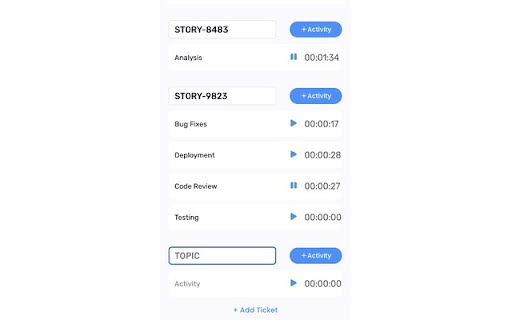


Chrome extension for tracking office hours, calculates end time.
Effortlessly manage your time with the TimeTrekker Pro Chrome extension, your ultimate companion for productivity. With just a click, project your workday's end time, automatically adjusting to 8 hours on Fridays for optimal scheduling. But that's not all - our latest update introduces a powerful new feature: activity tracking. Seamlessly monitor your time spent on various tasks by adding tickets for each activity. From project management to personal productivity, TimeTrekker Pro enhances your workflow, ensuring efficient time allocation and timely project completion. Experience the perfect blend of traditional time tracking and modern activity monitoring, all within your browser.
| 分类 | 📝工作流程与规划 |
| 插件标识 | ecmhaijdjkihpdfbgepgfhhgfeniegoo |
| 平台 | Chrome |
| 评分 |
★★★★★
5
|
| 评分人数 | 3 |
| 插件主页 | https://chromewebstore.google.com/detail/timetrekker-pro/ecmhaijdjkihpdfbgepgfhhgfeniegoo |
| 版本号 | 2.1.11 |
| 大小 | 492KiB |
| 官网下载次数 | 31 |
| 下载地址 | |
| 更新时间 | 2024-09-16 00:00:00 |
CRX扩展文件安装方法
第1步: 打开Chrome浏览器的扩展程序
第2步:
在地址栏输入: chrome://extensions/
第3步: 开启右上角的【开发者模式】
第4步: 重启Chrome浏览器 (重要操作)
第5步: 重新打开扩展程序管理界面
第6步: 将下载的crx文件直接拖入页面完成安装
注意:请确保使用最新版本的Chrome浏览器
同类插件推荐

Murdoch University LibrarySearch Plugin
Search Murdoch University Library's catalogue

Mergis Game
Now you can play Mergis Game right on Chrome™ Brow

MarkBook
MarkBookRevolutionize your browsing experience wit

Salesngine chrome
Save money while shoppingHelps online shoppers rec

TimeTrekker Pro
Chrome extension for tracking office hours, calcul

IDEAL NDIS Pricing Arrangements
Quickly search for relevant line items in the NDIS

Jira View
Improves Jira Cloud (*.atlassian.net) views to mak

Hit And Run Escape Game
You must collect the items on the track with your

gvsavings
мониторинг трат героев в городах для godville.net

brocrobes
Browser plugin for https://transcrob.esBrocrobes i

Team Bookmarks
Conquer Bookmark Chaos: Boost Team Efficiency. Spe

GitHub to CircleCI
Open your CircleCI pipelines directly from a GitHu