
Draftnik for FPL Chrome 插件, crx 扩展下载
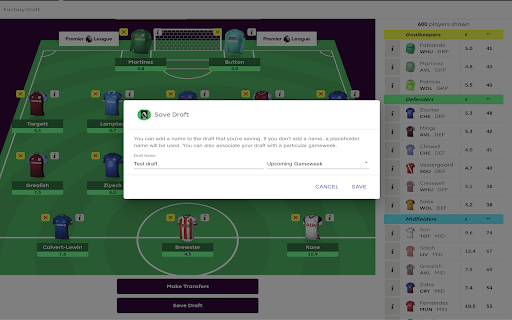

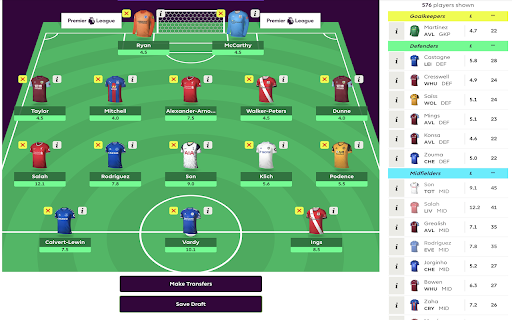
Save team drafts you create on Fantasy Premier League.
Do you play Fantasy Premier League? Do you plan different squad combinations before hitting that "Make Transfers" button? Do you use screenshots to keep track of the various drafts you create?
Say hello to Draftnik. And say goodbye to those folders full of screenshots!
The Draftnik Chrome extension adds a "Save Draft" button on the FPL transfers page for you to save the current squad of 15 you have created. You can view your saved drafts by clicking on the Draftnik logo on the extensions list (next to the address bar on Chrome). You can also view all your saved drafts on the Draftnik Dashboard (http://app.draftnik.cc/)
| 分类 | 🎬娱乐 |
| 插件标识 | eeolkemdaflnkhjpkodccelahhbdkhpf |
| 平台 | Chrome |
| 评分 |
★★★★★
5
|
| 评分人数 | 1 |
| 插件主页 | https://chromewebstore.google.com/detail/draftnik-for-fpl/eeolkemdaflnkhjpkodccelahhbdkhpf |
| 版本号 | 2.1.0 |
| 大小 | 1.26MiB |
| 官网下载次数 | 211 |
| 下载地址 | |
| 更新时间 | 2022-07-23 00:00:00 |
CRX扩展文件安装方法
第1步: 打开Chrome浏览器的扩展程序
第2步:
在地址栏输入: chrome://extensions/
第3步: 开启右上角的【开发者模式】
第4步: 重启Chrome浏览器 (重要操作)
第5步: 重新打开扩展程序管理界面
第6步: 将下载的crx文件直接拖入页面完成安装
注意:请确保使用最新版本的Chrome浏览器
同类插件推荐
FPL Analytics and Optimization
A tool to help with decision making for FPL - usin

Sportito Fantasy Premier League Team Export
Download your FPL Team and import it to other Fant

FPL Away Kits
A tool to access other shirts on FPL - if a player

FPL Wildcard Kits
New custom Kits for fantasy.premierleague.com FPL

Fantastico
Get the competitive edge in Draft Fantasy Premier

Fantasy Premier League WZRD
Fantasy PL WZRD will help you win your league.A si
Draftnik for FPL
Save team drafts you create on Fantasy Premier Lea

FPL Insights
A better way to get the latest statistics on all t

FPL Upcoming Fixtures
View your team selection in future gameweeks, dire
FPL Plus by fantasyfootballfix.com
Supercharge Fantasy Premier League with the most a

myfpl
A browser extension for fantasy.premierleague.com

EPL Tracker
EPL Tracker is a chrome extension which provides u
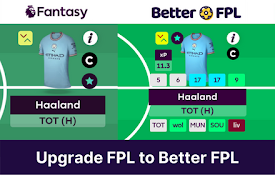
Better FPL
Master Fantasy Premier League with the Better FPL