Fontcetera - Unicode Text Formatter Chrome 插件, crx 扩展下载
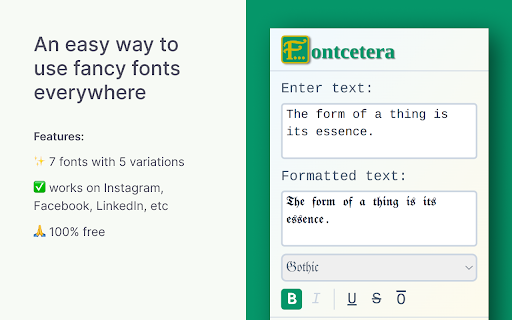
Fontcetera is a browser extension that allows you to use custom fonts on any website.
Transform your plain text into stylish Unicode fonts with ??????????!
This easy-to-use extension allows you to format your text with various Unicode fonts and styles, perfect for social media posts, messaging, or any platform that supports Unicode characters.
??? ????????:
• Multiple font options: ?????????, ??????, ??????...
• Text styling: Bold, Italic, Underline, Strikethrough, and Overline (availability depends on the selected font)
• Real-time preview of formatted text
• One-click copy to clipboard
• User-friendly interface
??? ?? ???:
?. ????? ???? ???? ?? ??? ????? ?????
?. ?????? ???? ??????? ???? ??? ????? ??????
?. ???? ??? ????????? ???? ??? ??? ?? ???????? ??????? ?? ?????????
Enhance your digital communication with ?????????? and make your text stand out!
| 分类 | 🛠️工具 |
| 插件标识 | efpedoejhnkhmjeclomcoamlbmohcaie |
| 平台 | Chrome |
| 评分 |
★★★★☆
4.7
|
| 评分人数 | 178 |
| 插件主页 | https://chromewebstore.google.com/detail/fontcetera-unicode-text-f/efpedoejhnkhmjeclomcoamlbmohcaie |
| 版本号 | 1.0.2 |
| 大小 | 89.42KiB |
| 官网下载次数 | 61 |
| 下载地址 | |
| 更新时间 | 2024-10-19 00:00:00 |
CRX扩展文件安装方法
第1步: 打开Chrome浏览器的扩展程序
第2步:
在地址栏输入: chrome://extensions/
第3步: 开启右上角的【开发者模式】
第4步: 重启Chrome浏览器 (重要操作)
第5步: 重新打开扩展程序管理界面
第6步: 将下载的crx文件直接拖入页面完成安装
注意:请确保使用最新版本的Chrome浏览器