
Barra/AI Chrome 插件, crx 扩展下载
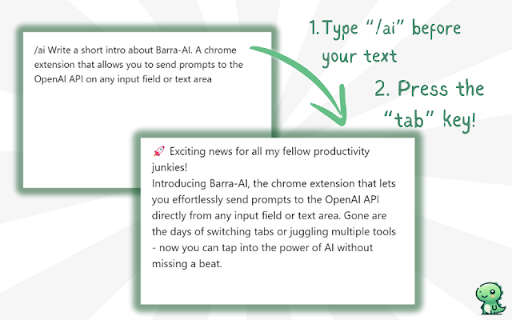
Type '/ai' let Barrasaur fetch GPT to help you
Barra/AI is a straightforward, no-frills, barebones AI browser extension. No subscriptions, no cute robots, just you and the ramblings of you OpenAI model of choice.
Type "/ai" followed by your prompt in any input or text field, press Tab, and the extension will fetch a response from the GPT model, replacing the field's content with the AI-generated answer.
("barra" means "slash" in Portuguese, as in /ai)
(´▽`ʃ♡ƪ) Features!
- No popups, no sidebars: Type /ai followed by your prompt in any text field and hit Tab. Boom! Instant AI response.
- Works everywhere (almost): Integrated seamlessly with most input fields on the web. Sorry, Meta users (Facebook, Instagram, Threads), we're working on it!
- Bring your own key: No hidden fees. No subscriptions. No limit usage.
- Client-side processing: All the data is stored in your browser's local storage. Requests to Open AI's API is sent directly from your current browser. We don't touch your data – everything happens right in your browser. Doubt us? Just check the code, we are open-source!
- Free and open-source: While all browsers will soon offer this feature natively, Barra AI gives you a taste of the punk future now. And for free!
For more info check out
https://github.com/MrCordeiro/barra-ai
TLDR
? NO Subscriptions
? NO Cute Robots
? NO Middlemen
? NO Bullshit
✅ Dinosaur icon! Because dinosaurs are cool – and so are you.
( ̄︶ ̄)↗ How to use (
1. Install the Extension:
2. Open the extension options/settings page, enter your OpenAI API key and select your preferred GPT model from the dropdown (e.g., GPT-3).
3. In any text input or field, type "/ai " followed by your prompt.
4. Press the Tab key.
(╬▔皿▔)╯Limitations
Barra AI currently does not work with sites that use the Lexical editor framework, including Whatsapp, Facebook, Instagram, and Threads.
| 分类 | 📝工作流程与规划 |
| 插件标识 | ehdmmalhleifjcfemdonbaemcbblfpja |
| 平台 | Chrome |
| 评分 |
★★★★☆
4
|
| 评分人数 | 7 |
| 插件主页 | https://chromewebstore.google.com/detail/barraai/ehdmmalhleifjcfemdonbaemcbblfpja |
| 版本号 | 1.0.0 |
| 大小 | 717KiB |
| 官网下载次数 | 39 |
| 下载地址 | |
| 更新时间 | 2024-08-06 00:00:00 |
CRX扩展文件安装方法
第1步: 打开Chrome浏览器的扩展程序
第2步:
在地址栏输入: chrome://extensions/
第3步: 开启右上角的【开发者模式】
第4步: 重启Chrome浏览器 (重要操作)
第5步: 重新打开扩展程序管理界面
第6步: 将下载的crx文件直接拖入页面完成安装
注意:请确保使用最新版本的Chrome浏览器
同类插件推荐

FetchFox
FetchFox lets you scrape any site for any data, us
Barra/AI
Type '/ai' let Barrasaur fetch GPT to help

WebTalkerAI - Chat with any website
Ask questions about the current website you're

AI Summary Helper - OpenAI, Mistral, Ollama, Kindle Summarize Save Articles
Get AI summaries of web content. Use Send To Kindl
ThatNeedle Gist - YouTube Summary
ThatNeedle Gist provides instant AI-generated summ
HighlightX | AI Chat with Ollama, Local AI, Open AI, Claude, Gemini & more
HighlightX is a powerful chat app that connects yo

TextGPT - Smarter Text Input by OpenAI
TextGPT: Your Virtual Co-Pilot for Smarter Text In

Mano - Your AI Copilot powered by GPT-4
Mano brings the most powerful AI tools directly in

BrainyAI - Browser AI Sidekick for Chat, Search, Read and Summarize
Enjoy seamless AI chat, search, summarization, and

ChatGPTBox
Integrating ChatGPT into your browser deeply, ever

Syncia - Power of ChatGPT on any website
Syncia is a browser extension that allows you to u

GitHub Recommender
Get similar repositories on GitHub pageGet recomme

Definio: Multi-modal AI Copilot - Claude3 Opus, ChatGPT 4o, Gemini 1.5 Pro
Access latest AI models in your sidebar, translate