
代理和用户代理切换器 Chrome 插件, crx 扩展下载

Proxy&User-Agent Switcher扩展程序有助于对任何网站进行地理位置测试和移动设备测试。
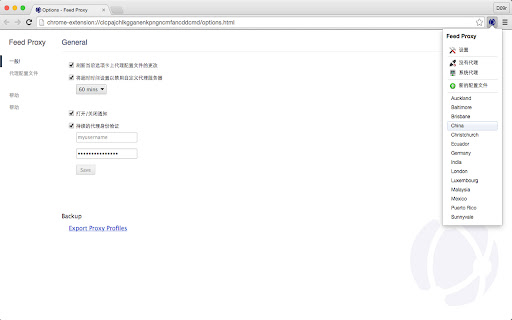
Feed Proxy is a Free Chrome Extension to Configure Advanced Proxy Settings and Manage Multiple Proxy Profiles.
Features:
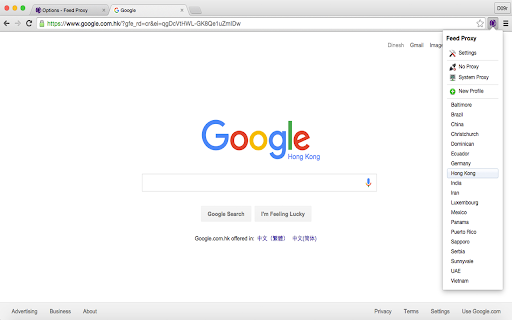
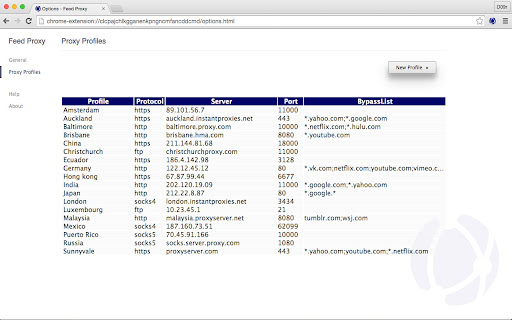
# Multiple Custom Proxy Profiles
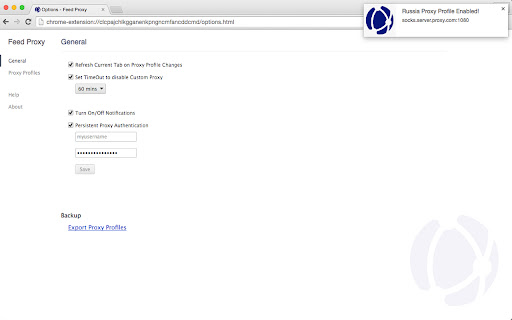
# Persistent Proxy Authentication
# Custom Proxy Profiles Supports Protocols HTTP, HTTPS, FTP, Socks4/ Socks5
# BypassList for Hosts to pass through without Proxy
# Default Profile of No Proxy (Direct Connection) and System Proxy Modes
# Rich Notifications with information of Proxy Profile, Server and Port on Proxy Profile Changes
# Auto Refresh the Current tab on Proxy Profile Changes
# Timer to disable Custom Proxy automatically to avoid Overage on Bill for excess bandwidth usage
# Multiple Languages Support, currently we include English, Spanish, Chinese, Hindi and more languages to come very soon
# Simple and Clean User Interface
# Backup Proxy Profiles and Preferences
# For Free!
| 分类 | 💻开发者工具 |
| 插件标识 | ehfljgbbpjgcfondpjcmbfmmpnhchfkg |
| 平台 | Chrome |
| 评分 |
☆☆☆☆☆
|
| 评分人数 | |
| 插件主页 | https://chromewebstore.google.com/detail/代理和用户代理切换器/ehfljgbbpjgcfondpjcmbfmmpnhchfkg |
| 版本号 | 2.0.0.4 |
| 大小 | 274KiB |
| 官网下载次数 | 480 |
| 下载地址 | |
| 更新时间 | 2020-07-24 00:00:00 |
CRX扩展文件安装方法
第1步: 打开Chrome浏览器的扩展程序
第2步:
在地址栏输入: chrome://extensions/
第3步: 开启右上角的【开发者模式】
第4步: 重启Chrome浏览器 (重要操作)
第5步: 重新打开扩展程序管理界面
第6步: 将下载的crx文件直接拖入页面完成安装
注意:请确保使用最新版本的Chrome浏览器