
代理和用户代理切换器 Chrome 插件, crx 扩展下载
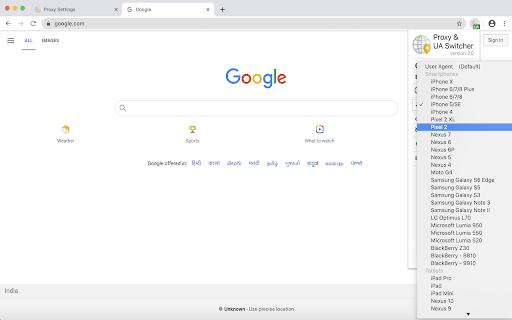
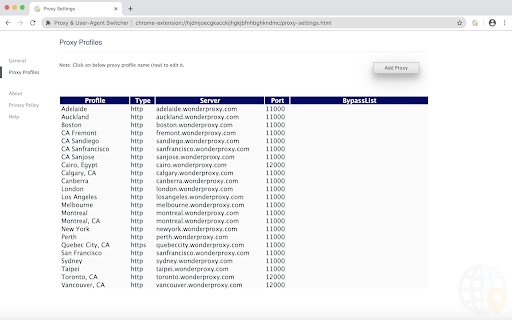
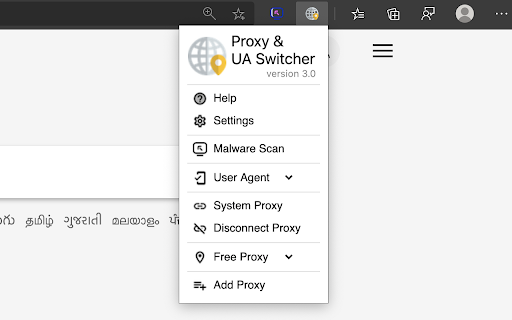
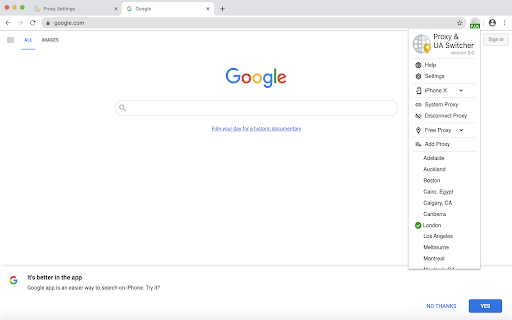
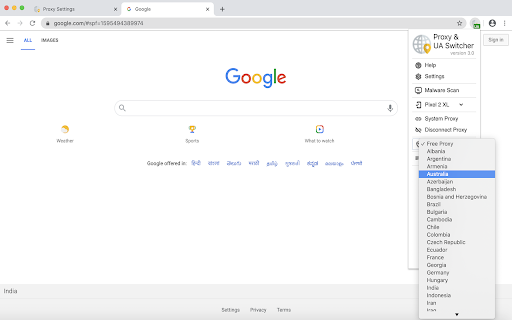
Proxy&User-Agent Switcher扩展程序有助于对任何网站进行地理位置测试和移动设备测试。
The URL Inspector extension does an intensive web analysis of any URL and provides information such as domain reputation, whois, geo-IP location, live HTTP headers, page links, page source, page archive, ads, and phishing & malware indications. Primarily, this extension supports proxy & user-agent switcher which helps to do geo-testing and mobile device-testing of any websites. Overall, this extension is made for developers, testers, or Ad Ops teams to do a geo-testing, mobile device-testing, and live web request & response monitors of any websites or Ads (creatives).
>> Features
- Proxy switcher (geo-testing)
- User-agent switcher (mobile device-testing)
- Phishing and Malware detection
- Live HTTP headers analysis
- Inspect Ads (advertisement)
- Auto-tagging non secure, redirection, site error, privacy, malware, phishing, scam, ads, and so on
- Whois & Subdomain lookup
- Geo-IP lookup (IP Location lookup)
- Page source
- Page archives (historical screenshots)
- Extracted page links (both internal & external links)
- Reverse analytics search
Privacy notice: https://d09r.github.io/url-inspector/privacy-policy
The URL Inspector extension also available on Firefox and Microsoft Edge browsers.
Mozilla Firefox: https://addons.mozilla.org/firefox/addon/url-inspector-extension
Microsoft Edge: https://microsoftedge.microsoft.com/addons/detail/fnhijfcdiaaafpgmnnfhcjbbjjeiciij
Google Chrome: https://chrome.google.com/webstore/detail/ibbejlanbkoaepocgcebajilofpnappm
>> Changelog
Version 2.2 - May 6, 2020
+ Fixed the user-agent switcher issue
Version 2.1 - May 1, 2020
+ Geo-IP lookup (IP Location lookup)
+ Latest mobile devices and browsers added in user-agents switcher
+ Performance improvements
+ Privacy policy updated
Version 2.0 - Apr 24, 2020
+ Malware detection
+ Ads inspect (creative tester)
+ Whois & Subdomain lookup
+ Page archives (historical screenshots)
+ Extracted page links (both internal & external links)
- Safeframe
- Call chain
Version 1.6 - July 3, 2018
+ Live HTTP headers monitor
+ Preview Ads
+ Safeframe (use to test websites or ads in a controlled way)
+ Page source
+ Auto-tagging such as non-SSL, redirection, scripts, iframe
+ Extracted domains list
+ More mobile devices added in user-agents switcher
+ Performance improvements
+ Privacy policy updated
Version 1.3 - Jun 30, 2018
+ User-agent switcher
+ Auto-disabled proxy
Version 1.0 - Jun 6, 2018
+ Proxy switcher
>> Do you wanna do a Malware scan as well? Try Malware Scanner https://chrome.google.com/webstore/detail/ianpniapgjchiheejeipopldaanbjicd
>> Take a look at my other extensions
For Chrome: https://chrome.google.com/webstore/search/d09r
For Firefox: https://addons.mozilla.org/firefox/user/d09r/
For Microsoft Edge: https://microsoftedge.microsoft.com/addons/search/d09r
>> Become a patron
Please consider a donation to support the ongoing development of this extension https://www.patreon.com/d09r
Hey,
Thanks for using the URL inspector extension. I’d like to hear your valuable feedback, if you have any feature requests or just like this extension, then please leave a comment on the extension review page.
#d09r
| 分类 | 💻开发者工具 |
| 插件标识 | ibbejlanbkoaepocgcebajilofpnappm |
| 平台 | Chrome |
| 评分 |
★☆☆☆☆
1
|
| 评分人数 | 1 |
| 插件主页 | https://chromewebstore.google.com/detail/代理和用户代理切换器/ibbejlanbkoaepocgcebajilofpnappm |
| 版本号 | 4.1 |
| 大小 | 322KiB |
| 官网下载次数 | 4000 |
| 下载地址 | |
| 更新时间 | 2024-06-27 00:00:00 |
CRX扩展文件安装方法
第1步: 打开Chrome浏览器的扩展程序
第2步:
在地址栏输入: chrome://extensions/
第3步: 开启右上角的【开发者模式】
第4步: 重启Chrome浏览器 (重要操作)
第5步: 重新打开扩展程序管理界面
第6步: 将下载的crx文件直接拖入页面完成安装
注意:请确保使用最新版本的Chrome浏览器
同类插件推荐

Anonymous HTTP Proxy
Access blocked web resources worldwide, surf the i

代理和用户代理切换器
Proxy&User-Agent Switcher扩展程序有助于对任何网站进行地理位置测试和移动设备

User Agent Switcher
Change your user agent quickly and easilyOpen sour
用户代理切换器
Quickly and easily switch between popular user-age

Direct Proxy
Simply switch the browser proxy between using dire

Http User-Agent Switcher
Http User-Agent Switcher 扩展提供网页快捷菜单,以及工具栏按钮方式快捷切换

代理和用户代理切换器
Proxy&User-Agent Switcher扩展程序有助于对任何网站进行地理位置测试和移动设备

Best Proxy Switcher
Use best proxy switcher with your proxy servers or

Proxy Switch by Proxy-Hub.com
Proxy Swtich v3 is an ultimate proxy manager for p

Proxy Switcher
Easily switch between multiple proxies via toolbar

Proxy Switcher and Manager
Manage and switch between multiple proxy types (SO

User Agent Switcher for Google Chrome™
Quickly and easily switch between popular user-age

User Agent Spoof
Change your user agent quickly and easily通过该插件,您可以