
Jira Metrics Plugin - Analytics & Insights Chrome 插件, crx 扩展下载
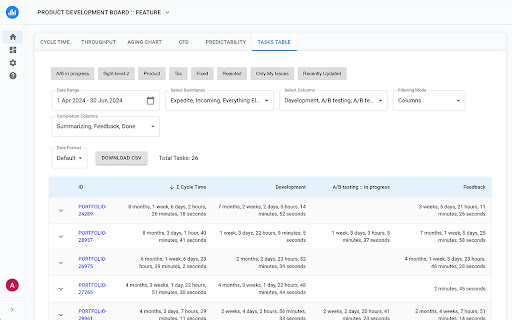
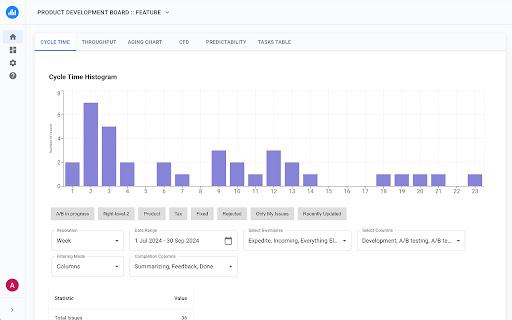
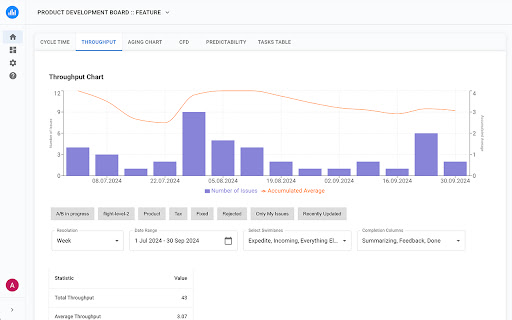
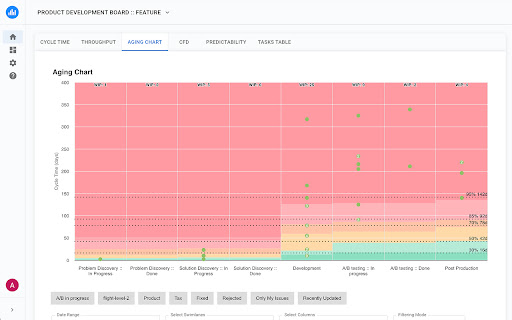
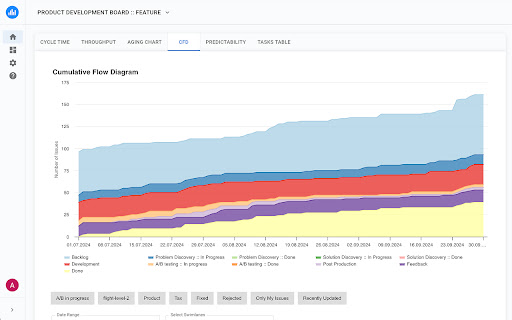
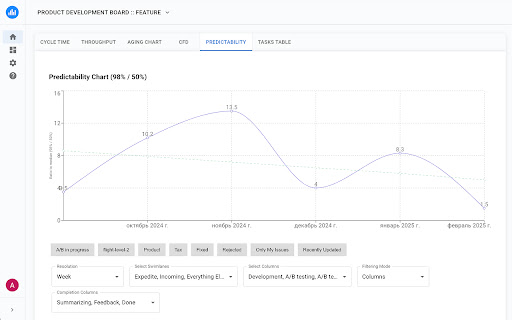
A lightweight analytics plugin that helps you track and analyze your team's performance metrics directly from Jira boards.
To get started, simply click the "Analyze Metrics" button, which can be found on your Kanban board in Jira.
Key Features:
✨ Advanced Analytics Reports
- Cycle Time Histogram with percentile analysis
- Throughput report with trends and patterns
- Aging Chart for work in progress
- Cumulative Flow Diagram (CFD)
? Deep Task Analysis
- Direct links to Jira tasks from reports
- Detailed breakdowns of time spent in each column
- Historical data analysis
- Percentile trend tracking
? Enhanced Security & Privacy
- Works locally in your browser
- No sensitive data storage
- Only tracks task movement timestamps
- Completely anonymous data processing
- No access to task content or personal information
⚡ Easy Setup & Use
- Quick installation as a Chrome extension
- No server configuration needed
- Works with both Jira Cloud and Jira Server
- Automatic integration with your Jira boards
- Instant access to analytics
Perfect For
- Project Managers seeking data-driven insights
- Agile teams tracking their performance
- Process improvement initiatives
- Team leads monitoring workflow efficiency
- Organizations focused on continuous improvement
Benefits
- Make informed decisions based on real data
- Identify bottlenecks in your workflow
- Track and improve team performance
- Reduce lead time and increase efficiency
- Save time on manual reporting
Compatible With
- Jira Cloud
- Jira Server
- All Chromium-based browsers
Start optimizing your team's performance today with clear, actionable metrics. Install Jira Metrics Plugin and transform your Jira data into valuable insights!
Technical Support
Need help? Have questions? Contact our support team or check out our documentation for detailed guides and best practices.
| 分类 | 📝工作流程与规划 |
| 插件标识 | ehhncnkhbchjllmnbcfebjllhnkgnfpc |
| 平台 | Chrome |
| 评分 |
★★★★☆
4.9
|
| 评分人数 | 17 |
| 插件主页 | https://chromewebstore.google.com/detail/jira-metrics-plugin-analy/ehhncnkhbchjllmnbcfebjllhnkgnfpc |
| 版本号 | 2025.02.25 |
| 大小 | 799KiB |
| 官网下载次数 | 1000 |
| 下载地址 | |
| 更新时间 | 2025-02-25 00:00:00 |
CRX扩展文件安装方法
第1步: 打开Chrome浏览器的扩展程序
第2步:
在地址栏输入: chrome://extensions/
第3步: 开启右上角的【开发者模式】
第4步: 重启Chrome浏览器 (重要操作)
第5步: 重新打开扩展程序管理界面
第6步: 将下载的crx文件直接拖入页面完成安装
注意:请确保使用最新版本的Chrome浏览器
同类插件推荐

JIRA Helper
There is a JIRA helper to view charts.There is a J
JIRA Dashboard Buffs
Creates consistent colors in JIRA Status pie chart

Jira Cumulative Flow Diagram
This extension creates Cumulative Flow Diagrams ba
Jira Metrics Plugin - Analytics & Insights
A lightweight analytics plugin that helps you trac

jira-helper
jira-helperJira Helper - adds visual elements for

Scope360 for Jira
Visualizes scope in Jira in complementary viewsSco

Jira View
Improves Jira Cloud (*.atlassian.net) views to mak

Github JSON Editor
Github JSON EditorWe normally have many Github rep

Jira Assistant: Worklog, Sprint report, etc
Help to track & upload work done on a Jira Tic

Go JIRA
JIRA browser extension to provides useful tools to

Semiant
Your Virtual Quality AssistantNEW: Major version 5

Active Group Users
Find the MOST ACTIVE people so you can help them g

Cards & Colors
Extension enhances visibility to issues and cards