
CrosPaper - The Wallpaper Engine for ChromeOS Chrome 插件, crx 扩展下载
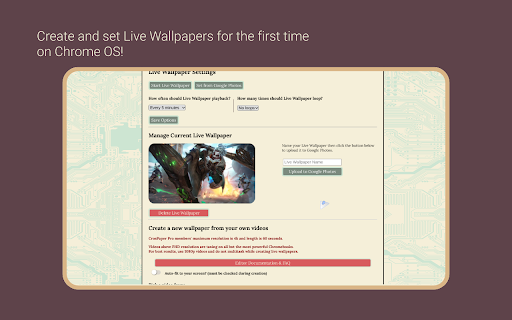

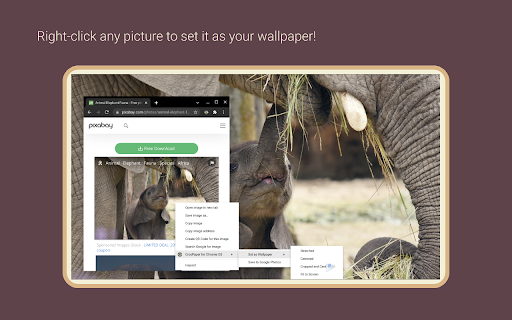
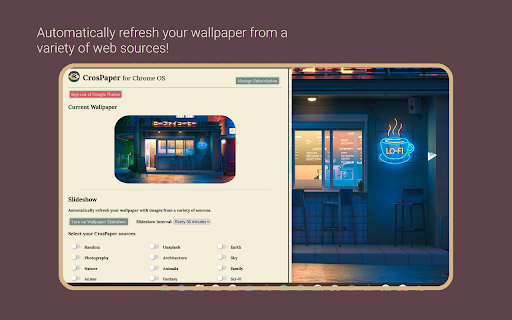
Customize your Chromebook's wallpaper with any image you find online, in your Google Photos library, or your file browser.
? ????'? ???
- Additional options and controls have been added for administrators on Managed Chromebooks.
- Made Enterprise Enrollment smoother.
- NOTE: Unsplash Custom Searches and Google Photos Live Wallpaper Upload have been deprecated.
- Added new wallpaper sources.
- Added tutorial for Live Wallpaper Editing.
The Best Wallpaper App for ChromeOS!
??????-????? ?? ????
- Make a wallpaper from any image, SVG, or web page you online! It's as easy as right-clicking and picking a layout.
- Grab GIFs and videos from supported websites, then edit them into Live Wallpapers!
- With Notifications turned on, you can even reset the layout of your wallpaper from the system tray.
? ???? ??? ?????
- Any picture you select from online can be saved to local storage.
- CrosPaper Pro members can upload directly to Google Photos from the Pop-up menu.
- Use the Share button to send your friends a link to your wallpapers
- Keep track of your old wallpapers using the History feature. Up to 20 entries for free members and 100 for Pro!
- Save CrosPaper Live Wallpapers for future use, or share them with your friends!
? ??? ???? ??? ?????? ?? ??????????
- Use the pop-up window to add wallpapers from images in your Chromebook's local storage.
- CrosPaper Pro members can pick images from their Google Photos library as wallpapers.
- Pick a solid color to serve as a neutral backdrop!
? ???? ???? ??????
- Add filters to enhance your backdrops with effects—including blur, brighten, and more!
- Unlike the standard ChromeOS Wallpaper app, CrosPaper can resize any image to fit your screen using our built-in image adjuster!
- Pro members can even adjust any video to fit their screen for a custom Live Wallpaper!
?️ ???? ??????????
- Missing Wallpaper Engine on ChromeOS? CrosPaper can create live wallpapers using your own videos!
- Watch your video or GIF playback on your desktop every 3 minutes in HD!
- Enhance battery life by configuring CrosPaper to automatically disable playback when your Chromebook’s battery drops below 25% or when it’s unplugged.
- CrosPaper Pro members can create videos up to 1 minute long, upload them to Google Photos, and even play them back in slow motion!
? ????????? ?????????, ????????, & ?????? ?????????
- CrosPaper uses a variety of sources across the web to supply you with pictures for cycling wallpapers.
- Pro members can choose from 19 categories of themed images!
- Pro members can randomly generate backgrounds as a source to see beautiful gradients created on your machine. It’s all local, so it’s all offline!
- As a Pro member, create local and web-based Playlists, which can change based on your media preferences. Want to have a special playlist for late-night dark mode surfing? Now you can!
- Watch your battery die in style with the Battery Playlist rule, or set a wallpaper for each moment with the Time of Day rule.
? ?????? ????????????
- CrosPaper Pro members can go beyond standard ChromeOS with customizable screensavers!
- Add webpage URLs to monitor a site, whenever your Chromebook runs idle.
- Playback video as a screensaver using URLs or local files.
- If you don’t have any other ideas, try the default screensaver or your favorite YouTube video!
? ????????? ???
For $9.99 a year, or $19.99 one time, get access to pro features.
(Custom Pricing for Enterprise/Education)
- With CrosPaper Pro, any picture you set from the web, wallpaper slideshow, or Google Photos can be adjusted to fit your screen ratio!
- Increase Wallpaper History slots from 20 to 100!
- Pick specific categories you want to show up on your Wallpaper Slideshow! Categories include: Nature, Animals, Sci-fi, Architecture, Sports, and much more!
- Enjoy beautiful, randomly generated gradients in the Abstract Patterns mode!
- Enhance the Live Wallpaper experience with longer clips, backup to Google Photos, and support for up to 4k resolution videos!*
- Live Wallpaper options are expanded for more customization. Enjoy loops and shorter intervals!
- Upload images directly to Google Photos from the Chrome Context Menu!
- Use your Google Photos library of images as static wallpapers or slideshows!
- Access the Playlist mode and additional sources for Slideshows—including beautiful satellite images!
- Change the letter-boxing color to match your image or brighten your screen!
- More features are always on the way!
????? ??????? & ??????
- We use the latest, most secure extension technologies from Google to accomplish what we do. Manifest Version 3 keeps you safe from harmful extensions and we embrace it wholeheartedly.
- CrosPaper Pro payments are handled by Stripe. This system is used and trusted by Google, Amazon, Zoom, and others.
- Everyone should feel safe while browsing the internet. To make that possible, Chrome's new Enhanced Protection mode is constantly checking potentially dangerous websites, downloads, and extensions. CrosPaper is declared safe by Google's Enhanced Protection standards and we'll continue to target this level of security with every update.
?????????? ???????????
- Any image stored on Google Photos depletes your Google Drive Storage allotment.
- The Wallpaper slideshow and all CrosPaper Pro features require internet connection.
- We developed CrosPaper for Chrome OS and it will not work on Windows, Mac OS, or Linux.
* For most devices running CrosPaper Pro Live Wallpaper, 1080p is recommended due to hardware limitations. CrosExperts is not liable for any hardware issues you may encounter.
https://www.crosexperts.com/crospaper
https://www.crosexperts.com/privacy-policy
For support, visit us on our subreddit:
https://www.reddit.com/r/CrosExperts/
| 分类 | ⚙️功能性 |
| 插件标识 | eiaekkbkomopkiidlmeabjpjldhbikfc |
| 平台 | Chrome |
| 评分 |
★★★★☆
4.2
|
| 评分人数 | 11 |
| 插件主页 | https://chromewebstore.google.com/detail/crospaper-the-wallpaper-e/eiaekkbkomopkiidlmeabjpjldhbikfc |
| 版本号 | 2.9.3.9 |
| 大小 | 875KiB |
| 官网下载次数 | 6000 |
| 下载地址 | |
| 更新时间 | 2024-09-15 00:00:00 |
CRX扩展文件安装方法
第1步: 打开Chrome浏览器的扩展程序
第2步:
在地址栏输入: chrome://extensions/
第3步: 开启右上角的【开发者模式】
第4步: 重启Chrome浏览器 (重要操作)
第5步: 重新打开扩展程序管理界面
第6步: 将下载的crx文件直接拖入页面完成安装
注意:请确保使用最新版本的Chrome浏览器
同类插件推荐

Google Chrome™漫画阅读器
从Google云端硬盘或本地计算机上快速阅读漫画书。想今天在线阅读漫画吗?只需今天就安装适用于Goo

CrosPaper - The Wallpaper Engine for ChromeOS
Customize your Chromebook's wallpaper with any

Web Developer Tool for Chrome
Web developer toolbox for your browser.⬇️ Easy to

Chramshoot Image Editor
Edit any image from your computer quickly and effi