
LeetTracker Chrome 插件, crx 扩展下载
Chrome extension that helps track solved LeetCode problems.
*Now updated to work with LeetCode's dynamic layout!
Looking for a way to keep track of LeetCode problems without the hassle? Automatically keep track of your notes and problem data in Google Sheets and have easy retrieval in the extension at any time!
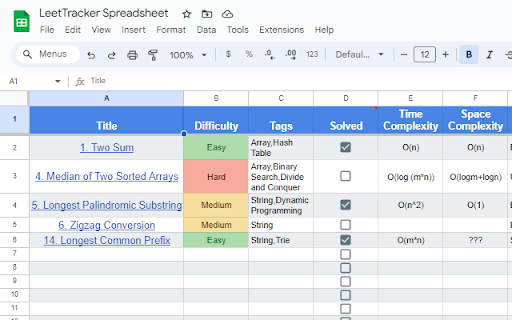
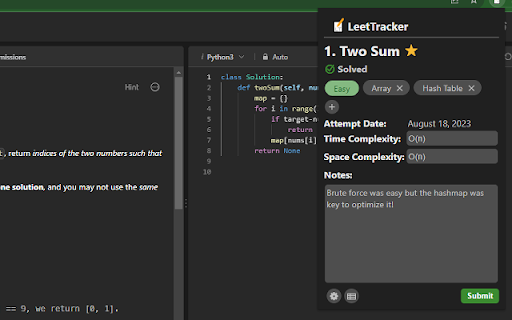
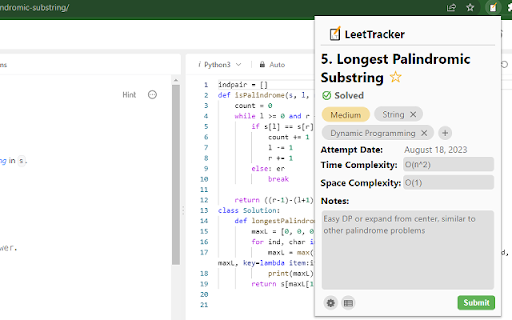
LeetTracker is meant to be a simple, hassle-free way to keep track of LeetCode problems you have done. When you view any LeetCode problem, the extension will display the problem data (title, difficulty, tags, solve status) within the pop up along with a user-submitted form to keep track of time and space complexity and general notes. Once a user submits this form, a Google Sheets spreadsheet will be created and formatted as a table if it isn't already created. Then, the data will be uploaded either as a new row entry if this problem has not been submitted before, or as an update to the row containing this problem. When you visit this problem again, the extension will pull this data into the pop-up and remind you of what you wrote!
Features:
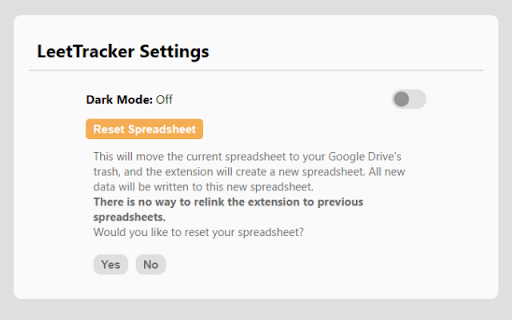
- Light Mode/Dark Mode
- Reset Spreadsheet
- Addition/Deletion of custom tags (along with LeetCode generated tags)
- "Star" problems for later review
- Track latest attempt/solve date for each problem
- Smart detection of LeetCode tab problem data
- Auto-generated and formatted creation of Google Sheets
- Auto update of spreadsheet with user-submitted data
- Retrieval within pop up of past problem notes/data from Sheets
- More soon to come!
Please reach out to us if you have any comments, suggestions or feedback!
-------------------------------------------------------------------------------------
LeetTracker is completely free! We do not track or store data in any database and use Chrome storage for QOL. All API calls are to Google APIs and nothing else.
We ask specifically for permission to 1. upload, edit, and delete files that the extension itself creates within your Google Drive 2. read LeetCode tab data to help populate the form 3. use browser storage to store what you've been writing and display it later.
*We are completely unaffiliated with LeetCode. This is simply a tool designed for increased productivity with the site.
| 分类 | 📝工作流程与规划 |
| 插件标识 | eifjkkaldpnckanlokabomfkfkbpakko |
| 平台 | Chrome |
| 评分 |
★★★★☆
4.2
|
| 评分人数 | 5 |
| 插件主页 | https://chromewebstore.google.com/detail/leettracker/eifjkkaldpnckanlokabomfkfkbpakko |
| 版本号 | 1.0.1 |
| 大小 | 89.15KiB |
| 官网下载次数 | 448 |
| 下载地址 | |
| 更新时间 | 2024-01-22 00:00:00 |
CRX扩展文件安装方法
第1步: 打开Chrome浏览器的扩展程序
第2步:
在地址栏输入: chrome://extensions/
第3步: 开启右上角的【开发者模式】
第4步: 重启Chrome浏览器 (重要操作)
第5步: 重新打开扩展程序管理界面
第6步: 将下载的crx文件直接拖入页面完成安装
注意:请确保使用最新版本的Chrome浏览器
同类插件推荐

LeetCode Tracker
Sync LeetCode's submissions with a GitHub repo

LeetNote
The efficient Leetcode Notebook with built-in Spac
LeetTracker
Chrome extension that helps track solved LeetCode

Leetcode format
Adds Format code button on leetcode to format the

Marble - LeetCode Tutor
AI-powered interactive walkthroughs for any leetco

Leetcode AI
Powerful Chrome extension that streamlines your in

CrackTech-LeetCode Company Tag, DSA Prep
Extension that can help candidate to prepare for a

LeetHub v2
Automatically integrate your Leetcode & Geeksf

Leetcode Explained
Enhances Leetcode problems with solution code, vid

GfG to LeetCode
Leetcode links in GeeksforGeeks ProblemsThis exten

Leetcode Enhancer
A browser extension to improve productivity on Lee

LeetCode Timer
Leetcode timer and performance trackingThis Chrome

LeetCode Video Solutions
Watch free LeetCode video ▶ solutions on the probl