
ProKeys Chrome 插件, crx 扩展下载


Save time and effort in emails, etc. with ProKeys! Define snippets, do math in browser, auto complete braces, and much more.
Never waste a second on repetitive typing and the tedium of copy-paste again. Impress your boss and colleagues with a spike in your productivity!
This user-friendly text expander lets you save largish text expansions and associate them with short abbreviations. We support plain or styled text, local and sync browser storage, clipboard macros, date and time macros, dynamic value fields in expansions, dynamic math, omnibox support, and much more!
Your words-per-minute will skyrocket, your colleagues will swoon at your productivity, online drudgery of the corporate world won't touch you, and you'll never bother with the Herculean task of right-click, copy, go-somewhere-else, right-click...
For more info, visit the Help section inside the app, or watch the promo video on this page.
⋆Snippets⋆ - expand abbreviations
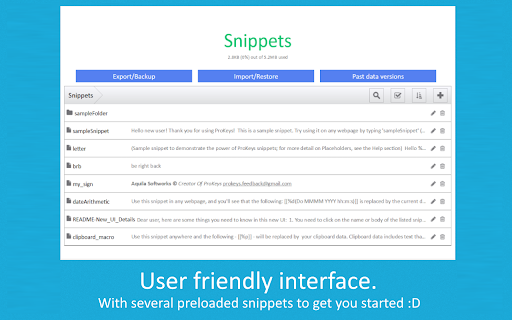
Define custom abbreviations, and expand them by simply pressing the hotkey (default: Shift+Space). It can be even a full-length email to your customer! Example: "brb" can expand to "Be right back!" Think of these as "canned responses".
⋆Placeholders⋆ - fields (inside snippets) which can be given dynamic values on using the snippet. Example: snippet "wishBday", which you can use to wish your friends Happy Birthday! Since the name of the friend keeps changing, so you can add a placeholder in the snippet body, as "%name%" (without quotes). It'll be auto-highlighted whenever you use the snippet and you can type your friend's name into it.
⋆Mathomania⋆ - do math without leaving your text editor, and without calculators. Simply type the math expression inside the `[[` and `]]` and press `=` to get the results. (watch the promo video for details) Parentheses and exponentiation is also supported.
Example: "[[ 15% * 600 =]]" gives "90" and "[[ (5+6) * 15^2 =]]" gives "2475".
⋆Omnibox support⋆ - use the keyword "pk" to directly expand snippets inside of the omnibox/address bar.
⋆Clipboard access⋆ - use [[%p]] anywhere in your snippet body, it is auto-replaced with the current clipboard data.
⋆Date/Time Macros⋆ - embed short symbols (inside a snippet body) which are auto-replaced their current date and time. Multiple date and time formats are supported.
⋆Date/Time Arithmetic⋆ - can be used to move forward or backward in time in the date and time macros. Supports both relative and independent evaluation of the symbols.
⋆Variables⋆ - quickly type date, time, browser version without having to leave your text editor or look at the clock!
⋆Auto-Insert⋆ - Quotes ('"') and braces - ( { [ -are auto-completed, and you can specify your custom insert-it-for-me symbols as well (like, inserting a '>' on typing of a '<') in the settings.
⋆Tab Key⋆ - can be used to insert 4 spaces, instead of its default function, thus speeding up your work.
Notes:
- All your data is stored on your PC (or synced across your Chrome sign-ins) and nothing is sent to any external servers! Check the source code if you wish to - https://github.com/GaurangTandon/ProKeys
- You can disable ProKeys for particular websites in the Settings.
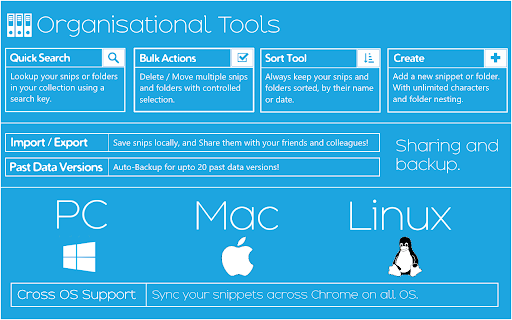
- You can take a backup of your data, restore it, and print it as well.
- You are sure of not losing your data as ProKeys stores (on your PC) past 20 revisions of your data.
- You can switch between Sync and Local storage.
Note that the following few web apps are known to be incompatible:
1. Facebook (only comments and profile posts)/Messenger/Quora - uses improper text editor.
2. Google Docs - as it is a full-fledged editor itself. (But Google Docs comments section works)
Contact me at [email protected] if you know of a dynamic web app that's missing from the list above, or to give feedback.
Also note that the input of type email and number do not support caret manipulation so ProKeys can't function there (and neither does it work in password fields, for obvious reasons).
ProKeys developed with ♥ by - Gaurang Tandon and Varun Singh
| 分类 | 📝工作流程与规划 |
| 插件标识 | ekfnbpgmmeahnnlpjibofkobpdkifapn |
| 平台 | Chrome |
| 评分 |
★★★★★
5
|
| 评分人数 | 2 |
| 插件主页 | https://chromewebstore.google.com/detail/prokeys/ekfnbpgmmeahnnlpjibofkobpdkifapn |
| 版本号 | 4.0.2 |
| 大小 | 417KiB |
| 官网下载次数 | 70000 |
| 下载地址 | |
| 更新时间 | 2024-06-27 00:00:00 |
CRX扩展文件安装方法
第1步: 打开Chrome浏览器的扩展程序
第2步:
在地址栏输入: chrome://extensions/
第3步: 开启右上角的【开发者模式】
第4步: 重启Chrome浏览器 (重要操作)
第5步: 重新打开扩展程序管理界面
第6步: 将下载的crx文件直接拖入页面完成安装
注意:请确保使用最新版本的Chrome浏览器
同类插件推荐

SEON Intelligence
SEON IntelligenceSEON - Best Fraud Detection Softw

Zendesk QA
Give feedback on your customer support conversatio
Paste From Context Menu
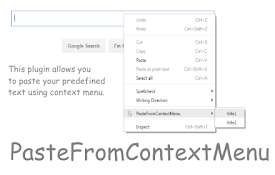
This extension allows you to save predefined snipp

ChronoMouse
Instantly displays local time information, perform

QuickText
QuickText allows you to simply paste predefined te

TextExpander: Keyboard Shortcuts & Templates
Create and expand repetitive text anywhere on the

FlyMSG: AI Writer & Autofill Text Expander
AI Writer & Autofill Text Expander App. Write,
ProKeys
Save time and effort in emails, etc. with ProKeys!

Text Snippets
Fill preseted texts to web page formsSupport: 1.Ma

Text Blaze: Templates and Snippets
Create smart text expansions to get more done and

免费的Google Chrome™自动文本扩展器
创建自定义键盘快捷键,以在键入时扩展和替换文本!是否想在您在计算机上打字时每天节省时间?使用适用于G

Magical: AI Agent for Autofill Automation
Magical 是一个用于自动填充自动化的 AI 代理。自动填充表单、电子表格和消息。?加入750,

Highlight This: finds and marks words
Automatically finds and highlights words and phras