
Text to Google Calendar | MyTask AI Chrome 插件, crx 扩展下载

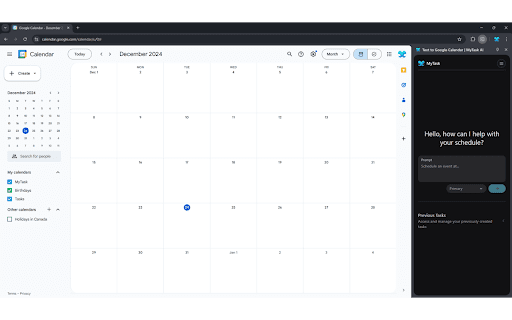
Tasking made Easier.
✨ MyTask: Effortless AI-Powered Event Creation
Turn your words into perfectly crafted Google Calendar events in milliseconds. MyTask’s cutting-edge AI handles every detail, so you can focus on what truly matters.
What MyTask Does
?️ Dates, Times & Timezones: Schedule events anywhere, anytime.
? Locations & Links: Add venues or auto-generate Google Meet & Zoom links.
? Invitations: Easily send invites and manage RSVPs.
? Recurrences: Set up daily, weekly, or custom repeating events.
? Descriptions & Reminders: AI-generated agendas and notifications.
? Video Conferencing: Seamless meeting link generation.
And much more—MyTask takes care of it all.
Why Choose MyTask?
? AI-Driven Precision: Events exactly as you envision.
⚡ Instant Integration: Create and sync events in milliseconds.
✨ Elegant Simplicity: Beautiful, effortless event creation.
Elevate Your Scheduling
Experience the future of scheduling with MyTask. Let AI turn your words into perfectly organized events, quickly and effortlessly.
? Download MyTask today and simplify your scheduling!
| 分类 | 📝工作流程与规划 |
| 插件标识 | enhihhigandhefaekneckmndkipcolmp |
| 平台 | Chrome |
| 评分 |
★★★☆☆
3.8
|
| 评分人数 | 5 |
| 插件主页 | https://chromewebstore.google.com/detail/text-to-google-calendar-m/enhihhigandhefaekneckmndkipcolmp |
| 版本号 | 1.10 |
| 大小 | 1.24MiB |
| 官网下载次数 | 355 |
| 下载地址 | |
| 更新时间 | 2025-02-15 00:00:00 |
CRX扩展文件安装方法
第1步: 打开Chrome浏览器的扩展程序
第2步:
在地址栏输入: chrome://extensions/
第3步: 开启右上角的【开发者模式】
第4步: 重启Chrome浏览器 (重要操作)
第5步: 重新打开扩展程序管理界面
第6步: 将下载的crx文件直接拖入页面完成安装
注意:请确保使用最新版本的Chrome浏览器
同类插件推荐

Agenda Hero for Chrome
Convert text to a calendar-ready entry in one clic

ChatGPT for Google Calendar
This is a Chrome extension that simplifies event s

Comment Helper Buddha
Automatic comment writing for bedakid teachersExcl
Text to Google Calendar | MyTask AI
Tasking made Easier.✨ MyTask: Effortless AI-Powere

Smart Calendar Event Plus
Add event to google calendarCreate Google Calendar

RIP Quick Add
Quickly create Google calendar events from natural

文本转Outlook日历
轻松从任何高亮显示的文本创建Outlook日历事件立即将文本转换为Outlook日历事件!? 厌倦

Google Calendar Right Click
create Google Calendar event with Title or Descrip
AI Event Scheduler
AI Event Scheduler: quickly create Google calendar

Pact for Google Calendar
Boost your productivity with Pact for Google Calen

文本转Google日历
轻松从任何高亮显示的文本创建谷歌日历事件? 立即将文本转换为Google日历事件!? 厌倦了创建一

Calendar Plus
Google Calendar extension that provides insights i
Time Tracker, Todo, Sprint Manager - Basecamp
Sync daily tasks or work between Basecamp & Mo