
MindMap Chrome 插件, crx 扩展下载

MindMap, don't miss.
In today's competitive digital world, it's not enough to have a great website or product. You need to control the consciousness of your users and make them aware that you are a key player in your market. Associating your website with other popular websites is a great tool to achieve this, as it helps users respect your website and the products or services it offers.
The extension aims to help you create a map of websites and users' navigation routes, including all the popular websites in your market, and add your website to that map. Then, use the extension to help you clean up the map, modify icons and titles, and publish.
Example:
As Wine Farm owner "MindWine",
I would like to create a site map of all the big brands (Drambuie, Smirnoff, Campari, etc...)
and my brand "MindWine".
and publish it.
That is how you associating your website with other popular websites.
Here are the key features of the MindMap Extension:
Map Creation: The extension helps you create a map of popular websites and navigation routes in your market. This map includes all the key players, including your own website.
Map Cleansing: The extension helps you clean up the map by removing any unwanted sites, modifying icons and titles, and making sure that the map accurately reflects the websites and products in your market.
Landing Page Creation: Once the map is ready, the extension helps you create a landing page with resources such as movies and snapshots. This landing page is designed to promote your website and products to users who are interested in your market.
Viral Promotion: The extension helps you promote your landing page and map through social media and other channels to make it go viral and reach a wider audience.
Recordings: The extension allows you to record user behavior on the map and landing page, which can be used to analyze and optimize user engagement.
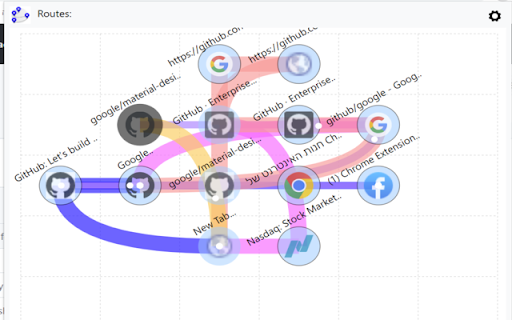
Click the Navigation Aid icon on the browser toolbar to see a map of navigation trends in your context.
Once you click on the navigation guide, a map with routes will be displayed.
On the map, you can see the current page displayed in the browser,
It is surrounded by a blinking circle,
Follow the white running dots!
The white dots moving on the routes show you the trends of the community.
Which navigations were made by the community to get to the current page?
And which navigation trends are recommended from the current page.
The extension gives you the tools to Create, Edit Records & Share, the map.
Privacy:
No navigation data is sent without your consent.
The data unknownymous rendered in the community route algorithms
to determine the best routes, we can offer.
| 分类 | 👥社交 |
| 插件标识 | enlngpnhogikopjfogmpcgofpboagiid |
| 平台 | Chrome |
| 评分 |
★★★★☆
4.4
|
| 评分人数 | 34 |
| 插件主页 | https://chromewebstore.google.com/detail/mindmap/enlngpnhogikopjfogmpcgofpboagiid |
| 版本号 | 3.981 |
| 大小 | 1.83MiB |
| 官网下载次数 | 49 |
| 下载地址 | |
| 更新时间 | 2023-05-03 00:00:00 |
CRX扩展文件安装方法
第1步: 打开Chrome浏览器的扩展程序
第2步:
在地址栏输入: chrome://extensions/
第3步: 开启右上角的【开发者模式】
第4步: 重启Chrome浏览器 (重要操作)
第5步: 重新打开扩展程序管理界面
第6步: 将下载的crx文件直接拖入页面完成安装
注意:请确保使用最新版本的Chrome浏览器
同类插件推荐

KnowledgeMap
A bookmark management tool that combines mind map

VAT Calculator
A Google Chrome extension to calculate VATI have c

ColorCraft
ColorCraft is a must-have extension for every deve

Bookmark Plus by Vidura
Bookmark Plus is a chrome extension to amplify the

Swiftly: Email Summarizer & Task Creator
Summarize your emails and turn them into tasks.A t

moyoNote
All-in-one tool for organizing, managing, and stru
Yarn and Pins
Create mindmaps for different sources of informati

MindMap
MindMap, don't miss.In today's competitive

WordMapDictionary | A visual dictionary
It is a visual dictionary/thesaurus. It uses a min

MindTree: Mindmap for ChatGPT
MindTree: Turn your linear ChatGPT chats into visu

A Mindmap for your Bookmarks
Manage & Clean your Bookmarks faster with this

AI思维导图制作工具 - 使用AI创建思维导图
基于AI的人工智能思维导图工具,可快速生成思维导图,并以所见即所得的方式继续编辑。思维导图对以下方面

GoldDust
Ask a question about a company or a person. If the