
ChromeKeys Chrome 插件, crx 扩展下载
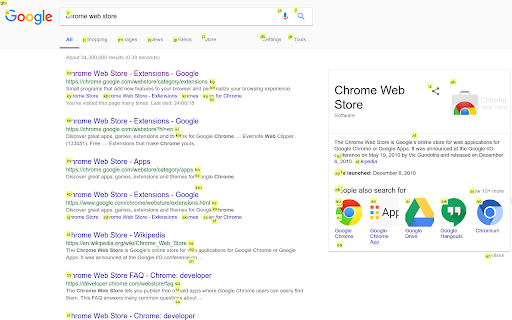
Extra keyboard shortcuts from Chrome
Browse the web with ease and speed using keyboard-driven shortcuts inspired by the fantastic qutebrowser and surf web browsers. Spend less time mousing around and searching through tabs.
How to click buttons, links, etc. with your keyboard:
Hit Shift+Spacebar to show the click hints, and type the hint to click the element you want.
Hit Ctrl+Shift+Spacebar to get click hints that open a link in a new tab.
How to find an open tab with given content:
Hit Alt+Enter to open a search field. Start typing to get a list of open tabs that contain the search text. Arrow down to the one you want and hit Enter.
Alt+Tab will flip you back to the previous tab.
Hit Esc to remove the click-hints and/or tab-search widget.
| 分类 | 📝工作流程与规划 |
| 插件标识 | epbohekicencbbaikbdlglpkblklpcec |
| 平台 | Chrome |
| 评分 |
★★★★☆
4.5
|
| 评分人数 | 208 |
| 插件主页 | https://chromewebstore.google.com/detail/chromekeys/epbohekicencbbaikbdlglpkblklpcec |
| 版本号 | 0.1.0 |
| 大小 | 193KiB |
| 官网下载次数 | 32 |
| 下载地址 | |
| 更新时间 | 2021-04-14 00:00:00 |
CRX扩展文件安装方法
第1步: 打开Chrome浏览器的扩展程序
第2步:
在地址栏输入: chrome://extensions/
第3步: 开启右上角的【开发者模式】
第4步: 重启Chrome浏览器 (重要操作)
第5步: 重新打开扩展程序管理界面
第6步: 将下载的crx文件直接拖入页面完成安装
注意:请确保使用最新版本的Chrome浏览器
同类插件推荐

Nice Speed Dials
Nice and Simple Speed dials Extension for ChromeNi
ChromeKeys
Extra keyboard shortcuts from ChromeBrowse the web

Chrome Dice
A simple dice rolling extension for Google ChromeC
Easy Extension Manager
Effortlessly Manage Your Chrome ExtensionsEasy Ext