
indexedDB viewer Chrome 插件, crx 扩展下载
view and export indexedDB data to json or csv
Gain Transparency and Control Over Your Browsing Data with indexedDB viewer.
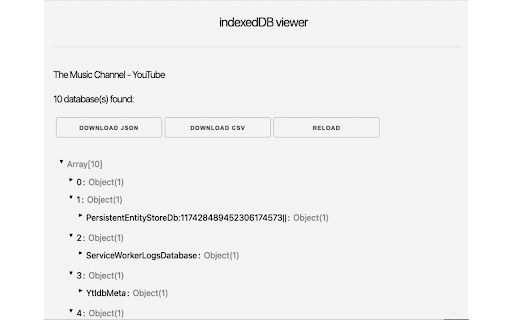
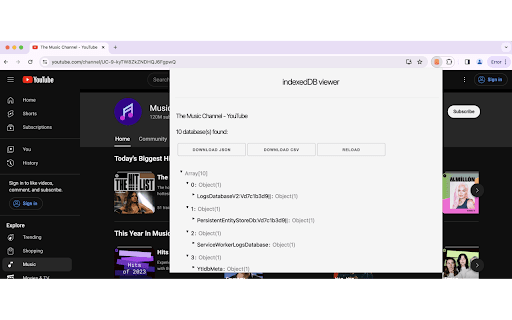
indexedDB viewer empowers you to view and manage the data websites store on your browser using IndexedDB technology.
Unveiling the Hidden:
- See what websites store: Gain transparency into the data websites keep on your browser, often unseen.
- Explore the data in detail: View the stored data in a user-friendly JSON format, allowing easy comprehension of its structure and content.
- Expand or collapse objects: Navigate the data efficiently with the ability to toggle individual objects for focused inspection.
Taking Control:
Download for further analysis: Export the data as JSON or CSV for in-depth analysis using external tools or sharing with others.
Empower informed choices: With knowledge of what's stored, you can make informed decisions about website permissions and data privacy.
Usage:
Open any website and click on the indexedDB viewer icon. If indexedDb is been used, it will display the data with the exporting options, otherwise it will inform you that indexedDb is not available.
indexedDB viewer is the ultimate tool for understanding and managing your browsing data. Download it today and reclaim control over your online experience!
| 分类 | 💻开发者工具 |
| 插件标识 | epieehlijjohhbgmbfnljkhnmohcehhd |
| 平台 | Chrome |
| 评分 |
★★★★☆
4.8
|
| 评分人数 | 67 |
| 插件主页 | https://chromewebstore.google.com/detail/indexeddb-viewer/epieehlijjohhbgmbfnljkhnmohcehhd |
| 版本号 | 1.0.0 |
| 大小 | 153KiB |
| 官网下载次数 | 593 |
| 下载地址 | |
| 更新时间 | 2024-02-21 00:00:00 |
CRX扩展文件安装方法
第1步: 打开Chrome浏览器的扩展程序
第2步:
在地址栏输入: chrome://extensions/
第3步: 开启右上角的【开发者模式】
第4步: 重启Chrome浏览器 (重要操作)
第5步: 重新打开扩展程序管理界面
第6步: 将下载的crx文件直接拖入页面完成安装
注意:请确保使用最新版本的Chrome浏览器
同类插件推荐
indexedDB viewer
view and export indexedDB data to json or csvGain

Export Chrome History
Export your Chrome History as an Excel-readable CS

IndexedDB Exporter
Export IndexedDB data to a JSON file.IndexedDB Exp

JSONVue
Validate and view JSON documentsJSONView port for