
ChatGPT Auto Post / ChatGPT 予約投稿・投稿自動化 Chrome 插件, crx 扩展下载
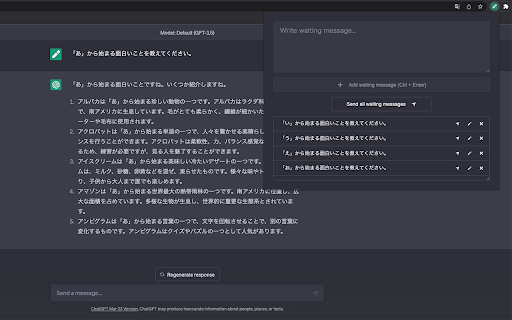

You will be able to auto-post with ChatGPT. / ChatGPT で予約投稿・投稿自動化を可能にします。
You will be able to auto-post with ChatGPT.
Prompts can be stocked, with the ability to automatically post stocked prompts one at a time or sequentially.
There is also a function to automatically click the "Regenerate response" and "Continue generating" buttons.
You can also load prompts using CSV files.
This is useful for writing prompts while waiting for prompts to run, or for posting multiple prompts in a predetermined order of execution.
Prompts are text-only and cannot include file attachments.
「ChatGPT Auto Post」は ChatGPT で予約投稿・投稿自動化を可能にする Chrome アドオンです。
プロンプトをストックでき、ストックしたプロンプトをひとつずつ投稿したり、順次自動的に投稿する機能があります。
また「Regenerate response」「Continue generating」ボタンを自動的にクリックする機能もあります。
CSVファイルを使って、プロンプトを読み込むことも可能です。
プロンプトを実行している待ち時間中にプロンプトを書いたり、事前に実行順を決めた複数のプロンプトを投稿したいときに便利です。
プロンプトはテキストのみに対応しており、ファイルを添付することはできません。
詳細は以下をご覧ください。
https://wk-partners.co.jp/homepage/tools/chatgpt-auto-post/
| 分类 | 📝工作流程与规划 |
| 插件标识 | fboccijajcicfilnhekjboglljcdkofm |
| 平台 | Chrome |
| 评分 |
★★★★☆
4.6
|
| 评分人数 | 460 |
| 插件主页 | https://chromewebstore.google.com/detail/chatgpt-auto-post-chatgpt/fboccijajcicfilnhekjboglljcdkofm |
| 版本号 | 1.0.11 |
| 大小 | 26.68KiB |
| 官网下载次数 | 166 |
| 下载地址 | |
| 更新时间 | 2024-12-20 00:00:00 |
CRX扩展文件安装方法
第1步: 打开Chrome浏览器的扩展程序
第2步:
在地址栏输入: chrome://extensions/
第3步: 开启右上角的【开发者模式】
第4步: 重启Chrome浏览器 (重要操作)
第5步: 重新打开扩展程序管理界面
第6步: 将下载的crx文件直接拖入页面完成安装
注意:请确保使用最新版本的Chrome浏览器
同类插件推荐

ChatGPT Auto Post / ChatGPT 予約投稿・投稿自動化
You will be able to auto-post with ChatGPT. / Chat
Ghostwrite: ChatGPT Email Assistant
A ChatGPT powered AI email writing assistant.A Cha

ChatGPT for Gmail by cloudHQ
直接从您的 Gmail 中轻松免费的在线投票和调查? 使用Gmail的ChatGPT为您的电子邮件游

ChatGPT Ctrl+Enter Sender
这个ChatGPT等AI聊天服务让你用'Ctrl+Enter'发送消息,防止误发。用