
Drift Live Wallpaper Chrome 插件, crx 扩展下载
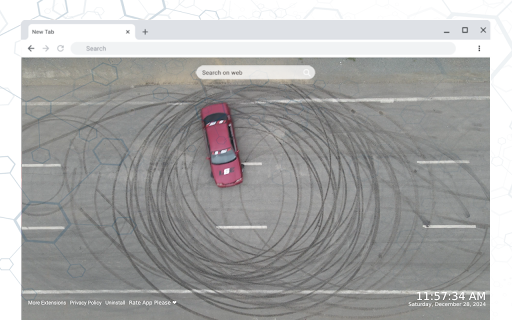
Get your adrenaline pumping with the Drift Live Wallpaper extension for Chrome.
Watch high-speed car drifts in action as you open a new tab, bringing the thrill of motorsport directly to your browser. Perfect for fans of fast cars and dynamic action! Discover more at https://haberikra.com.
Features
? Live Wallpaper: Immerse yourself in realistic car drift animations that keep you on the edge of your seat.
? Popular Site Shortcuts: Quickly access your favorite websites with customizable shortcut options.
➕ Add & Remove Shortcuts: Easily personalize your browsing experience with the ability to add or remove shortcuts.
? Clock & Date Display: Keep track of time with a sleek and stylish clock and date feature.
? Search Bar: Use your default search engine to search the web directly from your new tab page.
Additional Information
This extension respects your privacy and ensures no personal data is collected. You are in full control, and if you wish to uninstall the extension, simply click the "Uninstall" button located at the bottom of the new tab page.
Explore more extensions, read our privacy policy, or contact us for support:
More Extensions: Visit Haberikra.com to find more exciting Chrome extensions.
Privacy Policy: https://haberikra.com/privacy-policy/
Support: https://haberikra.com/contact-us
About Us
Haberikra.com creates Chrome themes and new tab extensions that enhance your browsing experience with captivating designs. Our goal is to deliver visually stunning and functional extensions. For inquiries or support, contact us at [email protected].
Keywords
Drift Live Wallpaper, Chrome extension, car drift animation, racing wallpaper, motorsport theme
| 分类 | 🎉趣味休闲 |
| 插件标识 | fcpccfdgnbkblanjfclcaoledhcpnehc |
| 平台 | Chrome |
| 评分 |
★★★★★
5
|
| 评分人数 | 3 |
| 插件主页 | https://chromewebstore.google.com/detail/drift-live-wallpaper/fcpccfdgnbkblanjfclcaoledhcpnehc |
| 版本号 | 1.0.0 |
| 大小 | 12.2MiB |
| 官网下载次数 | 45 |
| 下载地址 | |
| 更新时间 | 2025-01-20 00:00:00 |
CRX扩展文件安装方法
第1步: 打开Chrome浏览器的扩展程序
第2步:
在地址栏输入: chrome://extensions/
第3步: 开启右上角的【开发者模式】
第4步: 重启Chrome浏览器 (重要操作)
第5步: 重新打开扩展程序管理界面
第6步: 将下载的crx文件直接拖入页面完成安装
注意:请确保使用最新版本的Chrome浏览器
同类插件推荐

Drift Live Wallpaper
Get your adrenaline pumping with the Drift Live Wa

Live Wallpaper
Transform your Chrome browser into a high-speed ra

DeLorean Car Retro Live Wallpaper
Step back in time with the DeLorean Car Retro Live

BMW M4 City Ride Live Wallpaper
Experience the thrill of a BMW M4 cruising through

Lamborghini Drifting Live Wallpaper
Experience the thrill of Lamborghini drifting with

BMW M4 Night Live Wallpaper New Tab
Experience the thrill of the BMW M4 in your new ta

Formula DRIFT :Mustang - BMW The Dance of Adrenaline and Smoke Live Tab
Experience the adrenaline-fueled dance of Mustang

Street Traffic Cars Live Wallpaper
Turn your browser into a vibrant cityscape with th

Ferrari Live Wallpaper New Tab
Feel the thrill of Ferrari every time you open a n

Porsche 911 - Sports Car Live Wallpaper
Rev up your new tab with the iconic Porsche 911! E
Real Rally Car Live Wallpaper
Rev up your browser experience with the Real Rally
Need For Speed Unbound Nissan 350Z Live Wallpaper
Elevate your Chrome browsing experience with the N
Porsche Live Wallpaper
Bring the thrill of Porsche to your browser with t