
My Bookmarks Organizer Chrome 插件, crx 扩展下载
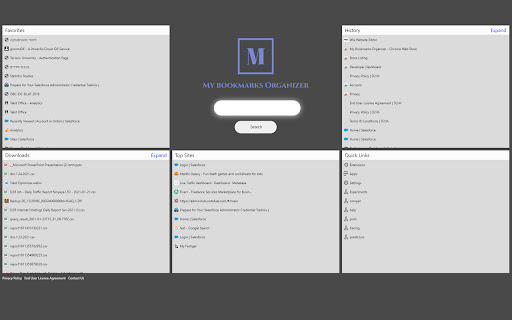
Easy way to browse and organize your Bookmarks, History, Downloads and much more
My Bookmarks Organizer provides an easy way to view and access your bookmarks and other browser features in one click with an accessible web search provided by bing.
One click will bring you to your favorite bookmarks, downloads, history, top visited sites and more! No more endless browsers menu to view your bookmarks, access all your browsing needs in just one click!
Please read carefully: By installing the Bookmarks Organizer extension you agree to install this application, and you agree to the End User License Agreement (https://www.d2rinternetholdings.com/eula-bk) and the Privacy Policy (https://www.d2rinternetholdings.com/privacypolicy).
You may remove this extension at any time from the chrome extension page.
| 分类 | 📝工作流程与规划 |
| 插件标识 | fdagfeejebamchdokdpjgfjdfaklofab |
| 平台 | Chrome |
| 评分 |
★★★★☆
4.6
|
| 评分人数 | 11 |
| 插件主页 | https://chromewebstore.google.com/detail/my-bookmarks-organizer/fdagfeejebamchdokdpjgfjdfaklofab |
| 版本号 | 3.6 |
| 大小 | 63.22KiB |
| 官网下载次数 | 145 |
| 下载地址 | |
| 更新时间 | 2022-09-03 00:00:00 |
CRX扩展文件安装方法
第1步: 打开Chrome浏览器的扩展程序
第2步:
在地址栏输入: chrome://extensions/
第3步: 开启右上角的【开发者模式】
第4步: 重启Chrome浏览器 (重要操作)
第5步: 重新打开扩展程序管理界面
第6步: 将下载的crx文件直接拖入页面完成安装
注意:请确保使用最新版本的Chrome浏览器
同类插件推荐

My Bookmarks Organizer
Easy way to browse and organize your Bookmarks, Hi

Tabbar - Bookmark, History, & Tab Manager
Supercharge Chrome with commands, shortcuts, and m

Omni - Bookmark, History, & Tab Manager
Supercharge Chrome with commands, shortcuts, and m

iLaunch: 管理书签、历史记录、标签、扩展 & 快捷命令启动工具
管理书签、历史记录、标签、扩展 & 快捷命令启动工具使用命令,让你像专业人士一样玩转浏览器。