
GAS Prettier + AI Completion Chrome 插件, crx 扩展下载

Google Apps Script Prettier Formatter Chrome Extention with AI Completion
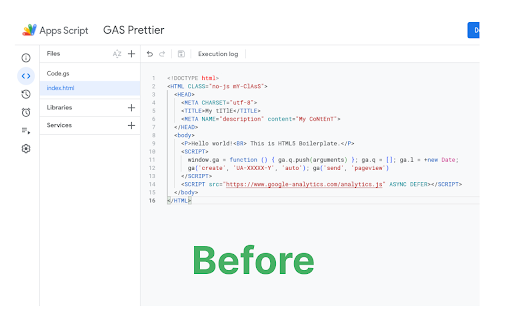
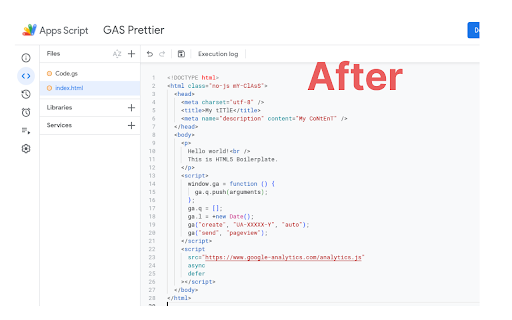
GAS Prettier integrates the popular Prettier code formatter directly into the Google Apps Script editor, allowing you to easily format both your HTML and Google Apps Script (GAS) files with a single click.
Some key features of GAS Prettier:
- Registers Prettier as the default formatter for the GAS editor.
- Supports formatting of both HTML and GAS files.
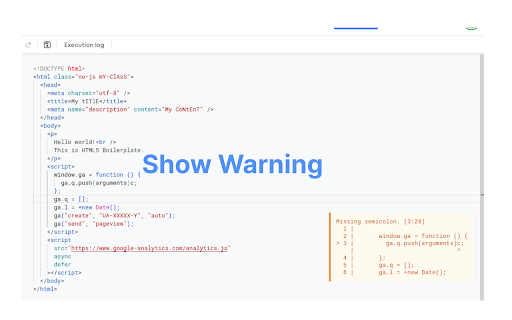
- Provides a warning message if there are any errors during the formatting process.
- Ai completion (working good on small google script file)
- Open source, so the community can contribute and help improve it.
How to Format Document?
Just use current Format Command (Ctrl + Shift + F) or Click Right Click it will show format button and just click format button.
This extension aims to streamline the development workflow for GAS developers by ensuring consistent code formatting across your project. No more manual formatting or fighting with different editor settings - just hit the format button and let Prettier do the work.
The GAS Prettier extension is available for free on the Chrome Web Store. I encourage you to check it out and let me know what you think! If you have any feedback or would like to contribute, the project is open source on GitHub.
GitHub Link:
https://github.com/saffiullahfahim/gas-prettier
| 分类 | 💻开发者工具 |
| 插件标识 | fdhhhjfaflnaopgeplkpcdppiifpgmap |
| 平台 | Chrome |
| 评分 |
★★★★☆
4.9
|
| 评分人数 | 866 |
| 插件主页 | https://chromewebstore.google.com/detail/gas-prettier-+-ai-complet/fdhhhjfaflnaopgeplkpcdppiifpgmap |
| 版本号 | 1.2.3 |
| 大小 | 304KiB |
| 官网下载次数 | 335 |
| 下载地址 | |
| 更新时间 | 2025-01-30 00:00:00 |
CRX扩展文件安装方法
第1步: 打开Chrome浏览器的扩展程序
第2步:
在地址栏输入: chrome://extensions/
第3步: 开启右上角的【开发者模式】
第4步: 重启Chrome浏览器 (重要操作)
第5步: 重新打开扩展程序管理界面
第6步: 将下载的crx文件直接拖入页面完成安装
注意:请确保使用最新版本的Chrome浏览器
同类插件推荐
GAS Prettier + AI Completion
Google Apps Script Prettier Formatter Chrome Exten

FlyMSG: AI Writer & Autofill Text Expander
AI Writer & Autofill Text Expander App. Write,

SheetsGPT - AI Google Sheets Formula Maker
AI extension that uses AI to provide Sheets functi

AI Chrome Extension powered by ChatGPT - Magictool AI
Your All-in-One AI Chrome Extension featuring Chat