
Newtion Chrome 插件, crx 扩展下载
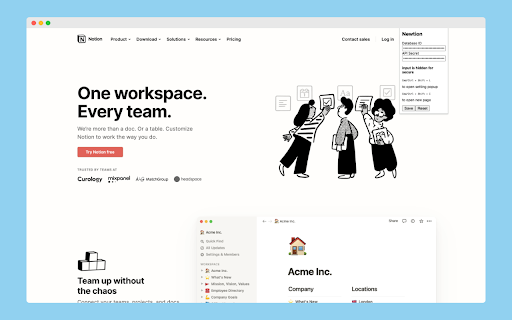
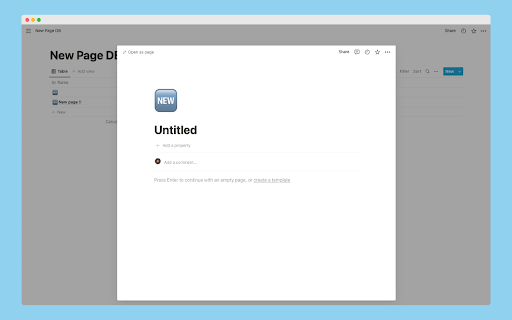
You can use New Page shortcut of Notion in web browser.
This chrome extension makes it possible to use new-page shortcut for Notion in web browser.
## Feature
### Open Source Software
The source code is publicly available and MIT license.
### Use safely
This Chrome extension requires Notion's official API, but the only permissions required are to insert data and no user information is required.
## Shortcuts
- `Cmd/Ctrl+Shift+L`
- Open setting popup
- `Cmd/Ctrl+Shift+I`
- Create & open new notion page
## Install
You also need set Newtion in the next section.
Access to [chrome web store](https://chrome.google.com/webstore/detail/newtion/fdjjmpjjbhhepdakdifipaehpcgojkgf).
Please wait for browser extensions other than GoogleChrome.
## How to use
You need 3 step settings. Please follow below.
### 1. Prepare Notion Integrations from setting page
- Access to [https://www.notion.so/my-integrations](https://www.notion.so/my-integrations) and click `+ New Integration`
- Input basic information
- name
- logo(optional)
- Associated workspace
- Capabilities
- check Insert Content
- check No user Information
- then, submit and copy `Internal Integration Token` (use later)
### 2. Prepare Notion Database
- Access to [https://www.notion.so/](https://www.notion.so/)
- Create new page with full screen database
- Delete `Tags` colomn (Optional)
- **? Set leftmost colomn name to `Name` (default in English)**
- This will be updated to customizable...
- Get database id and copy (use later)
- `https://www.notion.so/YOUR_DOMAIN/DATABASE_ID`
- `DATABASE_ID` is database id
- Invite your Integrations
- Click share button in header
- Then, Select an integration you created some time ago
### 3. Set up Newtion
- Input `Cmd/Ctrl + Shift + L` to open setting popup
- or click `Newtion` in list of chrome extensions
- Input Database ID and API Secret (char is hidden)
### Let's use Newtion Shortcut
Congratulations!
Input `Cmd/Ctrl + Shift + I` to create and open new page!
## Usecase
I assume the following cases.
- When you are searching a Web site and want to summarize the information in Notion
- Having trouble finding a shortcut to open a new page in the browser version of Notion.
- Opening a new page in Notion causes the number of pages in the sidebar to increase.
## Developer
Hi, I'm japanese university student.
## Links
- [Home page](https://cohu-dev.github.io/newtion/)
- [Privacy Policy](https://cohu-dev.github.io/chrome-privacy-policy/)
| 分类 | 📝工作流程与规划 |
| 插件标识 | fdjjmpjjbhhepdakdifipaehpcgojkgf |
| 平台 | Chrome |
| 评分 |
★★★★☆
4
|
| 评分人数 | 2 |
| 插件主页 | https://chromewebstore.google.com/detail/newtion/fdjjmpjjbhhepdakdifipaehpcgojkgf |
| 版本号 | 0.1.1 |
| 大小 | 645KiB |
| 官网下载次数 | 40 |
| 下载地址 | |
| 更新时间 | 2022-06-24 00:00:00 |
CRX扩展文件安装方法
第1步: 打开Chrome浏览器的扩展程序
第2步:
在地址栏输入: chrome://extensions/
第3步: 开启右上角的【开发者模式】
第4步: 重启Chrome浏览器 (重要操作)
第5步: 重新打开扩展程序管理界面
第6步: 将下载的crx文件直接拖入页面完成安装
注意:请确保使用最新版本的Chrome浏览器
同类插件推荐
Notion Quick Notes
Utilities for easy note taking with NotionHelps wi

NotionExtensions
Your notion.so workspace, with all the missing fea

Newtion
You can use New Page shortcut of Notion in web bro

notion-favicon-replacer
Replaces notion's dynamic favicons with their

QuickPad: fast Markdown notepad
An in-browser Markdown notepad. Optimize for writi

Notion Global Block
Paste Notion Block URLs as a Global Block URLLight

Notion Sidebar Tamer
Disable the hover sidebar in Notion.The sidebar in

Notion Style Tweaks
Tweaks for NotionNST is a free and open source Chr

Notion Tweaks
For Notion. Development of this extension is in st

SideNotion
Turn Notion into your online lecture sidekick.Reco

Notion Search
Search Notion pages on the popupSearch Notion page

Bookmarks to Notion
将浏览器书签与 Notion 数据库同步。集中您的书签。Bookmarks to Notion 用于
NotionX ( for Notion )
A Browser Extension that enhances Notion experienc