
Jyutping & Pinyin Subtitles for YouTube, Netflix, Disney+, Bilibili & more Chrome 插件, crx 扩展下载
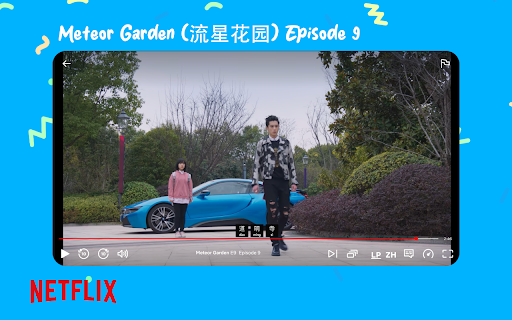

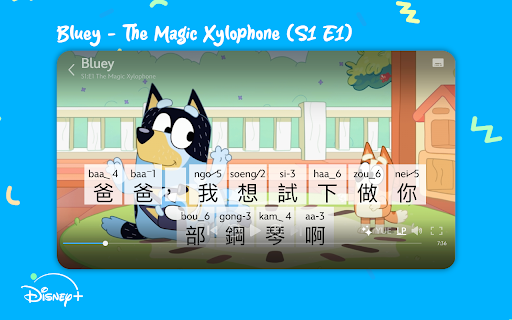
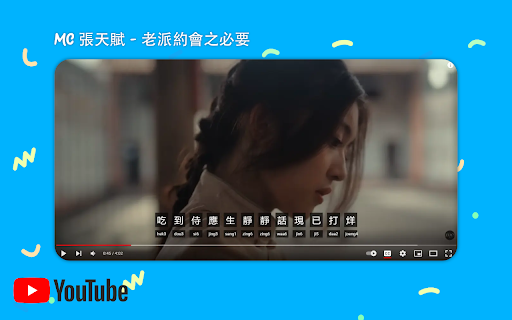
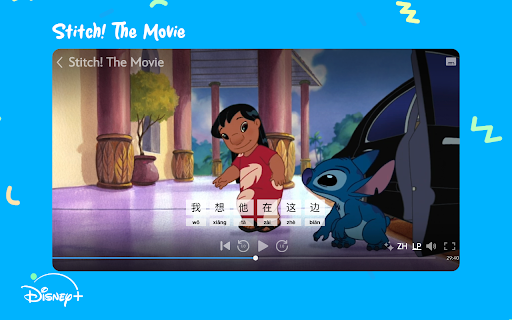
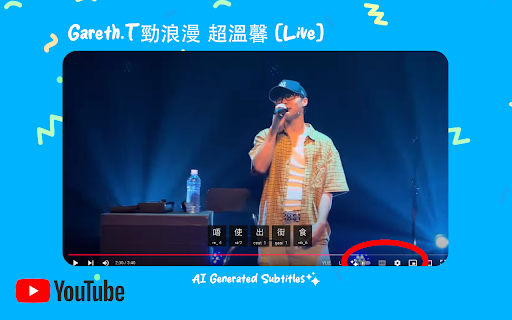
Transform Chinese subtitles on YouTube, Netflix, Disney+ & more into an interactive learning tool with added Jyutping or Pinyin!
Introducing Langpal话朋 Subtitles: A New & Immersive Way to Learn Mandarin or Cantonese! [ALPHA V0.2.0]
Elevate your Chinese learning journey by enhancing subtitles for YouTube, Netflix, Disney+, Bilibili & more by:
- Spacing out Chinese characters for better readability.
- Adding a phonetic guide—either Pinyin (Mandarin) or Jyutping (Cantonese)—beneath each subtitle line.
- Adding custom AI generated (& human vetted) Cantonese or Mandarin captions to YouTube videos that have none (Only a select amount available during the testing phase)
- Adding support for spoken Cantonese subtitles created by CantoCaptions.com (currently only available on select Bluey episodes on Disney Plus - but more to come!)
? Websites Supported
- Youtube.com
- Netflix.com
- DisneyPlus.com
- Bilibili.com
- Viu.tv
? Why You'll Love It
- Read Along Effortlessly: Follow the romanized text and learn to grasp pronunciations in real-time.
- Customize Your Experience: Choose between Mandarin and Cantonese to suit your learning needs.
- Learn While You Watch: Immerse yourself in authentic content and pick up new vocabulary naturally.
- Custom YouTube captions allow you to engage in more Cantonese and Mandarin content than ever before: with future versions allowing you to request subtitle generations within minutes with a Langpal premium account
- An initial look into true spoken Cantonese captions for Disney Plus that allows a whole new way of immersive Cantonese learning compared to the default SWC (Standard Written Chinese) subtitles
? Quick Installation Guide:
1) Install the Extension: Click "Add to Chrome" to get started.
2) Visit YouTube, Netflix, Disney+, Bilibili, or Viu Tv: Navigate to a video that has Chinese subtitles.
Enjoy Enhanced Subtitles: Start learning as you watch!
3) Select your desired language (defaults to Mandarin):
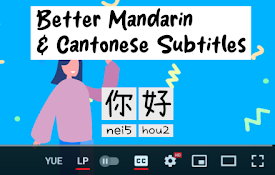
With the toggle found on the bottom right of a video toggle between "YUE" for Cantonese (Jyutping) or "ZH" for Mandarin (Pinyin).
4) When you want to stop using it simply toggle the "LP" button found next to the language toggle of your video player
? AI Functionality:
- When you navigate to any Youtube video now: a sparkle ✨ icon will now appear in the controls
- When this icon turns to white that shows you that custom AI generated captions are available for that video
In the future, requests can be made and generated within minutes using a Langpal premium account.
But for the testing phase feel free to email [email protected] for free generation requests!
? Explore More Learning Tools:
Visit Langpal.com.hk for additional resources to boost your Mandarin and Cantonese skills.
?️ Upcoming Features:
- Requesting custom generated captions for YouTube
- Personalised Learning: Sign in with your Langpal account to hide characters you already know, focusing on new ones.
- Support for Google Drive, YouTube Music & Spotify
? Known Issues:
- Some AI generated subtitles require vetting & may be incorrect
- Minor UX bugs are occasionally present
- Canto Captions support works on Disney+ with Season 1 of Bluey but is missing episodes #7 - #9
| 分类 | 📚教育 |
| 插件标识 | fekjlaahgikjmlecafjpkmkpafmaadnh |
| 平台 | Chrome |
| 评分 |
★★★★☆
4.6
|
| 评分人数 | 1220 |
| 插件主页 | https://chromewebstore.google.com/detail/jyutping-pinyin-subtitles/fekjlaahgikjmlecafjpkmkpafmaadnh |
| 版本号 | 0.2.0 |
| 大小 | 625KiB |
| 官网下载次数 | 252 |
| 下载地址 | |
| 更新时间 | 2024-12-02 00:00:00 |
CRX扩展文件安装方法
第1步: 打开Chrome浏览器的扩展程序
第2步:
在地址栏输入: chrome://extensions/
第3步: 开启右上角的【开发者模式】
第4步: 重启Chrome浏览器 (重要操作)
第5步: 重新打开扩展程序管理界面
第6步: 将下载的crx文件直接拖入页面完成安装
注意:请确保使用最新版本的Chrome浏览器
同类插件推荐
Jyutping & Pinyin Subtitles for YouTube, Netflix, Disney+, Bilibili & more
Transform Chinese subtitles on YouTube, Netflix, D
Sabi - Language Learning with Netflix, YouTube, Disney+, and Prime Video
Turn Netflix, YouTube, Disney+ & Prime Video i
FluentAI:Netflix等的双字幕
发现最好的方式来学习新语言,同时在Netflix, YouTube和Disney+上观看你最喜欢的电

Interactive Dual Subs for Languages Learning
Supercharge your language skills with instant tran