
AddToAny: Share Anywhere Chrome 插件, crx 扩展下载
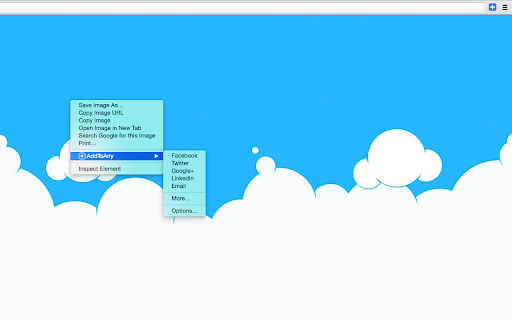
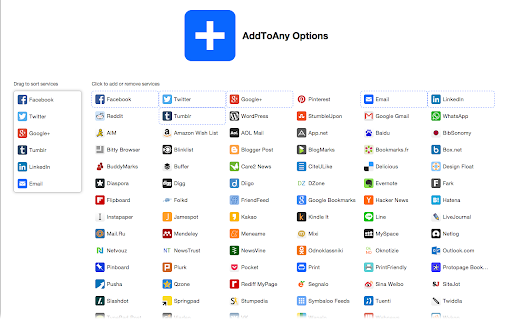



Share to Facebook, Mastodon, email, and any other sharing or saving service quickly and easily with one share button.
The AddToAny share button makes it easy and fast to share and save links using any service.
New:
- Share to Threads https://www.addtoany.com/blog/threads-share-button/
- Share to Bluesky
- Share to Microsoft Teams
- One-click sharing option if you enable just one service
- Choose whether to open Email in a new tab
Features:
- AddToAny's Universal Share Button
- Sharing to Gmail, WhatsApp, LinkedIn, Threads, and more social media networks
- AddToAny "More" button lets you instantly access any other service anytime
- Right-click to share from the context menu (optional)
- Share to multiple services quickly while keeping the share popup open:
- Just Ctrl+click or ⌘+click on a service, or
- Click the middle mouse button
- Large buttons with vector icons
- Perfectly crisp on high PPI screens such as Retina displays or the Chromebook family
- Automatic dark mode based on system preference
- Reassignable keyboard shortcut
Customizable:
- Customize the services that appear in the sharing menu
- Drag & drop to rearrange the order of services in the sharing menu
- Enable one-click sharing if you select just one service
- Toggle AddToAny in your context menu
- Add a custom service to share to
Fast & Secure:
- Optimized to load instantly without slowing down Google Chrome
- Directs to the HTTPS version of sites for privacy
- Zero permissions needed
| 分类 | 👥社交 |
| 插件标识 | ffpgijchhhkhnokafdeklpllijgnbche |
| 平台 | Chrome |
| 评分 |
★★★★☆
4
|
| 评分人数 | 15 |
| 插件主页 | https://chromewebstore.google.com/detail/addtoany-share-anywhere/ffpgijchhhkhnokafdeklpllijgnbche |
| 版本号 | 3.5.2 |
| 大小 | 253KiB |
| 官网下载次数 | 40000 |
| 下载地址 | |
| 更新时间 | 2024-04-16 00:00:00 |
CRX扩展文件安装方法
第1步: 打开Chrome浏览器的扩展程序
第2步:
在地址栏输入: chrome://extensions/
第3步: 开启右上角的【开发者模式】
第4步: 重启Chrome浏览器 (重要操作)
第5步: 重新打开扩展程序管理界面
第6步: 将下载的crx文件直接拖入页面完成安装
注意:请确保使用最新版本的Chrome浏览器
同类插件推荐

Share with for Google Chrome™
An extension that allows you to easily share web p

ShareThis
ShareThis offers free and easy to use sharing butt

Universal share
Share this page with all you want...Share or send

Simple Share
Share web pages, images, and links with Facebook,

Share with Facebook, Twitter, Google+, Email
Share web pages, images, and links with Facebook,

Akonter Share link & Page Buttons
Chrome Extension to share links and pages to multi

Shareaholic for Google Chrome
让您用最简单的方法将网页分享到社交网络、电子邮件和博客等We support 200+ servic

AddToAny: Share Anywhere
Share to Facebook, Mastodon, email, and any other

Subscribe RSS Feeds in Feedly
Subscribe RSS and Atom Feeds in Feedly. Automatica

Share Tools
Share the current page on Twitter, FB, Reddit and

Share on Facebook™
Easily share web pages and links on Facebook. Unof

FATRANK
Google Chrome extension that checks the ranking fo

Buffer
Buffer is the best way to share great content to S