
Banafo | Transcribe & Record Meetings Chrome 插件, crx 扩展下载



Record the audio of all your video meetings with one click. Generate automatic transcriptions.
Record the audio of all your video meetings with one click. Generate automatic transcriptions.
✜ Record all your conversations
Banafo works as an independent audio recorder in your browser. You have full control over what you record. You only need to click to start and stop recording.
✜ Video and calls
You can record web conferences, video calls, meetings, but also the VOIP calls you make with your browser.
✜ Automatic transcriptions
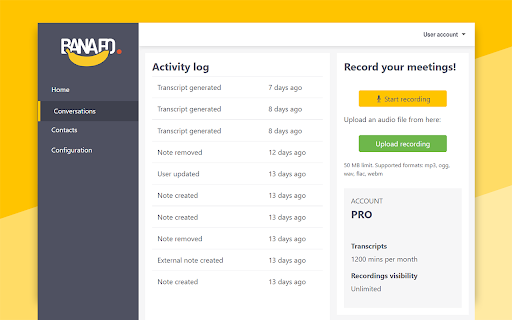
Your audio conversations are uploaded to your free Banafo account. There you can store and transcribe a limited amount of recordings for free. Please visit our website for more details.
✜ Meeting Notes
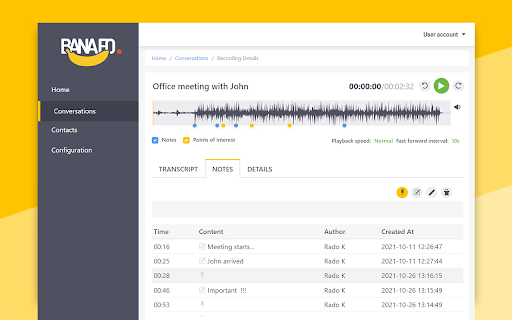
Take notes during your web meetings and calls! Once you start a Recording, a new interface element will be shown on screen where you can start typing. Your notes are automatically synced with the Recording and can be viewed later in the dashboard.
✜ Works with your favorite web conferencing tools, messengers, podcasts or news sites.
✜ Coming soon
We will be releasing more features and options in the near future. Please visit https://banafo.com to stay in the loop.
With the current free version, you can already take advantage of the many benefits Banafo offers you.
⏲️ Save time
Quickly read the transcriptions instead of having to listen again to recorded calls and hoping you are listening to the one you need.
? Save money
No more need to outsource transcriptions of your calls. Banafo does it for you.
✒️Notes and points of interest
You can easily add notes and points of interest to your recorded web conversations.
? Boost team skills
It has never been so easy to find the proper web conversations you can use as the best training material for your staff.
| 分类 | 📝工作流程与规划 |
| 插件标识 | fimdehpmamnjanklbfejacbkomabdhdh |
| 平台 | Chrome |
| 评分 |
★★★★★
5
|
| 评分人数 | 2 |
| 插件主页 | https://chromewebstore.google.com/detail/banafo-transcribe-record/fimdehpmamnjanklbfejacbkomabdhdh |
| 版本号 | 2.2.1 |
| 大小 | 652KiB |
| 官网下载次数 | 401 |
| 下载地址 | |
| 更新时间 | 2025-02-15 00:00:00 |
CRX扩展文件安装方法
第1步: 打开Chrome浏览器的扩展程序
第2步:
在地址栏输入: chrome://extensions/
第3步: 开启右上角的【开发者模式】
第4步: 重启Chrome浏览器 (重要操作)
第5步: 重新打开扩展程序管理界面
第6步: 将下载的crx文件直接拖入页面完成安装
注意:请确保使用最新版本的Chrome浏览器
同类插件推荐

Banafo | Transcribe & Record Meetings
Record the audio of all your video meetings with o

Record & Summarize your Meetings - Inkdrop
Maximize Meeting Efficiency with Inkdrop - Record,

Zoiper Click2Dial
Make phone numbers clickable and initiate calls fr

PRMDB for Bard-Gemini
Create public and private custom prompts for Googl

Audio Recorder
Application✔ Support Google Meet ✔ One Click Login

Looppanel - Record & Transcribe Video
Automatically record & transcribe Google Meet

ContentIn - LinkedIn™️ Analytics & AI Content and Insights
The ContentIn Chrome extension for LinkedIn post a

Writewiz: AI Content Creator & Writing Tool
Elevate your writing with a contextually-aware AI

AutoReview for Power Automate
Create Automated Review of Power Automate Cloud Fl

Gyde: AI Documentation in Video & Screenshots
Save hours daily by instantly auto-generating &

ChatGPT Recall Prompts
I recall ChatGPT prompts. That's it!"Chat

Open in GPT
Open selected text directly in ChatGPT with a cust

Linqbase - LinkedIn CRM & Outreach
Effortlessly collect, organize, and export detaile