
IG Leads Spider Chrome 插件, crx 扩展下载
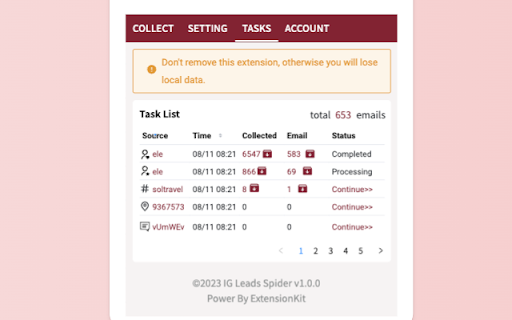
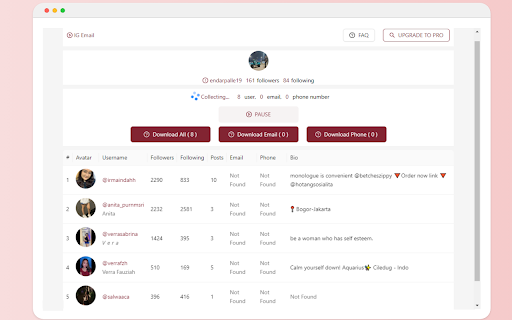
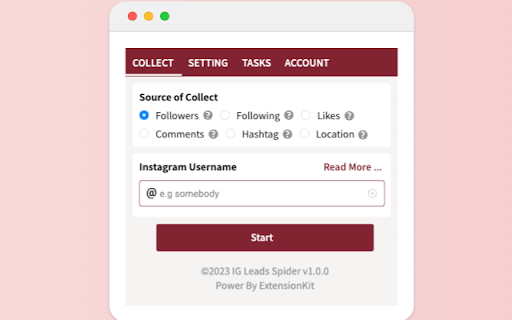
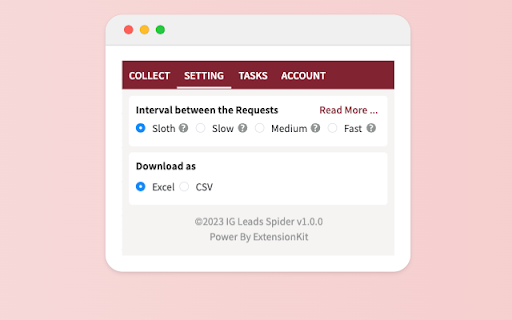
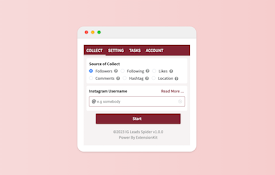
IG Leads Spider is your ultimate Instagram companion, designed to empower your business by extracting valuable leads from Instagram…
IG Leads Spider is your ultimate Instagram companion, designed to empower your business by extracting valuable leads from Instagram profiles.
You're a business visionary looking to amplify your reach on Instagram. IG Leads Spider is your go-to tool, effortlessly extracting emails and crucial contact details from followers, following, commenters, likers, hashtags, and locations.
Features at a Glance:
- Scrape emails from followers, following, commenters, likers, hashtags, and locations.
- Refined Output: Automatically eliminate duplicate emails for a refined list.
- Customization: Extract from custom user lists for precise targeting.
- Local Storage: Securely save and download extracted data anytime.
- Advanced Controls: Set extraction limits and use 'Pause Mode' for convenience.
- Export Convenience: Export data to Excel xlsx and CSV files for seamless analysis.
A Walkthrough:
1. Choose Extraction Type: Select your preferred extraction category.
2. Enter Details: Enter usernames, post, hashtags or locations.
3. Click to Extract: Effortlessly trigger the extraction process.
4. Export : Download Leads as you will.
Your Data, Your Security: IG Leads Spider prioritizes your privacy. No Instagram passwords needed, and all data remains on your local device.
Important Note: Be cautious about potential risks to your Instagram account when using the extension. Manage usage frequency responsibly.
For any assistance, reach us at [[email protected]].
Privacy Assurance: Your data is safe with us. IG Leads Spider doesn't transfer data through external servers.
| 分类 | 📝工作流程与规划 |
| 插件标识 | fkcgecaicjnlbmicfoglhmhiojbohiod |
| 平台 | Chrome |
| 评分 |
☆☆☆☆☆
0
|
| 评分人数 | 1 |
| 插件主页 | https://chromewebstore.google.com/detail/ig-leads-spider/fkcgecaicjnlbmicfoglhmhiojbohiod |
| 版本号 | 1.0.1 |
| 大小 | 474KiB |
| 官网下载次数 | 107 |
| 下载地址 | |
| 更新时间 | 2023-08-16 00:00:00 |
CRX扩展文件安装方法
第1步: 打开Chrome浏览器的扩展程序
第2步:
在地址栏输入: chrome://extensions/
第3步: 开启右上角的【开发者模式】
第4步: 重启Chrome浏览器 (重要操作)
第5步: 重新打开扩展程序管理界面
第6步: 将下载的crx文件直接拖入页面完成安装
注意:请确保使用最新版本的Chrome浏览器
同类插件推荐
IG Leads Spider
IG Leads Spider is your ultimate Instagram compani

IGHashtag - Export IG Hashtags
A smart tool to scrape hashtags from Instagram and

FollowFox - IG Follower Export Tool (Email)
IGFollow extract Instagram follower and following

CommentsFox - Export IG Comments (Email)
IGCommentsPro to extract Instagram comments includ

IG Lead Generator
A smart business lead tool, Extracts emails from I

LikeFox - Export IG Likes (Email)
IGLike extract Instagram likes include Emails and

Instagram follower export tool
An Instagram Follower Export Tool to Extract Insta

Follower Data Exporter for IG
Simplify your Instagram marketing with IGExport

Exporter for Followers
Export IG followers, following to Excel CSV format

IGEmail - Instagram 电子邮件采集提取
IGEmail scrape and extract emails from Instagram f

Super Export Tool - Instagram 用户资料导出工具
Super Export Tool scrape and extract user data fro

Email Scraper for Ins
Email Scraper for Ins helps you extract email from

Email Scraper for Ins
A smart business lead tool, Extracts emails from I