
YouTube Subscribers Count Chrome 插件, crx 扩展下载
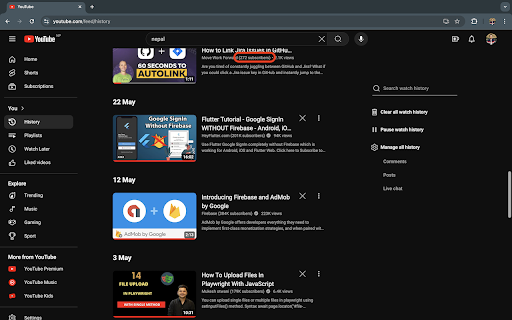

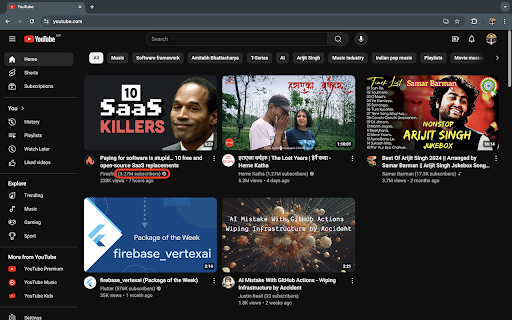
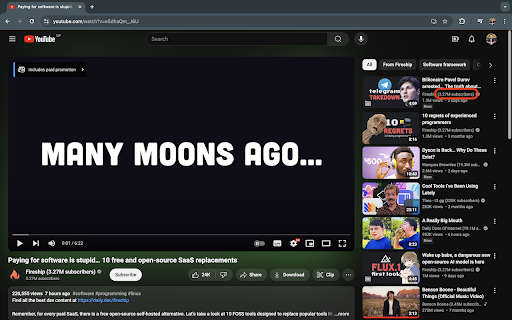
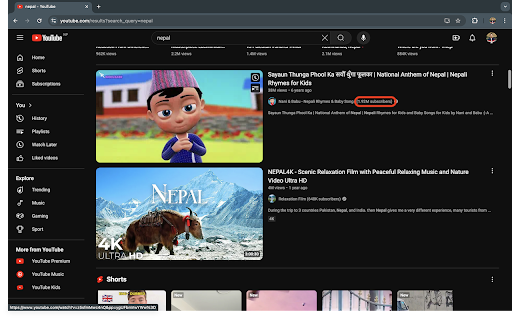
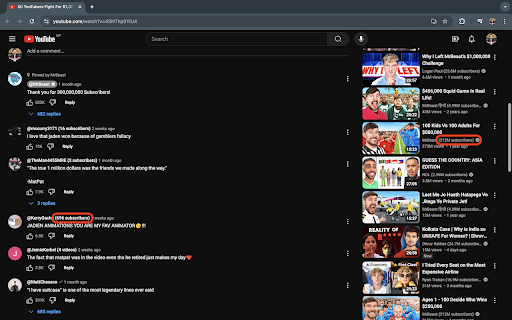
Show YouTube subscriber counts with channel names everywhere.
Instantly see YouTube subscriber counts alongside channel names everywhere!
YouTube does not display subscriber counts alongside channel names by default, except on video detail pages and channel search results. This extension enhances your browsing experience by showing subscriber counts next to channel names across various YouTube pages, including the home feed, recommended videos, comments, search results, and playlists. Quickly assess a channel's credibility and make more informed decisions about what to watch.
Tags: YouTube subscriber count, YouTube extension, display subscriber count, YouTube channel stats, YouTube browsing enhancement, YouTube search results, YouTube home feed, YouTube comments, YouTube playlists
https://youtu.be/vW-ZdhToSEc
| 分类 | ⚙️功能性 |
| 插件标识 | fkdmjdjnanmmlbgkmicaolmmdccimjdc |
| 平台 | Chrome |
| 评分 |
★★★★☆
4.1
|
| 评分人数 | 127 |
| 插件主页 | https://chromewebstore.google.com/detail/youtube-subscribers-count/fkdmjdjnanmmlbgkmicaolmmdccimjdc |
| 版本号 | 1.0.0 |
| 大小 | 10.72KiB |
| 官网下载次数 | 120 |
| 下载地址 | |
| 更新时间 | 2024-08-30 00:00:00 |
CRX扩展文件安装方法
第1步: 打开Chrome浏览器的扩展程序
第2步:
在地址栏输入: chrome://extensions/
第3步: 开启右上角的【开发者模式】
第4步: 重启Chrome浏览器 (重要操作)
第5步: 重新打开扩展程序管理界面
第6步: 将下载的crx文件直接拖入页面完成安装
注意:请确保使用最新版本的Chrome浏览器
同类插件推荐
YouTube Subscribers Count
Show YouTube subscriber counts with channel names

Subscriber Count on Comments for YouTube™
Displays the number of YouTube™ subscribers next t
Youtube Playlist Duration Calculator
An extension to calculate & display the total

Return YouTube Subscribers
Returns the full unabbreviated subscriber count to