
MZ Color Picker Chrome 插件, crx 扩展下载
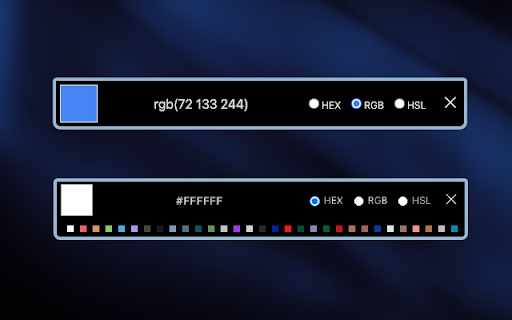
MZ Color Picker Chrome extension allows you to capture colors directly from your browser's web pages.
MZ Color Picker Chrome extension allows you to capture colors directly from your browser's web pages. It simplifies the process of color selection. With a single click, you can effortlessly sample any color you encounter while browsing the web. Whether you stumble upon a visually stunning website, inspiring artwork, or a beautifully designed interface, this extension lets you instantly identify and extract the exact hues that catch your eye.
Features: ?
1. Intuitive Interface: select colors directly from the Chrome extension icon. There are no annoying pop-ups or additional windows to contend with.
2. Color Formats: the extension supports Hex, RGB, and HSL color formats.
3. Copy to Clipboard: users can copy the selected color code to their clipboard with a single click.
4. Secure and Privacy-Focused ?️: privacy is a top priority. The extension does not track or store user data, ensuring a secure and private browsing experience.
5. Color History: The extension keeps a history of recently picked colors, making it convenient for users to revisit and reuse their selected colors without the need for repeated sampling.
How to Use: ?
1. Start by installing the extension from the Chrome Web Store.
2. After installation, you should see the extension's icon in the Chrome toolbar, typically located in the top-right corner of your browser. It might look like a puzzle piece, a gear, or another icon, depending on your browser version and theme.
3. Click on it and pin the MZ Color Picker extension to the top bar.
4. Click on the MZ Color Picker extension icon to pick colors.
| 分类 | 💻开发者工具 |
| 插件标识 | fkfhoikblphemkgkdfhcfbebgkmdmkni |
| 平台 | Chrome |
| 评分 |
★★★★★
5
|
| 评分人数 | 1 |
| 插件主页 | https://chromewebstore.google.com/detail/mz-color-picker/fkfhoikblphemkgkdfhcfbebgkmdmkni |
| 版本号 | 1.0.2 |
| 大小 | 358KiB |
| 官网下载次数 | 36 |
| 下载地址 | |
| 更新时间 | 2023-10-12 00:00:00 |
CRX扩展文件安装方法
第1步: 打开Chrome浏览器的扩展程序
第2步:
在地址栏输入: chrome://extensions/
第3步: 开启右上角的【开发者模式】
第4步: 重启Chrome浏览器 (重要操作)
第5步: 重新打开扩展程序管理界面
第6步: 将下载的crx文件直接拖入页面完成安装
注意:请确保使用最新版本的Chrome浏览器
同类插件推荐

Image Tag Converter
This extension converts Markdown image syntax to i

Armadillo
The Armonia Meta Chain (AMAX) Wallet for web3, it

AT&T MFA
The AT&T MFA app for Chrome is the companion t
MZ Color Picker
MZ Color Picker Chrome extension allows you to cap

IDmelon WebLogin
IDmelon WebLogin empowers you to replace your pass

No Mobile links on desktop
Convert mobile links to desktop onesConvert mobile

GMU Schedule Maker
Generate all possible schedules through easy and f

MZ Disable JavaScript
MZ Disable JavaScript is a Chrome extension that a

Whisper Anywhere
Voice-to-Text Anywhere in Chrome with OpenAI Whisp

Color Eyedropper
Pick colors from web pages, color picker and your

Mangoboard ColorPicker
망고보드 컬러픽커는 브라우저 내의 색상을 뽑아낼 수 있습니다.망고보드(www.mangobo

RGB 颜色选择器
颜色代码查找器、十六进制和 RGB 颜色选择器 Google Chrome 浏览器扩展。从图像中查找

Click Color Picker
Pick Your Colors with Ease - Click Color Picker Ma