
No X-Frame-Options Chrome 插件, crx 扩展下载
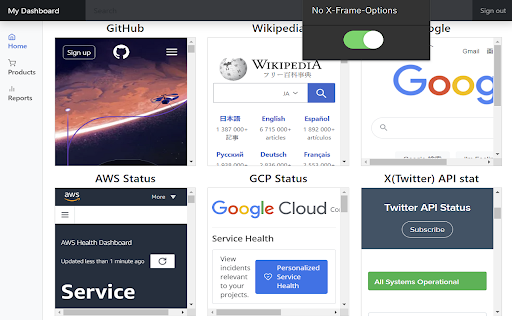
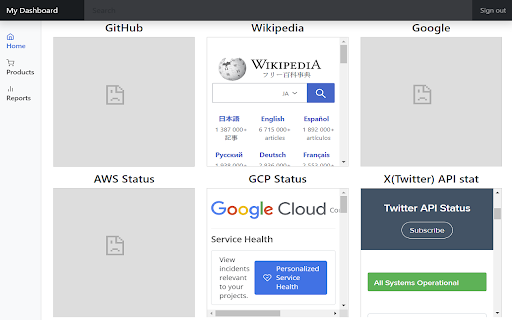
Remove X-Frame-Options header from the response
Overview:
This extension enables you to display external websites using embedded tags on your personal dashboard or digital signage.
Details:
When displaying another HTML page inside an HTML embedded tag (<iframe> or <embed>), another HTML page may not be displayed.
The reason for not displaying the page is that the accessing server is responds with response headers ("X-Frame-Options", "Content-Security-Policy") to deny the display.
This extension can remove these response headers.
Notes:
It's a security risk to turn ON this extension all the time. Only turn ON this extension when necessary.
| 分类 | 🛠️工具 |
| 插件标识 | fkomcobhigmmgablmoionjkodaggmmoe |
| 平台 | Chrome |
| 评分 |
★★★★★
5
|
| 评分人数 | 1 |
| 插件主页 | https://chromewebstore.google.com/detail/no-x-frame-options/fkomcobhigmmgablmoionjkodaggmmoe |
| 版本号 | 1.0 |
| 大小 | 13.42KiB |
| 官网下载次数 | 46 |
| 下载地址 | |
| 更新时间 | 2023-10-25 00:00:00 |
CRX扩展文件安装方法
第1步: 打开Chrome浏览器的扩展程序
第2步:
在地址栏输入: chrome://extensions/
第3步: 开启右上角的【开发者模式】
第4步: 重启Chrome浏览器 (重要操作)
第5步: 重新打开扩展程序管理界面
第6步: 将下载的crx文件直接拖入页面完成安装
注意:请确保使用最新版本的Chrome浏览器
同类插件推荐

Wikipedia Lists
Use wikipedia reading lists, just like in the apps
No X-Frame-Options
Remove X-Frame-Options header from the responseOve

Allow X-Frame-Options
Easily remove X-Frame-Options from the response he

UndoFlow
Brings back the undo and redo buttons in Webflow D

Political Scribe
Create engaging political content on social media,

Detail Page Optimizer
Detail Page OptimizerThe Keyword Identification an

Tab Search Pro
Search active tabs, highlight results, save search

Chatin for Problem Analysis
This extension enables Design Science Research thr

YouTube Bookmarker
Bookmark your YouTube video timestampsKeep track o

Simple QR Code Generator
Generates a QR code based off on what website are

brocrobes
Browser plugin for https://transcrob.esBrocrobes i

Verse Medical Orders
Conveniently submit orders to versemedical.com by