
Bluesky+ Sidebar ? Chrome 插件, crx 扩展下载





Add Bookmarks, Leaderboard, Trends, Drafts & Analytics to Bluesky.
Enhance your Bluesky experience with BlueskyPlus - an all-in-one, 100% FREE sidebar that helps you track what matters, save what you love, and make Bluesky your own.. No login required, and your data stays private, on your device.
KEY FEATURES:
➤ ANALYTICS
• Track posting consistency for any user
• Monitor followers growth over time
• Measure engagement metrics and trends
➤ SMART BOOKMARKS
• Save and organize posts in custom folders
• Search through username, handle, and content
• View in cards or table layout
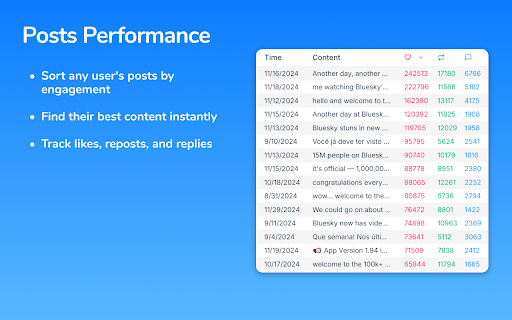
➤ POSTS PERFORMANCE
• Access any user's posts in one place
• Sort by likes, reposts, and replies
• Track best-performing content
➤ LEADERBOARD
• Create your own list of Bluesky creators to track
• Monitor their posts and follower counts at a glance
➤ DRAFTS
• Save posts for later directly from the sidebar
• Store drafts from Bluesky's composer
➤ PLATFORM INSIGHTS
• View real-time Bluesky statistics
• Monitor total users, posts, and likes
• Track top 10 trending topics
➤ CUSTOMIZATION
• Personalize Bluesky with your favorite colors
• Change the platform's primary theme
HOW IT WORKS:
Install the extension and go to bsky.app (you need to be signed in on Bluesky).
The extension enhances the Bluesky website by adding new buttons: a bookmark icon appears under each post alongside the existing control buttons, and an "Add to Leaderboard" button is added next to the follow/unfollow button on user profiles.
You can hide the sidebar by clicking the "X" at the top right and reopen it using the button that remains visible on the right side of the window.
Enjoying BlueskyPlus? Leave a review! Your feedback and support help us make the extension even better.
| 分类 | 👥社交 |
| 插件标识 | flbheallcbkoaffegmjenkpojhocmdla |
| 平台 | Chrome |
| 评分 |
★★★★☆
4.6
|
| 评分人数 | 5 |
| 插件主页 | https://chromewebstore.google.com/detail/bluesky+-sidebar-?/flbheallcbkoaffegmjenkpojhocmdla |
| 版本号 | 1.0.5 |
| 大小 | 429KiB |
| 官网下载次数 | 360 |
| 下载地址 | |
| 更新时间 | 2025-01-30 00:00:00 |
CRX扩展文件安装方法
第1步: 打开Chrome浏览器的扩展程序
第2步:
在地址栏输入: chrome://extensions/
第3步: 开启右上角的【开发者模式】
第4步: 重启Chrome浏览器 (重要操作)
第5步: 重新打开扩展程序管理界面
第6步: 将下载的crx文件直接拖入页面完成安装
注意:请确保使用最新版本的Chrome浏览器
同类插件推荐

BluePeers
Engagement analysis tool for BlueskyFind your acti

Bluesky - Cleanup Username
cleans all usernames of their extention on Bluesky

Bluesky Color Customizer
Lets you customize Bluesky's accent colorLets

BluePrint: Custom Bluesky theming by Postpone
Custom theming for BlueskyCustomize your Bluesky e

Bluesky Analytics
Insights for your Bluesky activities and engagemen

Bluesky Share Extension
Share current tab, links and selected text on Blue

Bluesky+ Sidebar ?
Add Bookmarks, Leaderboard, Trends, Drafts & A

Bluesky Bookmarks
Adds a bookmark button to Bluesky postsAdds a long

Share on BlueSky
Share the current page on BlueSkyShare current tab

Bluesky Follower Info
Display users profile descriptions and stats in no

Bluesky Large Thumbnails
Enlarges the containers of single-media posts in B

bluesky-shortcuts
Adds keyboard shortcuts to bsky.appEnjoy Bluesky,

Sky Follower Bridge
轻松将您的关注用户和列表成员从X迁移到Bluesky。? 文档 https://www.sky-f