
Sasayaki Ghost Chrome 插件, crx 扩展下载
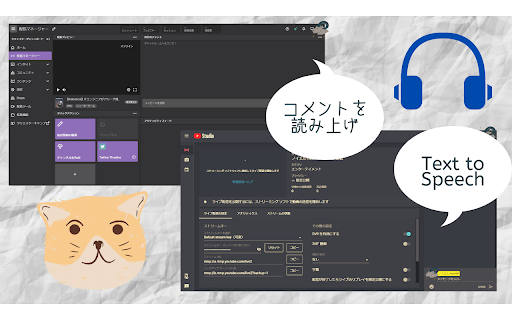
Read out comment on Twitch, Youtube for Live streamer. You don't need to set up complex tools anymore
This Extension provide to read aloud comments on YouTube and Twitch for live streamer.
Do you miss to check comments from your followers While streaming?
or did you open many desktop application in order to reading aloud ?
All you have to do is installing this, If you start to read aloud.
How to use
1. Access to the Site.
YouTube: Keep open YouTube Studio Live streaming pages.
Twitch: Keep open "Stream-manager" page.
2. Someone (include you) type comments into the chat box.
3. App read aloud that text.
4. You can change setting as you like. (ex. volume, reading speed, read user name or not)
Features
- Reading aloud comments on Twitch and YouTube
- Multiple languages available. Over 16 Countries.
- Adjust speaking volume, speed, pitch etc.
- Switchable Reading user name or not
- Comment filter
- User define Nickname (β)
- Give a nickname. type "!!name your-nickname"
- if you reset nickname, type "!!rmname"
note
- If you have some troubles, reload Browser page. It will be better.
- According to the browser specifications, Reading aloud Long text might cause bugs.
Thank you for reading.
Release note:
version 3.9.0
- Fixed bugs on YouTube
version 3.8.0
- Available on "https://www.twitch.tv/moderator/{user-name}"
version 3.6.0
- Character limit
- Ignore comment including user defined words (Prefix match)
- Change upper limit for reading speed. (1.5 -> 1.8)
version 3.6.0
- Ignore long text.
version 3.5.0
- Honorific title is available.
version 3.4.0
- You can choose starting to read out on the page or not.
version 3.1.0
- New logo.
version 3.0.0
- Nickname is available (refer to Option page)
version 2.10.0
- Add Username list except for Reading out.
- Fixed some bugs.
version 2.9.0
- Start β test for giving a nickname.
- Add Voice test button to check own setting.
version 2.8.0
- Fix the problem long text prevent from reading out.
- Read aloud full-sized English, digit (for Japanese user ).
version 2.7.0
- Read out on Twitch Pop-out.
- Add YouTube icon and developer's link on setting menu.
- Change some text and design.
version 2.6.0
- Change popup page design.
- Improve the problem that ghost read aloud same comments two times.
- Enhance Anti-spam.
version 2.5.0
- Add switch "Read aloud emoticon". Ghost become able to read Emoticon.
version 2.4.0
- Voice is selectable.
- Extension supported SAPI. You can install 3rd party voice.
- The name is changed in Japanese. New name is "コメント読み上げオバケ"
version 2.3.0
- Pitch option is available. You can change voice pitch on setting.
(Thank you for telling me this Idea)
version 2.2.0
- Reading aloud comments is only available on live streamer's management page.
- adjust default language setting.
- Fixed "Atom problem".
version 2.1.0
- Fully translated. User Interface is optimized for each language.
- Show Confirmation popup for switching extension enable/disable, when you open the page is related to read aloud.
- Change extension's name. new name is "Sasayaki Ghost". Sasayaki means whisper in Japanese.
version 2.0.0
- One of the most impressive features is that You can use reading aloud on YouTube !!
- BOT got good at speaking English (it's available in Japanese and English. You can set it up on Menu)
- Add feature of Comment filter (Read aloud comment, except symbols)
version 1.0.1
- As soon as you change setting, it reflects BOT's Reading aloud.
- When you open a page that BOT can read aloud, it shows Popup.
- Add reading aloud user' name.
| 分类 | ♿无障碍访问 |
| 插件标识 | flmpcpdnanjglhiokpheaenaokpjcljn |
| 平台 | Chrome |
| 评分 |
★★★★☆
4
|
| 评分人数 | 117 |
| 插件主页 | https://chromewebstore.google.com/detail/sasayaki-ghost/flmpcpdnanjglhiokpheaenaokpjcljn |
| 版本号 | 3.9.0 |
| 大小 | 124KiB |
| 官网下载次数 | 10000 |
| 下载地址 | |
| 更新时间 | 2024-06-24 00:00:00 |
CRX扩展文件安装方法
第1步: 打开Chrome浏览器的扩展程序
第2步:
在地址栏输入: chrome://extensions/
第3步: 开启右上角的【开发者模式】
第4步: 重启Chrome浏览器 (重要操作)
第5步: 重新打开扩展程序管理界面
第6步: 将下载的crx文件直接拖入页面完成安装
注意:请确保使用最新版本的Chrome浏览器
同类插件推荐

AdjusTimer
Amazon Prime Video/Tver/Youtube/dアニメストア/Netflix/ニコ

NotifiCat
Let you know, if you got comment on Twitch, Youtub
Sasayaki Ghost
Read out comment on Twitch, Youtube for Live strea

TabSpeech
阅读显示的选项卡上的文本怎么用 1.选择要开始阅读的范围 2.单击PageAction图标(右上角
音読さん
音読さん用音声読み上げ拡張機能です。この拡張機能を追加すると範囲指定した文章を音読さんで読み上げられ

Twitch聊天弹幕
将Twitch聊天嵌入直播视频内部且以弹幕方式呈现,支持Twitch表情符号和BetterTTV自定

SukoStamp
YouTubeのタイムスタンプがサクサク作れるやつ◆どんな機能? YouTubeのタイムスタンプ作成

Skeb Button
Add Skeb button to X.Skebを利用しているTwitterユーザーのプロフィール

Flow Chat for YouTube Live
Chrome Extension for Flow Chat Messages on YouTube

x-zombie-killer
X(旧Twitter)のインプレゾンビを一気に非表示にします。 Androidスマホをご利用の方はK