
CalcMagic — a convenient and functional calculator Chrome 插件, crx 扩展下载
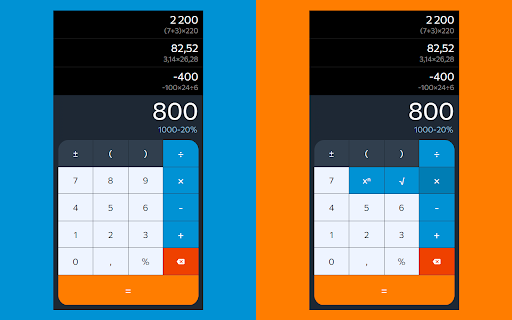
A feature-rich calculator extension for Chrome. Perform calculations, view history, and enjoy a user-friendly interface.
This extension offers a user-friendly and powerful tool for performing mathematical calculations directly in your browser. With our calculator, you can quickly execute various computations without leaving your current page.
Key features:
- User-friendly interface: The simple design allows you to perform calculations easily, even if you're not a math expert.
- Advanced functions: Supports various mathematical operations, including percentages, brackets, and changing the sign of a number.
- Calculation history: View your calculation history and easily return to previous results. The history is automatically saved between sessions.
- Convenient editing: Correct mistakes by moving the cursor and deleting the last character.
- One-click copy: Copy the equation or result to the clipboard with one click for quick use.
CalcMagic simplifies mathematical calculations directly in the Chrome browser, making it a useful tool for students, professionals, and anyone who needs a reliable calculator always at hand.
| 分类 | 🛠️工具 |
| 插件标识 | fmmkepnhhdimpaafhfdmjlbcgnpjlhkm |
| 平台 | Chrome |
| 评分 |
★★★★☆
4.9
|
| 评分人数 | 224 |
| 插件主页 | https://chromewebstore.google.com/detail/calcmagic-—-a-convenient/fmmkepnhhdimpaafhfdmjlbcgnpjlhkm |
| 版本号 | 1.1.4 |
| 大小 | 567KiB |
| 官网下载次数 | 96 |
| 下载地址 | |
| 更新时间 | 2024-06-12 00:00:00 |
CRX扩展文件安装方法
第1步: 打开Chrome浏览器的扩展程序
第2步:
在地址栏输入: chrome://extensions/
第3步: 开启右上角的【开发者模式】
第4步: 重启Chrome浏览器 (重要操作)
第5步: 重新打开扩展程序管理界面
第6步: 将下载的crx文件直接拖入页面完成安装
注意:请确保使用最新版本的Chrome浏览器
同类插件推荐

CalcMagic — a convenient and functional calculator
A feature-rich calculator extension for Chrome. Pe

计时器 应用程序
使用 计时器 应用程序 作为在线和简单的倒计时工具。这个Chrome扩展提供5分钟计时器、1小时计时

时间管理者
一个简单的工作时间记录器。使用这个Chrome扩展程序跟踪任务,提高生产力,并保持井井有条。? Ti

待办事项清单
待办事项列表 - 一个简单免费的待办事项应用程序和任务管理器,就在您的浏览器中。您是否厌倦了努力跟踪