
GG Auto Clicker 1.2 Chrome 插件, crx 扩展下载
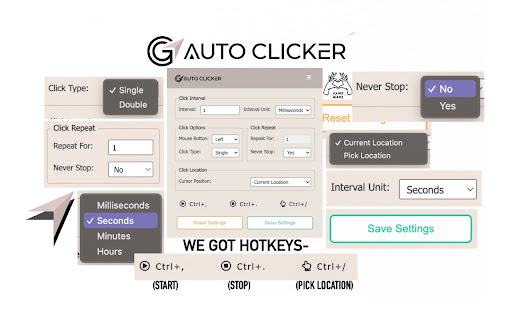
GG Auto clicker helps you automate mouse clicks on your chrome browser and has multiple options for automation.
Note- ALL THE BUGS IN EXTENSION HAVE BEEN RESOLVED. IT WORKS PERFECT NOW.
Hello people of the internet, we made an auto clicker for y’all that works, cherry on the top, in your chrome!
☆ GG Auto clicker chrome extension ☆
The first chrome extension with multiple clicking features to automate mouse clicks on chrome browser.
NOTE - Press Ctrl and comma together to start. (Ctrl + ,). Don’t get confused! The plus symbol only means that ctrl and , should be pressed together (don’t press +)
Support email - [email protected] (feel free to reach out for support)
Allow us a moment to explain all the features to you-
✓ Click Interval: You can select the click interval between two clicks and set the unit. Example: 1 millisecond, 10 seconds or 20 minutes.
✓ Click options: You can select right or left, single or double mouse options.
✓ Click repeat: You can set the number of times it should click. Press “NEVER STOP” if you want it to run until stopped.
✓ Cursor position: You can click on current cursor location, or pick X-Y coordinates using Ctrl + / from anywhere on the screen and manually input them.
☆☆ How to operate ☆☆
✓ Fill in your required settings.
✓ Leave the boxes that you don’t want to change, as it is.
✓ Save settings.
✓ Go back to your desired chrome window where you want to run the auto clicker online. Click on the screen once.
✓ Press Ctrl and comma buttons together to start (ctrl + ,) - please do not use the +, you only have to use two buttons simultaneously- the + is only for showing you which buttons to use together.
Here are the shortcuts / commands you can use.
★ To start the auto clicker, press Ctrl + ,
★ To stop, press Ctrl + .
★ To pick X-Y coordinates, press Ctrl + /
THAT IS IT, SEE THE MAGIC HAPPEN.
ADDITIONAL:
You will find two other options at the bottom in colour-
★ Reset settings: It will reset the settings to default.
★ Save settings: It will save your current settings. (It will stay like this, unless you press reset).
The chrome extension is free of cost and all the features have been thoroughly tested by our developers. But if you still find any bugs or face any issue operating, feel free to email us.
★★★ EMAIL US at [email protected] for any kind of support. ★★★
Please don’t drop a negative review, before reaching out to us. We will make it work for you, in most cases.
| 分类 | 📝工作流程与规划 |
| 插件标识 | fndokfnecpehdehdjpdldadienbcjllf |
| 平台 | Chrome |
| 评分 |
★★☆☆☆
2.4
|
| 评分人数 | 115 |
| 插件主页 | https://chromewebstore.google.com/detail/gg-auto-clicker-12/fndokfnecpehdehdjpdldadienbcjllf |
| 版本号 | 1.2 |
| 大小 | 1.48MiB |
| 官网下载次数 | 70000 |
| 下载地址 | |
| 更新时间 | 2024-08-14 00:00:00 |
CRX扩展文件安装方法
第1步: 打开Chrome浏览器的扩展程序
第2步:
在地址栏输入: chrome://extensions/
第3步: 开启右上角的【开发者模式】
第4步: 重启Chrome浏览器 (重要操作)
第5步: 重新打开扩展程序管理界面
第6步: 将下载的crx文件直接拖入页面完成安装
注意:请确保使用最新版本的Chrome浏览器
同类插件推荐
![自动点击器 - 自动填充 [DEV]](https://www.chajianmi.com/images/Yqey49pUBlWRSF-zrCLQRB84tnJp4-Ql9EkQqmgXDLB8c59XGHfXJf3a3pK2YMB1Qwaq7i1d6vhqFuBsJqrOIRR2=s275-w275-h175)
自动点击器 - 自动填充 [DEV]
自动填充输入字段或自动点击按钮或链接任何地方。您可以配置并检查点击速度测试欢迎使用 Auto Cli

Auto Clicker
Just click automationThis extension is a straightf

OP Auto Clicker
A full-fledged autoclickerNote: Only some web page

Autoclicker
Automatically click on element matching search cri

Auto Clicker
The top-rated free auto clicker Chrome Extension f

Auto Clicker
An auto clicker triggered by a hotkey with configu

Easy Auto Clicker
A free auto clicker which will easy to solve all y

GS Auto Clicker
A useful tool to automatically click mouse instead

GG Auto Clicker 1.2
GG Auto clicker helps you automate mouse clicks on

Auto Clicker
Automate ClicksAutoClicker designed to automate re

Auto Click Scheduler - FoxyClick
Just right click on any element and set a timer. E

Cookie Clicker Fair Auto Clicker
Fair Auto Clicker for Auto Clicker. Hold Mouse1 on

自动点击器 - 自动填充器
自动填充输入字段或自动点击按钮或链接任何地方。您可以配置并检查点击速度测试مرحبًا بك في