
Gemini Chrome Extension Chrome 插件, crx 扩展下载
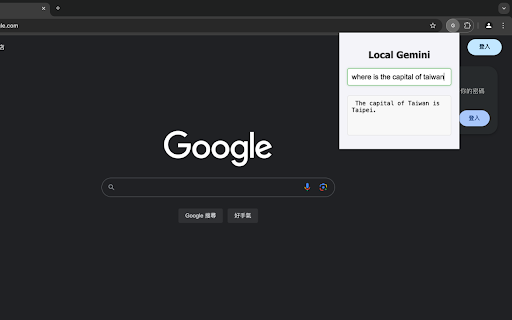
A Chrome extension to interact with Gemini.
The Gemini Chrome Extension is a powerful tool designed to provide quick and efficient responses directly within your browser. This extension seamlessly integrates with Chrome's native Gemini Nano model, allowing users to interact with AI for quick answers to simple questions. One of its standout features is the ability to access the Gemini Nano model offline, ensuring reliable and immediate assistance at any time. Enhance your browsing experience with the Gemini Chrome Extension, offering fast, on-demand AI support without needing an internet connection.
Usage: (You can visit https://github.com/TriangleSnake/TriGemini/blob/main/README.md for more detail)
To using this extension, you have to enable some settings in your Chrome browser
1. Visit chrome://flags and enable Enables optimization guide on device and Prompt API for Gemini Nano
notice: your Chrome version must be 127 or higher
2. Hit F12 to open your console and enter await window.ai.createTextSession()
It is normal that your console throwing an error, don't worry.
3. Visit chrome://components and download Optimization Guide On Device Model
4. Restart your Chrome and install the extension
5. Click the extension's icon or simply press ctrl (command) + shift + Y to chat with Gemini Nano
| 分类 | 🛠️工具 |
| 插件标识 | fnnibnhiaepgmioomkknpcbomaogkdhn |
| 平台 | Chrome |
| 评分 |
★★★★☆
4.2
|
| 评分人数 | 53 |
| 插件主页 | https://chromewebstore.google.com/detail/gemini-chrome-extension/fnnibnhiaepgmioomkknpcbomaogkdhn |
| 版本号 | 1.0 |
| 大小 | 4.67KiB |
| 官网下载次数 | 236 |
| 下载地址 | |
| 更新时间 | 2024-10-28 00:00:00 |
CRX扩展文件安装方法
第1步: 打开Chrome浏览器的扩展程序
第2步:
在地址栏输入: chrome://extensions/
第3步: 开启右上角的【开发者模式】
第4步: 重启Chrome浏览器 (重要操作)
第5步: 重新打开扩展程序管理界面
第6步: 将下载的crx文件直接拖入页面完成安装
注意:请确保使用最新版本的Chrome浏览器
同类插件推荐
Gemini Chrome Extension
A Chrome extension to interact with Gemini.The Gem

Custom Highlight
A chrome extension for customizing highlight color

Chrome Show Tab Numbers
A Chromium extension to show tab numbers.This exte

Extension Manager
A Chrome extension to manage other extensions.&quo