
简易截图工具 Chrome 插件, crx 扩展下载
轻松捕获、编辑和保存网页屏幕截图。简单的屏幕截图工具可以让您轻松获取所需的内容。
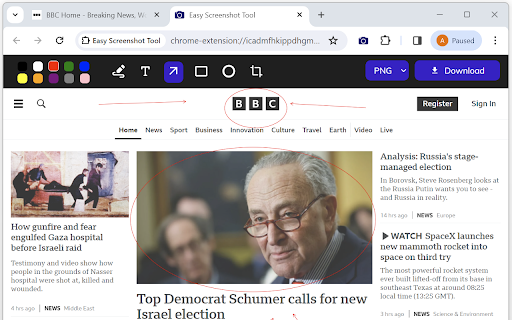
Capture entire websites or specific page elements effortlessly with our offline "Easy Screenshot Tool" extension – no registration required. Quickly edit your screenshots by cropping, adding arrows, text, or captions.
Our "Easy Screenshot Tool" extension allows you to make full-page or partial captures with options for further editing, downloading, or adding text. Launch the app directly from your browser by clicking the extension icon, saving you valuable time. Choose between capturing the entire page or a selected portion without dealing with additional windows.
No need to waste time navigating through unnecessary pages – simply click the extension icon to select your capture preferences.
Whether you're reporting technical issues, creating product demos, or crafting how-to tutorials, here are reasons to opt for our "Easy Screenshot Tool" extension:
✔️ Capture the entire page, not just the visible or selected area.
✔️ One-click screenshot functionality.
✔️ Storage and processing without the need for a server.
✔️ Save PNG files or copy to the clipboard with a single click.
✔️ No login or registration required.
✔️ No restrictions on file size.
✔️ Edit and undo changes to your screenshot.
✔️ Add graphic and text elements, such as pointers, arrows, squares, and more.
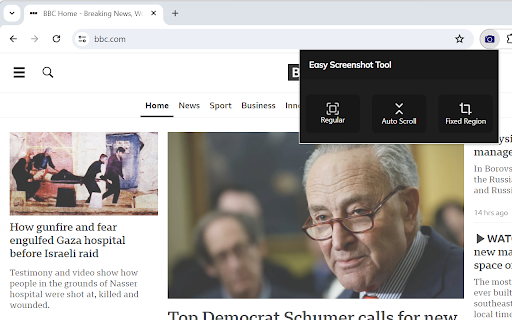
To use the "Easy Screenshot Tool," click on the extension icon in the upper right corner of your browser. Choose your capture option, and watch as the tool captures each part of the page, transferring the finished screenshot to a new tab. Here, you can edit the image and download it to your PC.
Please note: Reload the page after installing the extension before attempting to take a screenshot (Chrome should initialize the extension for each page).
Our "Easy Screenshot Tool" extension is free and user-friendly. If you find it useful, please consider giving us a 5-star rating!
| 分类 | 🛠️工具 |
| 插件标识 | gapabieidifhgbkbelkkjinnemdihbck |
| 平台 | Chrome |
| 评分 |
★★★★☆
4.6
|
| 评分人数 | 393 |
| 插件主页 | https://chromewebstore.google.com/detail/简易截图工具/gapabieidifhgbkbelkkjinnemdihbck |
| 版本号 | 1.1 |
| 大小 | 215KiB |
| 官网下载次数 | 85 |
| 下载地址 | |
| 更新时间 | 2024-03-17 00:00:00 |
CRX扩展文件安装方法
第1步: 打开Chrome浏览器的扩展程序
第2步:
在地址栏输入: chrome://extensions/
第3步: 开启右上角的【开发者模式】
第4步: 重启Chrome浏览器 (重要操作)
第5步: 重新打开扩展程序管理界面
第6步: 将下载的crx文件直接拖入页面完成安装
注意:请确保使用最新版本的Chrome浏览器
同类插件推荐
简易截图工具
轻松捕获、编辑和保存网页屏幕截图。简单的屏幕截图工具可以让您轻松获取所需的内容。Capture en

截屏大师:全页截图
简单、免费且功能齐全的截图应用,轻松捕捉、编辑和保存您的截图。Screenshot Master是一

Screenshot & Screen Recorder Tool
Free and easy to use screen recorder and screen ca

Amazing Screenshot 截图和标注工具
轻松方便捕捉网页截图,强大的涂鸦功能让你随心所欲编辑截图Amazing Screenshot截图和标