Multiple Screenshots Chrome 插件, crx 扩展下载
Capture high-quality screenshots from multiple URLs quickly and easily with Multiple Screenshot, a versatile Chrome extension.
Multiple Screenshots - Effortless Webpage Screenshot Capturing
Multiple Screenshots is a powerful Chrome extension designed to make capturing webpage screenshots simple, fast, and efficient. Whether you're a professional researcher, a web designer, a content creator, or anyone who needs to document websites, this tool automates the process, saving you valuable time and effort.
Why Choose Multiple Screenshots?
Say goodbye to manual screenshot-taking! With Multiple Screenshots, you can capture high-quality screenshots from multiple URLs in just a few clicks. Simply paste your list of URLs, and let the extension handle everything—from opening webpages to saving organized screenshots tailored to your preferences.
Key Features
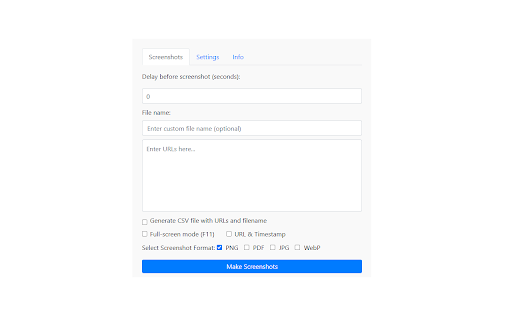
- Automatic Screenshot Capture: Input a list of URLs, and the extension will open each webpage, capture a screenshot, and save it automatically.
- Customizable Delays: Adjust the delay to ensure all webpage elements load properly before taking screenshots.
- Flexible File Naming Options: Organize your screenshots with custom file names that suit your workflow.
- Multiple Output Formats: Choose the format that works best for you—JPG, PNG, WebP, or PDF.
- Full-Page Screenshots: Capture the entire length of a webpage for comprehensive documentation.
- CSV File Generation: Automatically generate a CSV file mapping URLs to screenshot file names for easy reference and analysis.
- Optional Path Column: Include a full path for saved files in the CSV for better organization.
- URL & Timestamp Overlay: Add a URL and timestamp directly to your screenshots for reference.
Who Is This Tool For?
Multiple Screenshots is perfect for:
- Marketers: Capture competitor websites or online ads for analysis and strategy.
- Developers & Designers: Test webpage layouts and performance across multiple URLs.
- Researchers: Collect visual data and evidence from websites quickly and efficiently.
- Content Creators: Save visual elements for presentations, tutorials, or documentation.
How It Works
1. Paste your list of URLs into the extension.
2. Customize settings like delay, file naming, screenshot format, URL & Timestamp overlay and optional path or overlays.
3. Let Multiple Screenshots automate the entire process for you!
Get Started Today!
Simplify your workflow and save hours of manual effort with Multiple Screenshots, the ultimate Chrome extension for bulk webpage screenshot capturing.
? Have questions or suggestions? Reach out to us at [email protected].
☕ Love this extension? Support its development: https://buymeacoffee.com/skolmowski
? Check out the project on GitHub: https://github.com/McLowin/Multiple_Screenshots
| 分类 | 🛠️工具 |
| 插件标识 | gbgeckhegkbgdlfpcgjdhdckdfcimmbc |
| 平台 | Chrome |
| 评分 |
★★★★☆
4.6
|
| 评分人数 | 1289 |
| 插件主页 | https://chromewebstore.google.com/detail/multiple-screenshots/gbgeckhegkbgdlfpcgjdhdckdfcimmbc |
| 版本号 | 0.1.2 |
| 大小 | 1.73MiB |
| 官网下载次数 | 122 |
| 下载地址 | |
| 更新时间 | 2025-01-30 00:00:00 |
CRX扩展文件安装方法
第1步: 打开Chrome浏览器的扩展程序
第2步:
在地址栏输入: chrome://extensions/
第3步: 开启右上角的【开发者模式】
第4步: 重启Chrome浏览器 (重要操作)
第5步: 重新打开扩展程序管理界面
第6步: 将下载的crx文件直接拖入页面完成安装
注意:请确保使用最新版本的Chrome浏览器