
Tab Lock Forever Chrome 插件, crx 扩展下载

Keep Your Browser Tabs Forever
Tab Lock Forever
Overview
Tab Lock Forever is a user-friendly Chrome extension designed for individuals who frequently open specific tabs at the start of their browsing session. This extension simplifies tab management, ensuring that your preferred URLs are always accessible without the hassle of manual re-opening.
Features
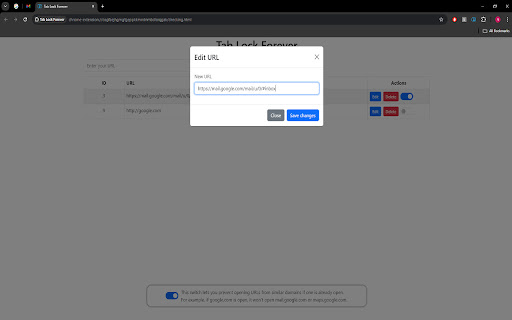
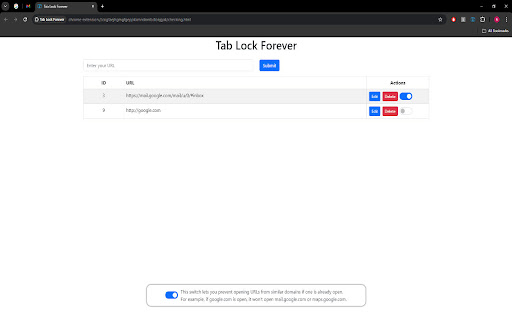
Easy URL Addition: Click the extension icon and hit the "Add URL" button to enter the URLs you want to lock. This action redirects you to a new tab where you can conveniently add your desired URLs.
Automatic Tab Restoration: Upon starting Chrome, Tab Lock Forever automatically checks for the URLs you’ve added. If any tab is missing, it will open those URLs immediately and pin them for easy access.
Domain Similarity Control: A unique feature of this extension is the blue checkbox that allows you to prevent the opening of URLs from similar domains if one is already open. For instance, if google.com is open, the extension will not open mail.google.com or maps.google.com, ensuring your workspace remains organized.
Installation
Download the Tab Lock Forever extension from the Chrome Web Store.
Click on the extension icon in the toolbar to access the features.
Add your desired URLs and enjoy a seamless browsing experience.
Usage
To add a URL, click the extension icon and select "Add URL."
The extension will handle the rest by ensuring your specified tabs open automatically each time you start Chrome.
Conclusion
Tab Lock Forever is the perfect solution for those who rely on specific tabs for their daily browsing activities. With its intuitive interface and powerful features, it streamlines your workflow, allowing you to focus on what matters most.
For support or feedback, please contact us at [email protected].
| 分类 | 📝工作流程与规划 |
| 插件标识 | gcjbnbbomkfcefeeakgnihgbndlbgilh |
| 平台 | Chrome |
| 评分 |
★★★★☆
4.7
|
| 评分人数 | 2965 |
| 插件主页 | https://chromewebstore.google.com/detail/tab-lock-forever/gcjbnbbomkfcefeeakgnihgbndlbgilh |
| 版本号 | 1.0 |
| 大小 | 301KiB |
| 官网下载次数 | 98 |
| 下载地址 | |
| 更新时间 | 2024-09-23 00:00:00 |
CRX扩展文件安装方法
第1步: 打开Chrome浏览器的扩展程序
第2步:
在地址栏输入: chrome://extensions/
第3步: 开启右上角的【开发者模式】
第4步: 重启Chrome浏览器 (重要操作)
第5步: 重新打开扩展程序管理界面
第6步: 将下载的crx文件直接拖入页面完成安装
注意:请确保使用最新版本的Chrome浏览器
同类插件推荐
Tab Lock Forever
Keep Your Browser Tabs ForeverTab Lock Forever Ov

Tab Counter
Keeps count of your open tabs and windowsCounts ho

Tab Suspender by Workona
Suspend your browser tabs to save memory.Keep your

Recent Tabs with your browsing history
Undo closed tabs with your browsing historyExtensi