
Steam Review Summarizer Chrome 插件, crx 扩展下载
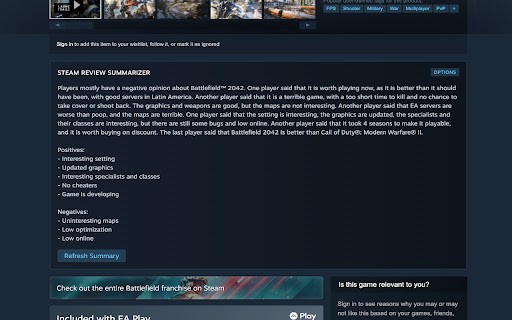
Summarizes Steam reviews with the power of OpenAI's GPT models.
This extension adds a new section to the game page on Steam. It summarizes the reviews for that game using OpenAI's GPT models.
You need to provide your own a OpenAI API Key to use this extension! To do this you need to register an account on https://openai.com/. After that you can get your API Key here: https://platform.openai.com/account/api-keys
If you get any error code when entering your API Key please refer to the OpenAI API Documentation: https://platform.openai.com/docs/guides/error-codes/api-errors
If you get an error about exceeding your quota please make sure that you:
1. did not reach your billing limit: https://platform.openai.com/account/billing/limits
2. you have entered your payment credentials and created a new API key after that. There are problems with free accounts as you can read here: https://community.openai.com/t/opentai-api-request-error-you-exceeded-your-current-quota-please-check-your-plan-and-billing-details/82538/29
------------------------
Changelog:
v1.4 - Adds dynamic model loading. Choose any GPT model thats available to you by the OpenAI API.
| 分类 | 📝工作流程与规划 |
| 插件标识 | gdnfnbnmocpjnfpjlkeefpelmkiomfio |
| 平台 | Chrome |
| 评分 |
★★★☆☆
3.6
|
| 评分人数 | 16 |
| 插件主页 | https://chromewebstore.google.com/detail/steam-review-summarizer/gdnfnbnmocpjnfpjlkeefpelmkiomfio |
| 版本号 | 1.4 |
| 大小 | 70.36KiB |
| 官网下载次数 | 255 |
| 下载地址 | |
| 更新时间 | 2024-03-22 00:00:00 |
CRX扩展文件安装方法
第1步: 打开Chrome浏览器的扩展程序
第2步:
在地址栏输入: chrome://extensions/
第3步: 开启右上角的【开发者模式】
第4步: 重启Chrome浏览器 (重要操作)
第5步: 重新打开扩展程序管理界面
第6步: 将下载的crx文件直接拖入页面完成安装
注意:请确保使用最新版本的Chrome浏览器
同类插件推荐

ChatGPT For Explorer
You can use it to search for answers through ChatG

Steam enhancer
Steam web page enhancementsSteam extension that en

Game Revenue Estimate
Add Steam revenue estimate to every Steam store pa
Steam Review Summarizer
Summarizes Steam reviews with the power of OpenAI&

Next Steam Sale Tracker
Track Steam sales in real-time and get the best de

Steam Store Tooltip
Show Steam games information when hovering the sto

demos in my Steam wishlist
Check which games in your Steam wishlist have a de

Steam Owned
Checks if you own a game on Steam on various websi

Coursera Mini Video Player Resizer
This makes Coursera mini video players resizable!Y

Accessibility Checker for GitHub Markdown
Highlight accessibility issues as you write Markdo

Krunch
Shorten URLs like never beforeThis powerful chrome

Twitter Reaction Counter
This extension get list of Like/Retweet on a tweet

reveddit language fix
Allows reveddit.com to work properly when the brow