
Tabaroo: AI Tab Manager Chrome 插件, crx 扩展下载
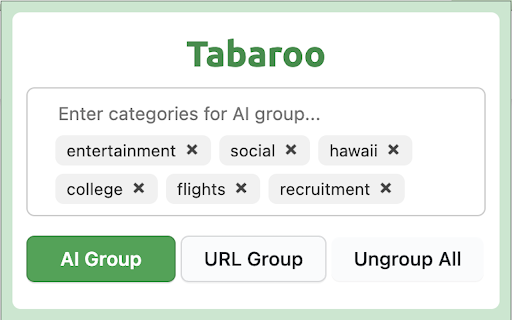
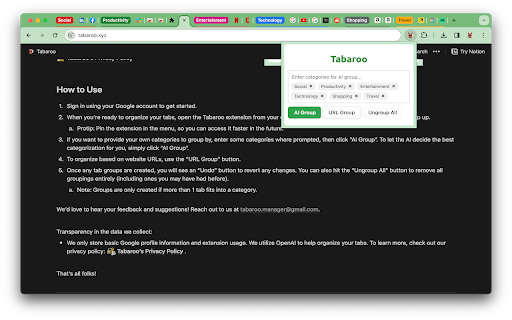
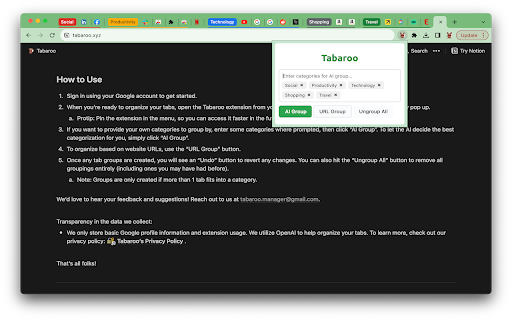
Tabaroo uses AI to effortlessly organize your tabs.
Welcome to Tabaroo - the smart Chrome extension powered by OpenAI's ChatGPT and advanced language models. Say goodbye to tab chaos and hello to effortless organization!
Why Tabaroo?
1. AI-Powered Organization: Tabaroo's intelligent auto-grouping feature neatly arranges your tabs into user-defined or AI-suggested categories.
2. Flexible and User-Friendly: Easily revert any changes with an "Undo" button. Not satisfied? "Ungroup All" to start fresh.
3. Enhanced Privacy: We value your privacy. Learn about our minimal data collection in our privacy policy.
Hop into organized browsing with Tabaroo – where every tab finds its pouch!
~~~
Getting Started is Easy:
1. Quick Setup: Sign in with your Google account.
2. Access Tabaroo: Find it in your extensions menu (Tip: Pin it for faster access!).
3. Customize Your Groups:
a. For personalized categories, enter your chosen categories when prompted, then select “AI Group”.
b. To let AI determine the best categorization, simply click on “AI Group”.
c. For URL-based organization, use the “URL Group” button.
4. Stay in Control: Modify groupings anytime with “Undo” and “Ungroup All” options.
5. Note: Groups are only created when more than one tab fits a category.
~~~
We’d love to hear your feedback and suggestions! Reach out to us at [email protected].
Transparency in the data we collect:
We only store basic Google profile information and extension usage. We utilize OpenAI to help organize your tabs. To learn more, check out our privacy policy at tabaroo.xyz.
~~~
Credits:
Kangaroo icon created by Darius Dan - Flaticon
| 分类 | 🛠️工具 |
| 插件标识 | gfdghfeelbgnjencoggmheenliblidab |
| 平台 | Chrome |
| 评分 |
★★★★☆
4.6
|
| 评分人数 | 13 |
| 插件主页 | https://chromewebstore.google.com/detail/tabaroo-ai-tab-manager/gfdghfeelbgnjencoggmheenliblidab |
| 版本号 | 1.0.4 |
| 大小 | 252KiB |
| 官网下载次数 | 326 |
| 下载地址 | |
| 更新时间 | 2023-12-16 00:00:00 |
CRX扩展文件安装方法
第1步: 打开Chrome浏览器的扩展程序
第2步:
在地址栏输入: chrome://extensions/
第3步: 开启右上角的【开发者模式】
第4步: 重启Chrome浏览器 (重要操作)
第5步: 重新打开扩展程序管理界面
第6步: 将下载的crx文件直接拖入页面完成安装
注意:请确保使用最新版本的Chrome浏览器
同类插件推荐

AI Tab Organizer
Organizes tabs into groups using AI with one click

ChatGPT 标签组管理器
AI 驱动的 ChatGPT 助手,自动将相关的浏览器标签页组织到标签组中。『AI 标签页管理器』协

Smart Tab by NoteGPT - AI 智能标签知识管理器
收集并管理你的浏览器标签/链接。借助AI理解、学习、发现新的洞察。创建你的个人AI知识库。你是否疲惫

Group Tab AI extension
Is a browser extension that uses advanced AI techn

Tabaroo: AI Tab Manager
Tabaroo uses AI to effortlessly organize your tabs

Group your tabs++
Effortlessly manage your tabs through user-defined
TabGPT - Group/organize your tab with chatGPT
Keep your tabs organized effortlessly with TabGPT,
AI Group Tabs
Group your tabs with AIA Chrome extension helps yo

PlutoAI - AI Bookmarks and Tabs Manager
AI bookmarking assistant that enables you to insta
Tab Manager Auto
Fully Automated Tab Manager ExtensionAre you tired

Phew AI Tab - AI Auto Group & Vertical Tabs
AI Auto Tabs Group, Vertical Tab, AI, AI Bookmarks

Curateit
Introducing CurateIt - the ultimate all-in-one Chr

tabOS - Tab management, ChatGPT 4o, Docs/Images, RSS/YouTube/Reddit feeds
Enhance your New tab/Sidebar - Manage tabs, ChatGP