
Samsung Food Chrome 插件, crx 扩展下载

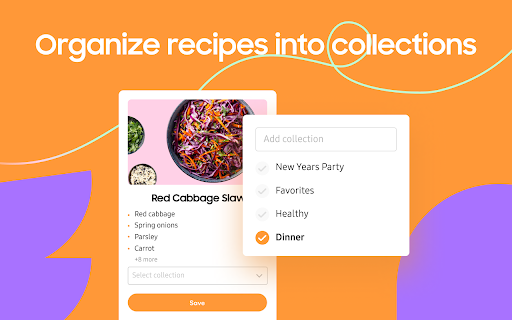
Save recipes from anywhere across the web.
The Samsung Food button allows you to save recipes from all your favorite sites. You can also sort and organize all your recipes into collections. Once recipes are saved to Samsung Food you can easily scale servings and generate shopping lists with one click! Samsung Food’s shopping list intelligently combines ingredients from multiple recipes so you buy just the right amounts.
Samsung Food makes planning and shopping easy with collaborative lists you can share with friends and family. Take your list to the store or buy ingredients online with integrated retailers.
All your saved recipes are synced to your Samsung Food account available on app.samsungfood.com.
| 分类 | 🛍️购物 |
| 插件标识 | gfoijmnbedaipllfimaogeepohalbgka |
| 平台 | Chrome |
| 评分 |
★★★★☆
4.2
|
| 评分人数 | 17 |
| 插件主页 | https://chromewebstore.google.com/detail/samsung-food/gfoijmnbedaipllfimaogeepohalbgka |
| 版本号 | 2.11.3 |
| 大小 | 1.45MiB |
| 官网下载次数 | 20000 |
| 下载地址 | |
| 更新时间 | 2024-01-22 00:00:00 |
CRX扩展文件安装方法
第1步: 打开Chrome浏览器的扩展程序
第2步:
在地址栏输入: chrome://extensions/
第3步: 开启右上角的【开发者模式】
第4步: 重启Chrome浏览器 (重要操作)
第5步: 重新打开扩展程序管理界面
第6步: 将下载的crx文件直接拖入页面完成安装
注意:请确保使用最新版本的Chrome浏览器
同类插件推荐

Toolkit for YNAB
UI customizations and tweaks for the web version o

CookBook Manager - Recipe Importer
Import recipes to your CookBook Manager App accoun

Umami
Shows just the recipe and skips the rest. Save and

Cook'n Recipe Capture Plugin
This extension captures the recipe in a web page a

Samsung Food
Save recipes from anywhere across the web.The Sams

Copy Me That
Copy any recipe from any website with just one cli

I Just Want the Recipe Janet
I don't need the whole backstory, I just want
Recipe Cart | Viewer & Grocery Assistant
View online recipes without distraction. Easily se

Recipe Filter
Recipe Filter shows recipes found anywhere on the
Simplify Gmail
Make Gmail simpler, more capable, and more respect

Raindrop.io
多功能的书签管理工具The Bookmarking Tool that Does it All S

Readwise Highlighter
Save a page to Readwise ReaderThis is the official