
LinkMatch For CATS Chrome 插件, crx 扩展下载

Automated LinkedIn sourcing for CATS
CATS integration with LinkedIn and Xing.
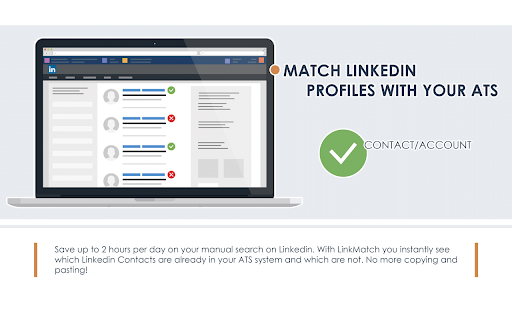
LinkMatch Chrome extension automatically shows which LinkedIn or Xing profiles are in your CATS database.
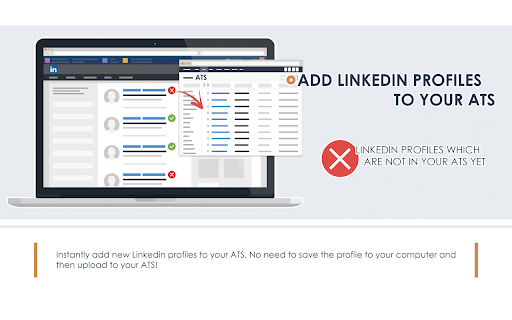
That way you don't have to manually check it for yourself, which makes it easier to connect with new candidates right away.
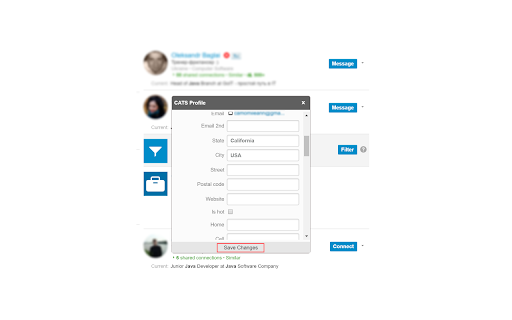
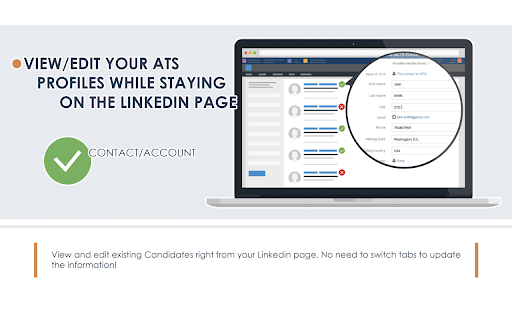
You can also view and edit the profile info of the existed candidates right in the LinkedIn.
3.10
- Transaction code is removed(deprecated by CATS)
- a lot of stability improvements
2.25
- Contacts are now matched as well. Orange< checkmark is used to indicate the Contact match. You can also adjust the fields display options separately for Contacts profile popup on the options page.
- Matching algorithm is improved,
- Bunch of bugs are fixed to improve your experience with LinkMatch
1.95
- improved matching algorithm, added matching by location for US, Canada, South Africa
- couple of ui imrovements
1.81
- bug fixes
1.80
- improved matching algorithm for new LinkedIn UI
1.70
- improved matching algorithm
1.60
- fix for changes in the CATS API
- improved matching algorithm
1.55
- fix and issue with Connected LinkedIn profiles not matching
1.50
- adjusting to the new LinkedIn UI
1.46
- bug fixes
1.43
- handling the change in the CATS API
1.40
- users in the candidate profile form are now shown with full names instead of links
New in 1.30
- you can now adjust the order and appearance of the fields in the profile view. These settings are available in the options page.
- improved matching algorithm
New in 1.20
- new UI
- improved matching algorithm
New in 1.11
- couple of bug fixes
New in 1.10
- you can now see the candidate's assigned jobs, their description, status etc.
New in 0.96
- bug fixes
New in 0.93
- bug fixes
New in 0.90
- added support for catsone.nl domain
By installing this Chrome Extension you agree to the Terms of Service - linkmatch.net/terms
------
Browser permissions description for compliance with Chrome WebStore policies:
- tabs: for finding a tabs which has LinkedIn or Xing launched to show notification if needed
- https://*.linkedin.com/* - to be able to make requests to linkedin.com
- https://*.xing.com/* - to be able to make requests to xing
- https://*.linkmatch.net/* - API calls to LinkMatch(application server)
- https://*.catsone.com/* - to be able to make requests to CATS API on .com domain
- https://*.catsone.nl/* - to be able to make requests to CATS API on .nl domain
| 分类 | 📝工作流程与规划 |
| 插件标识 | ggidbcpppmepapiemlcpfhjgdfdkfmpj |
| 平台 | Chrome |
| 评分 |
★★★★☆
4.8
|
| 评分人数 | 1221 |
| 插件主页 | https://chromewebstore.google.com/detail/linkmatch-for-cats/ggidbcpppmepapiemlcpfhjgdfdkfmpj |
| 版本号 | 6.11 |
| 大小 | 5.51MiB |
| 官网下载次数 | 236 |
| 下载地址 | |
| 更新时间 | 2025-02-14 00:00:00 |
CRX扩展文件安装方法
第1步: 打开Chrome浏览器的扩展程序
第2步:
在地址栏输入: chrome://extensions/
第3步: 开启右上角的【开发者模式】
第4步: 重启Chrome浏览器 (重要操作)
第5步: 重新打开扩展程序管理界面
第6步: 将下载的crx文件直接拖入页面完成安装
注意:请确保使用最新版本的Chrome浏览器
同类插件推荐
LinkMatch For CATS
Automated LinkedIn sourcing for CATSCATS integrati

LinkMatch For Zoho CRM
Automated LinkedIn sourcing for Zoho CRMSeamless Z

LinkMatch For Pipedrive
Automated LinkedIn sourcing for PipedriveStreamlin

LinkMatch For HubSpot
Automated LinkedIn sourcing for HubSpotSeamless Li