
Video Speed Controller Chrome 插件, crx 扩展下载
Video Speed Controller for netflix video, primevideo, hotstar, etc.
Video Speed Controller offers stable and adjustable video speed controller extension options on various Video Streaming Services, such as Netflix, Amazon Prime Video, YouTube, Twitch, Disney+ Hotstar, and others. It’s perfect for speed control for streaming videos, making lessons quicker or action sequences slower, or adjusting video playback rate for any video in a browser, up to 4x speed.
Enjoy a more personalized approach to viewing video content in 2025, whether you’re changing playback speed on Netflix, binging shows or movies, or studying important sections with ease
Key Features
Adjustable Playback Speed: Control AV playback speed; slow motion (e.g., 0.25x) or quick preview (e.g., 4x). Use this video speed adjustment tool for complete flexibility.
User-Friendly Interface: A single, easy-to-understand pop-up menu for activation and regulation of playback speed, making it a customizable video speed experience.
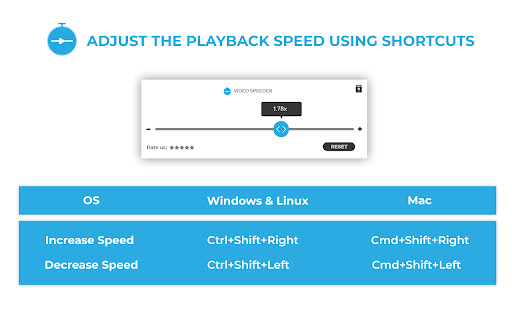
Keyboard Shortcuts: Get full speed control with default and personalized video speed shortcut Chrome keys for quicker adjustments.
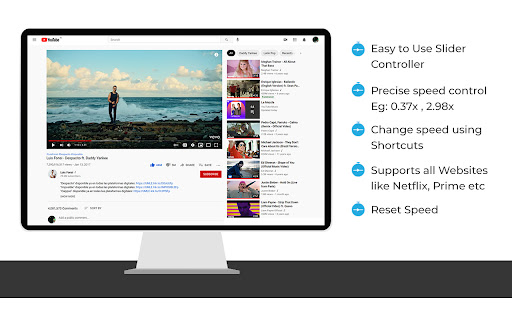
Platform Compatibility: Supports streaming on Netflix, Amazon Prime Videos, YouTube, Twitch, Disney+ Hotstar, and more. Perfect for playback speed extension for YouTube users.
Fine-Tuning Options: For precise speed changes, use step adjustments to refine your playback experience.
How to Use Video Speed Controller Extension
Install the Extension: The video speed controller extension is available for free and can be installed via the Chrome Web Store.
Open a Video: Start a video on the platform of your choice, such as Netflix or YouTube, and adjust video playback rate to your liking.
Access the Extension: Locate the control video speed Chrome extension icon in the browser toolbar.
Adjust Playback Speed: Use the pop-up menu to change playback speed Netflix, speed up or slow down YouTube videos, or watch Netflix faster or slower.
Enjoy: Start streaming your content at your desired pace, tailored perfectly with the speed control for streaming videos feature!
Keyboard Shortcuts
Increase Speed:
Windows/Linux: Ctrl + Shift + Right
Mac: Command + Shift + Right
Decrease Speed:
Windows/Linux: Ctrl + Shift + Left
Mac: Command + Shift + Left
Open Extension:
Windows/Linux: Ctrl + Shift + J
Mac: Option + J
Reset Speed:
One-click reset to normal speed (1.0x).
FAQs
1. Does the Video Speed Controller work on all streaming sites?
Yes, it supports most popular streaming sites like Netflix, Prime Video, YouTube, and Twitch.
2. Can I use this extension to adjust speed in smaller steps?
Yes, you can fine-tune the playback speed using small step adjustments for greater control.
3. Are keyboard shortcuts customizable?
Currently, keyboard shortcuts are preset but cover the essential speed control functions for quick adjustments.
| 分类 | 📝工作流程与规划 |
| 插件标识 | gioehmkjkeamcinbdelehlpnpdcdjpdp |
| 平台 | Chrome |
| 评分 |
★★★★☆
4.9
|
| 评分人数 | 32 |
| 插件主页 | https://chromewebstore.google.com/detail/video-speed-controller/gioehmkjkeamcinbdelehlpnpdcdjpdp |
| 版本号 | 3.2.6 |
| 大小 | 768KiB |
| 官网下载次数 | 90000 |
| 下载地址 | |
| 更新时间 | 2025-01-22 00:00:00 |
CRX扩展文件安装方法
第1步: 打开Chrome浏览器的扩展程序
第2步:
在地址栏输入: chrome://extensions/
第3步: 开启右上角的【开发者模式】
第4步: 重启Chrome浏览器 (重要操作)
第5步: 重新打开扩展程序管理界面
第6步: 将下载的crx文件直接拖入页面完成安装
注意:请确保使用最新版本的Chrome浏览器
同类插件推荐

Video Speeder
Allowing videos speed to go over 2XThis extension

Video Hızlandırcı
Tüm Videoları 16x'e Kadar Hızlandırın.Videoyu

Video Speed Controller
Control the playback speed of HTML5 videos.Video S

Video Speed Controls
Speed controller for all video players. Simply spe
Video Speed Controller
Speed up, slow down, advance and rewind HTML5 audi

Video Speed Controller
Video Speed Controller is a super lightweight exte

Video Speed Controller
Video Speed Controller for netflix video, primevid

Speed Control
Control the speed of HTML5 videoThis extension wil

Super 视频加速
Adjust playback speed for any video. 视频加速 for your

Video Speed Controller
Control the speed of your video!It is a speed cont

Video Speed Control
Easily control HTML5 video playback speed via tool

适用于Google Chrome™的HTML5视频速度控制
加快或减慢任何网站上的任何HTML5视频。加快或减慢视频速度的最快,最简单的方法。 调整您正在观看

視訊速度控制器 - 視訊管理器
HTML5 的視頻速度控制。 通過視頻播放和視頻控制、視頻控制器管理視頻速度。 視頻速度播放視頻速度