
API Tester - REST Client Testing Tool Chrome 插件, crx 扩展下载
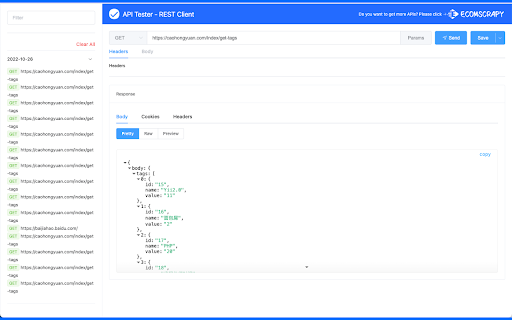
Free REST API Tool, Use it to develop, test, debug RESTful APIs and HTTP request & REST services in Google Chrome Web Store.
This is simple REST Client. Use it to develop, test, debug RESTful APIs, HTTP APIs and and easy-to-use UI.
This has a number of powerful features than postman...
Favorites:
- Save favorite requests (including headers, payload etc.) and re-use them with the click of a button.
- Import/Export favorites.
- Your favorites are automatically synced with your Google account and are not tied to a single machine.
History:
- View all your previous requests and responses.
- Easily run them again.
- Easily filter out the requests you're not interested in.
Custom Headers:
- Choose from a large range of existing request headers.
- Create and save your own custom request headers.
More...
- View the request response in beautiful syntax highlighting (including JSON, XML, HTML and CSS).
- See how long each request took to complete.
- Supports GET, POST, PUT and DELETE request methods. Custom request methods can also be added by the user.
- HTTP Basic Authentication.
- Responsive Design.
- Dark Mode.
- 100% Free. No strings attached.
Note on Extension Permissions: The badly named "Read and change all your data" permission is required to send a request to any domain. This does not access or use your data in any way.
| 分类 | 💻开发者工具 |
| 插件标识 | gjpgfhjgdajmdhialdclpkjmfkhbdchl |
| 平台 | Chrome |
| 评分 |
★★★★☆
4.2
|
| 评分人数 | 291 |
| 插件主页 | https://chromewebstore.google.com/detail/api-tester-rest-client-te/gjpgfhjgdajmdhialdclpkjmfkhbdchl |
| 版本号 | 1.4.0 |
| 大小 | 426KiB |
| 官网下载次数 | 10000 |
| 下载地址 | |
| 更新时间 | 2023-04-22 00:00:00 |
CRX扩展文件安装方法
第1步: 打开Chrome浏览器的扩展程序
第2步:
在地址栏输入: chrome://extensions/
第3步: 开启右上角的【开发者模式】
第4步: 重启Chrome浏览器 (重要操作)
第5步: 重新打开扩展程序管理界面
第6步: 将下载的crx文件直接拖入页面完成安装
注意:请确保使用最新版本的Chrome浏览器
同类插件推荐
Talend API Tester - Free Edition
Visually interact with REST, SOAP and HTTP APIs.We
API Tester - REST Client Testing Tool
Free REST API Tool, Use it to develop, test, debug

Requestly - Free API Testing & Mocking Tool
Open-Source API Client & HTTP Interceptor. API

tweak: mock and modify HTTP requests
Mock or modify your HTTP requests to test, develop