Custom Menu Chrome 插件, crx 扩展下载
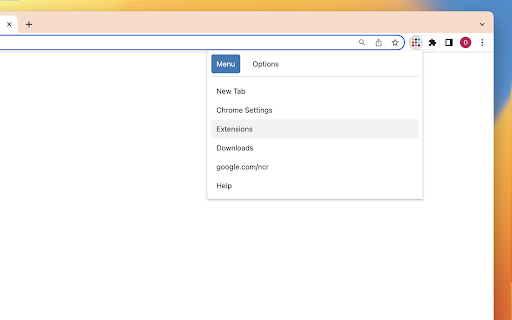
Add a custom menu to your browser toolbar.
Create your own quick menu right in the toolbar. With this addon you can arrange your own simple list of links and pin them as a popup menu to the toolbar.
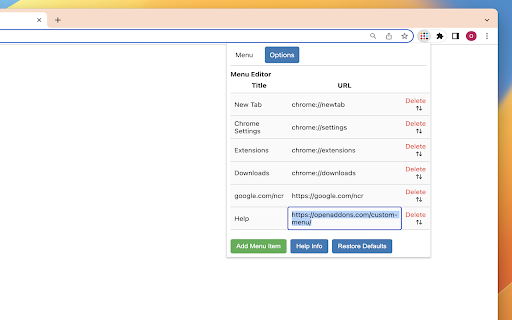
Simple Menu Editor: The extension allows you to customize your browser's menu by adding, removing, and rearranging menu items. Simply click on the "Options" tab to access the menu editor.
Add, Edit and Delete Menu Items: In the menu editor, you can add new menu items by clicking the "Add" button. Each item consists of a title and a URL. Click on the Title or URL to edit. You can also delete unwanted menu items by clicking the delete button associated with each item. Press and hold the drag icon to rearrange (menu items are draggable)
Reset to Default: If you want to revert to the default menu settings, you can click the "Reset" button. This will remove all custom menu items and restore the original menu provided on the initial install by the extension.
"Material design": The extension provides a sleek and modern user interface with extremely clean fonts and color scheme.
| 分类 | 📝工作流程与规划 |
| 插件标识 | gkhoalcdabjldlpoaoaknjipgiakljfj |
| 平台 | Chrome |
| 评分 |
★★★★☆
4.5
|
| 评分人数 | 41 |
| 插件主页 | https://chromewebstore.google.com/detail/custom-menu/gkhoalcdabjldlpoaoaknjipgiakljfj |
| 版本号 | 1.0 |
| 大小 | 37.09KiB |
| 官网下载次数 | 540 |
| 下载地址 | |
| 更新时间 | 2023-05-21 00:00:00 |
CRX扩展文件安装方法
第1步: 打开Chrome浏览器的扩展程序
第2步:
在地址栏输入: chrome://extensions/
第3步: 开启右上角的【开发者模式】
第4步: 重启Chrome浏览器 (重要操作)
第5步: 重新打开扩展程序管理界面
第6步: 将下载的crx文件直接拖入页面完成安装
注意:请确保使用最新版本的Chrome浏览器