
SUPR - Salesforce User Permission Report Chrome 插件, crx 扩展下载
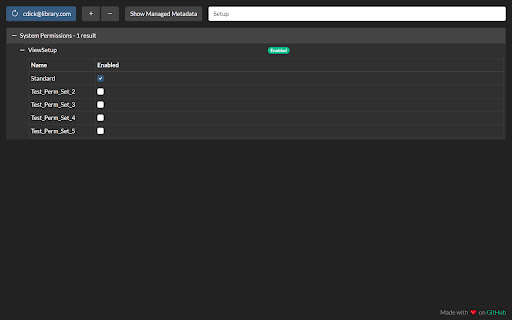
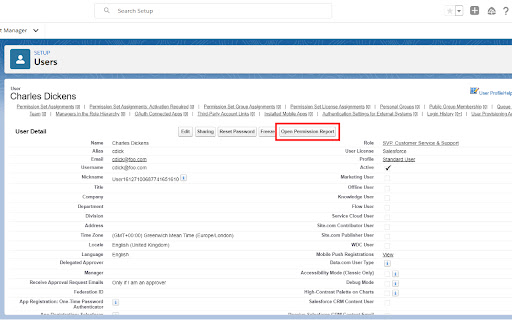
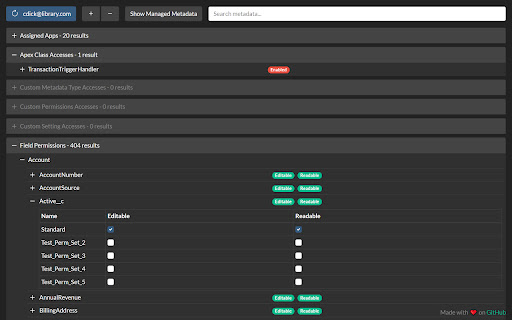
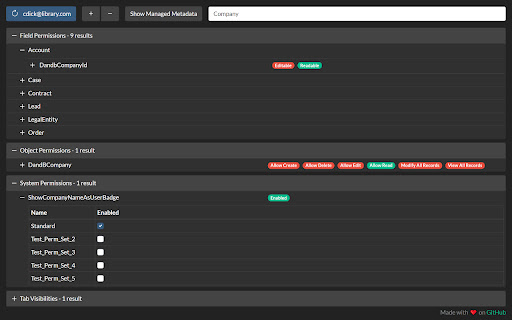
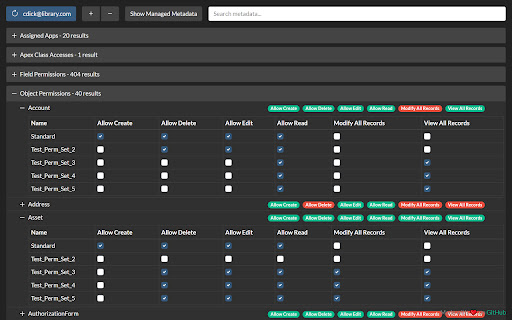
Salesforce User Permission Report allows you to see a report of all the permissions a user has and where they are set.
DESCRIPTION
This tool reads all of the user's Profile and Permission Set metadata, merges it, and presents it in a single view allowing busy admins and developers to quickly troubleshoot security and permission issues!
FEATURES
- Search
- Dark mode
- Intuitive tree view
- Toggle managed metadata
- Permission Set Group support
- Consolidated view of user permissions
- Compatible with Classic and Lightning Experience
SECURITY/PRIVACY
No data is stored by the extension in the browser (apart from in-memory during use) and no data is transferred to third-party (i.e. non-Salesforce) servers. All communication is secured using HTTPS/TLS, so in theory the unencrypted (plain text) data is only visible in your Salesforce org and in the extension when it is used.
A network request is made to the SOAP API's getUserInfo resource which may contain the running user's PII as described here: https://developer.salesforce.com/docs/atlas.en-us.api.meta/api/sforce_api_calls_getuserinfo.htm
The only other piece of PII is the target user's username which is queried and displayed on the refresh button.
| 分类 | 🛠️工具 |
| 插件标识 | gkibdicghcpcikhjpgjoijpobdipklnp |
| 平台 | Chrome |
| 评分 |
★★★★☆
4.6
|
| 评分人数 | 184 |
| 插件主页 | https://chromewebstore.google.com/detail/supr-salesforce-user-perm/gkibdicghcpcikhjpgjoijpobdipklnp |
| 版本号 | 1.2.5 |
| 大小 | 324KiB |
| 官网下载次数 | 939 |
| 下载地址 | |
| 更新时间 | 2024-11-27 00:00:00 |
CRX扩展文件安装方法
第1步: 打开Chrome浏览器的扩展程序
第2步:
在地址栏输入: chrome://extensions/
第3步: 开启右上角的【开发者模式】
第4步: 重启Chrome浏览器 (重要操作)
第5步: 重新打开扩展程序管理界面
第6步: 将下载的crx文件直接拖入页面完成安装
注意:请确保使用最新版本的Chrome浏览器
同类插件推荐
SUPR - Salesforce User Permission Report
Salesforce User Permission Report allows you to se

Salesforce Profile Reader
Lists Various Salesforce Permissions of Profiles/P

EasyCrud(Salesforce)
Assign your CRUD and FLS for Salesforce in Bulk fr

Lightning Studio
Build Salesforce LWC development easy and fastest.

Maven Tools for Salesforce
One tool to rule them all! An ever-growing collect

Salesforce Admin Check All
This extension provides 'check all' checkb

Salesforce Show Api Name
Display Field & Object API Names on Detail Pag

Salesforce Change Set Helper
Enhances the Salesforce change set. Adds last chan

Crazy Compare For Salesforce
Quickly compare two different salesforce profiles

Salesforce Colored Favicons
Updates the standard favicon on Salesforce tabs wi

Salesforce advanced Code searcher
By using the advanced quick find you can get your

Salesforce Lightning Inspector
For inspecting Lightning appsThe Salesforce Lightn

Salesforce inspector
Productivity tools for Salesforce administrators a