
xHighlighter Chrome 插件, crx 扩展下载
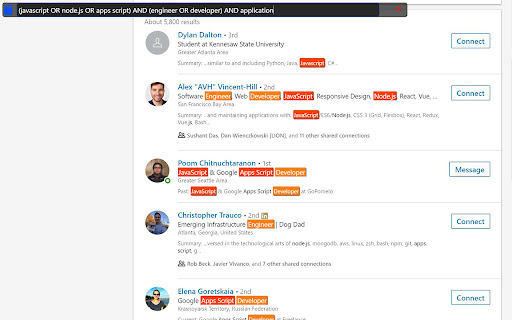

Find and highlight words with boolean search and regular expressions
Search and highlight matching words on a web page using boolean search operators or regular expressions.
Control+Shift+H to initiate
macCtrl+Shift+H for macOS
Alt+H (Option+H for macOS) or ArrowDown to scroll to next highlight.
Your last search will auto-populate in the field when initiated. Checks for last search on domain and returns that first if available.
Version 2.18 updates (11 Sep 2024)
1) Fixed issue where highlights do not show up on single page apps.
Version 2.17 updates (10 Sep 2024)
1) Position of UI will save itself for the next time it is loaded. If the UI gets moved out of bounds, it will re-align back to the top left.
Version 2.16 updates (7 Sep 2024)
1) Added ability to name and save multiple saved searches. This uses local browser storage. Clicking the x next to the saved search will remove it from your browser.
2) loads in the top right corner now. other minor UI changes
Version 2.15 updates (5 Sep 2024)
1) Fixed commands issue.
2) started adding support for multiple saved searches, but it is not yet complete. Saved searches will not save beyond the current browser session.
Version: 2.14 updates (3 Sep 2024)
1) Changed command keys.
2) Removed unnecessary permissions.
Version: 2.11 updates (2 Sep 2024)
1) UI updates/changes.
2) now has the option for you to select "always open" so it will always load your last search when a window loads.
3) fixed the regex and pasting issue so you no longer need to press enter.
4) no longer need to press ctrl+shift+comma to scroll to the next match on the page unless your cursor is not focused in the search textarea. Instead of ctrl+shift+comma, you can now just use your up and down arrow keys.
a) current focus of view for highlighted match will glow.
| 分类 | 🛠️工具 |
| 插件标识 | glhdakhjcoloepbkanhmnkjlfknmhhfh |
| 平台 | Chrome |
| 评分 |
★★★★★
5
|
| 评分人数 | 4 |
| 插件主页 | https://chromewebstore.google.com/detail/xhighlighter/glhdakhjcoloepbkanhmnkjlfknmhhfh |
| 版本号 | 2.18 |
| 大小 | 29.2KiB |
| 官网下载次数 | 122 |
| 下载地址 | |
| 更新时间 | 2024-09-12 00:00:00 |
CRX扩展文件安装方法
第1步: 打开Chrome浏览器的扩展程序
第2步:
在地址栏输入: chrome://extensions/
第3步: 开启右上角的【开发者模式】
第4步: 重启Chrome浏览器 (重要操作)
第5步: 重新打开扩展程序管理界面
第6步: 将下载的crx文件直接拖入页面完成安装
注意:请确保使用最新版本的Chrome浏览器
同类插件推荐

Regex Checker
This extension uses regular expressions to find im
xHighlighter
Find and highlight words with boolean search and r

GitHubber
Detailed View of Github Profile Search ResultsThis

include.ai Sidebar
Superpowers for the web.We are currently in closed

OctoHR
OctoHR - GitHub profile pages for Recruiters. Hel

Rex - RegEx Highlight or Collapse Text
Use regular expressions to highlight or collapse t

GlossaryTech | Learn tech words
Learn tech terms whilst web sourcingGlossaryTech C

AmazingHiring
Source Tech Candidates with AmazingHiring Extensio

Domino Tabs: Social Profile Bulk URL Opener
Opens social profile URLs in new tabs graduallyDom

Multi Highlight
highlight multiple text on web pages.multi highlig

Multi Highlight
Efficiently and flexibly highlight your online rea

Search and Highlight
This extension highlights the specified word. You