
Quick Search Chrome 插件, crx 扩展下载
A simple extension for quick search
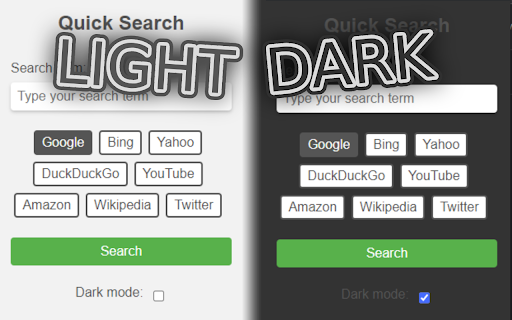
Quick Search is a simple extension that provides users with a quick and easy way to search for information on their favorite search engines. With a user-friendly interface this extension allows users to choose from a variety of popular search engines including Google, Bing, Yahoo etc.
Once users have selected their desired search engine, they can enter their search term into the search box and hit the search button to see the results. The extension will automatically redirect the user to their selected search engine and display the results on another tab.
Quick Search also comes with a dark mode feature, which users can activate by checking the "Dark mode" checkbox in the extension popup. This feature can reduce eye strain and make searching more comfortable, especially in low-light environments.
Quick Search is an essential extension for anyone who frequently searches online. Its intuitive design and customizable search options make it a must-have tool for anyone who wants to improve their search experience.
| 分类 | 🛠️工具 |
| 插件标识 | gmefpbalggbekgjjnnnbjndnbljfdhmp |
| 平台 | Chrome |
| 评分 |
★★★★★
5
|
| 评分人数 | 1 |
| 插件主页 | https://chromewebstore.google.com/detail/quick-search/gmefpbalggbekgjjnnnbjndnbljfdhmp |
| 版本号 | 3.5 |
| 大小 | 9.04KiB |
| 官网下载次数 | 58 |
| 下载地址 | |
| 更新时间 | 2023-05-23 00:00:00 |
CRX扩展文件安装方法
第1步: 打开Chrome浏览器的扩展程序
第2步:
在地址栏输入: chrome://extensions/
第3步: 开启右上角的【开发者模式】
第4步: 重启Chrome浏览器 (重要操作)
第5步: 重新打开扩展程序管理界面
第6步: 将下载的crx文件直接拖入页面完成安装
注意:请确保使用最新版本的Chrome浏览器
同类插件推荐

Search It!
Easily search Google in a new tab or window. Easil

Search Engine Switch
Easily switch among multiple search engines withou

Settings Button
Easily open settings in a new tab via the toolbar

Select and Search
Search for selected text on any search engine.You

Font Contrast
Improves webpage readability.Simple add-on to impr

Select Search
Select -> Search / Translate / Go to link支持 mac

One Click Search - Select and search popup
Select any text and click the popup icons to searc

Lookup In Popup
Lookup selected texts in the popup on your preferr

Quick Search
A simple extension for quick searchQuick Search is

地址栏搜索切换器
地址栏搜索引擎一键切换。内置国内外热门搜索引擎:谷歌,必应,百度,搜狗等;特色搜索引擎:淘宝/京东/

Selection Search - Quick Search
Easily search ? for selected text in different se

Search bar
You can search by selecting search engines.- You c

搜索助手
快速切换自定义搜索引擎;在右键菜单添加自定义搜索引擎。只需右键,快速搜索选中文本。 只需一键,快速切