
Skimlinks Editor tool Chrome 插件, crx 扩展下载
SL Editor extension.
Skimlinks Editor Toolbar
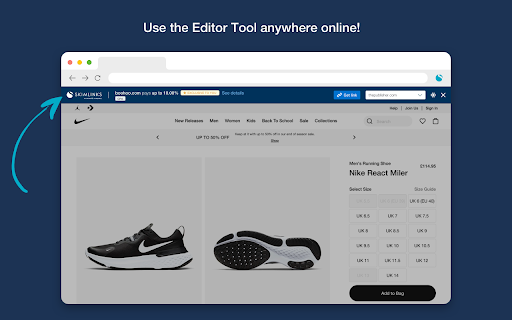
The Skimlinks Editor Toolbar is the easy to use Chrome Extension that any publisher who is writing commerce content must have installed.
NEW FEATURE - See Merchant Programs in Google Search Results
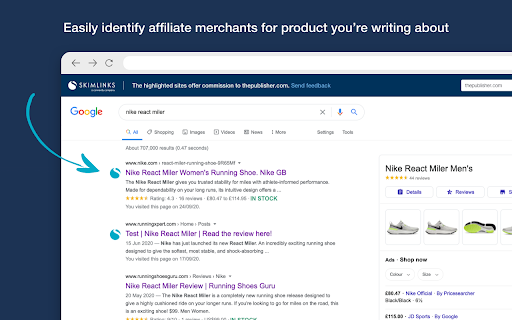
You can now see if a merchant has an affiliate program with Skimlinks directly in your Google Search results. All you need to do is make sure you have the Editor Toolbar installed and open when you search for a product or merchant, and you’ll now see the Skimlinks logo next to the search result if they have a program available.
Other Features of the Skimlinks Editor Toolbar:
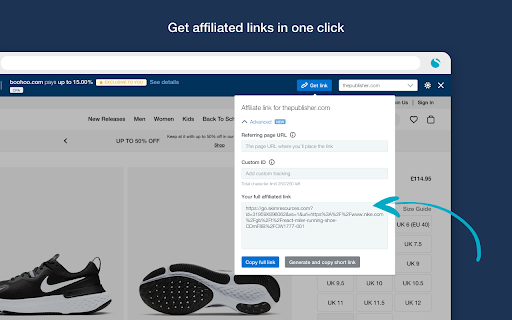
- When a publisher is on the merchant's website, they’ll instantly be able to see if they provide commission rates, what they are and easily be able to create an affiliate link directly from the toolbar.
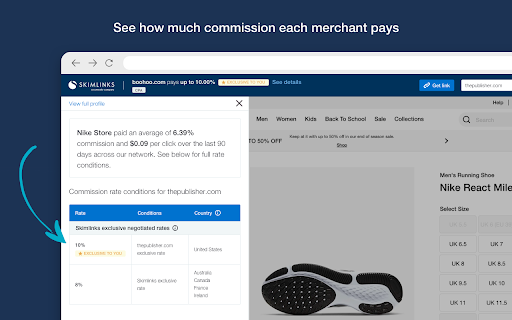
- Easily see the average commission rate the merchant has paid over the last 90 days
- The ability to see the full conditions relating to commission rates without leaving the page
- Whether the merchant provides exclusive or higher than average commission rates
- Shorten links to share on social networks or in email
- If you manage multiple domains, the ability to select the domain you want to affiliate so that the relevant commission rates show
You need to have a Skimlinks account and be logged in for the Editor Toolbar to work. You can sign up for an account here https://signup.skimlinks.com/
| 分类 | 👥社交 |
| 插件标识 | gmfcchdbgideoiehadmlmpnbhdcjoaih |
| 平台 | Chrome |
| 评分 |
★★★☆☆
3.9
|
| 评分人数 | 126 |
| 插件主页 | https://chromewebstore.google.com/detail/skimlinks-editor-tool/gmfcchdbgideoiehadmlmpnbhdcjoaih |
| 版本号 | 8.7.0 |
| 大小 | 1.41MiB |
| 官网下载次数 | 10000 |
| 下载地址 | |
| 更新时间 | 2025-02-27 00:00:00 |
CRX扩展文件安装方法
第1步: 打开Chrome浏览器的扩展程序
第2步:
在地址栏输入: chrome://extensions/
第3步: 开启右上角的【开发者模式】
第4步: 重启Chrome浏览器 (重要操作)
第5步: 重新打开扩展程序管理界面
第6步: 将下载的crx文件直接拖入页面完成安装
注意:请确保使用最新版本的Chrome浏览器
同类插件推荐

Amazon Publisher Studio Extension Beta
This is the official Amazon Associates extension f

MyAwin
Easily create Awin tracking links for your partner

Howl.Link
Welcome to the improved Howl.Link extension for Ch

Commission Factory
Easily check account balances, create and share li

Geniuslink | Intelligent Link Creator
Easily build geni.us links with the click of a but

Skimlinks Editor tool
SL Editor extension.Skimlinks Editor Toolbar The

Kwanko toolbox
Kwanko Toolbox is a plugin dedicated to Kwanko Pub

Tradedoubler for publishers
This extension is the best tool for Tradedoubler&#

Mavely Link Creator
Easily create shoppable links to your favorite bra

Sovrn Commerce
Instantly create and share monetized links to over

digidip Creator's Kit
The practical solution for digidip content creator

Tailwind – AI marketing content assistant
Easily generate copy with AI, schedule and publish